Rayzia
Graphic-design-tools
Browser-based vector editors have struggled to match the feature depth of desktop applications, but Rayzia narrows that gap significantly while eliminating the friction of installation and licensing. The tool targets a broad audience: social media managers assembling quick posts from templates, designers moving between rough concepts and detailed vector work, and anyone who wants professional design capabilities without committing to heavy software or monthly subscriptions.
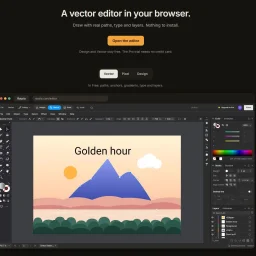
The defining feature is its dual-mode architecture. Design mode and Vector mode operate on the same file without flattening or conversion, letting users switch contexts instantly. Someone can sketch a poster layout using templates and drag-and-drop components, then jump into Vector mode to refine a curve or manipulate paths, then return to Design mode to adjust text and spacing. This eliminates the traditional friction point where moving between quick-turnaround work and precision editing normally requires separate files or creative workarounds.
The feature set is comprehensive. Vector mode includes the expected tools—pen, node editing, shape operations—alongside advanced capabilities like boolean operations, mesh-based color gradients, 3D extrusion, blending, envelope deformation, and live effects that remain editable in appearance. Shape Builder and Width tools offer intuitive ways to merge overlapping shapes and modulate stroke thickness. For teams integrating AI into workflows, Rayzia connects with Claude Code and other MCP agents, allowing those tools to manipulate the design using the editor's own operations.
Import and export flexibility matters for production work. The editor opens multiple formats including SVG, PDF, EPS, PNG, JPG, WebP, and GIF, with export covering SVG, PNG, JPG, WebP, and PDF in the Pro tier. Files save automatically as you work, and the application runs on any device with a browser, accepting input from mouse, touch, or pen.
The pricing model emphasizes accessibility. All vector tools live in the free plan with no feature gates within the mode itself. The Pro tier unlocks Design mode, templates, and PDF export, and users can trial Pro for two weeks without providing a credit card. This approach gives designers immediate access to serious vector capabilities before requesting payment.
What Rayzia demonstrates is that browser-based design tools need not be feature-light. By combining a comprehensive toolset with a thoughtful dual-mode workflow, the product tackles the real decision designers face: speed versus precision. It allows both, on the same canvas.