
Bulkimage
- No match
Machine translation — the English original is authoritative.
The Story
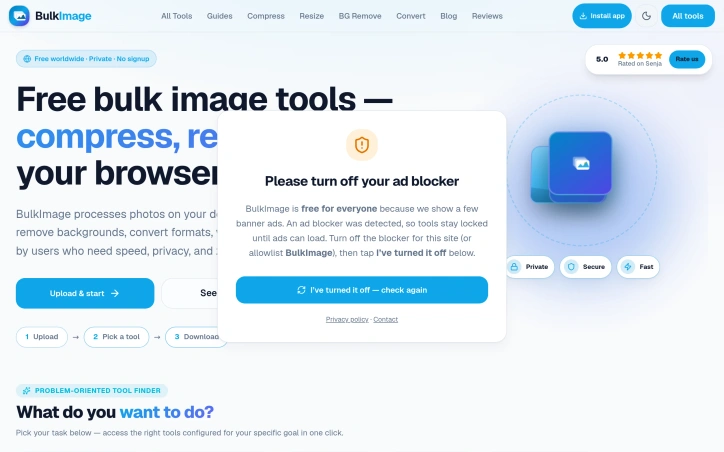
As a creator and developer, I was tired of repetitive, slow tools whenever I needed to resize, compress, or convert dozens of images at once. Most existing platforms either put strict file limits, ask for annoying signups, charge heavy subscriptions, or upload private files to unknown cloud servers.
That’s why I built BulkImage (https://bulkimage.in/).
BulkImage solves this frustration by providing a 100% free, fast, and privacy-focused batch image optimizer. Everything runs directly in your browser, meaning your images never leave your device. Whether you need to compress large files, resize hundreds of photos, or convert formats (JPG, PNG, WebP) in bulk, BulkImage gets it done in seconds without any account or watermarks.
AI Overview
AI-generatedRepetitive image processing tasks plague creators, developers, and e-commerce sellers who regularly handle dozens or hundreds of photos. Existing solutions either restrict file sizes, demand signup credentials, charge subscription fees, or require uploading sensitive media to remote servers—a combination of frictions that motivated one developer to build an alternative.
BulkImage addresses these pain points with a fully free, browser-based batch image processing suite. The platform runs entirely on the user's device, eliminating the privacy concerns that come with cloud uploads. This local-first approach means images never leave the computer, making it suitable for confidential work and sensitive materials.
The toolset spans 27 distinct capabilities organized around common workflows. Compression reaches up to 90 percent file-size reduction without noticeable quality loss. Resizing accommodates both custom dimensions and platform-specific presets for Instagram, YouTube, and ecommerce marketplaces like Shopify and Amazon. An AI-powered background remover produces transparent PNG exports in bulk, while format conversion handles JPG, PNG, WebP, and HEIC transformations across entire batches. Additional features include watermarking for brand protection and an image upscaler that enhances resolution through client-side AI models.
What distinguishes BulkImage is its focus on solving specific user problems rather than offering generic tools. A problem-oriented finder guides users directly to curated tool combinations for particular tasks—whether preparing product catalogs, optimizing social media assets, or meeting government form photo specifications. Multi-step workflows connect sequential operations without redundant uploads or manual handoffs between tools.
The interface prioritizes speed and accessibility. Users upload images, select their task, and download results without creating accounts or navigating complex menus. Pricing is straightforward: the entire platform is free, with no watermarks, paywalls, or hidden costs.
For professionals handling volume image work, the privacy guarantees and lack of signup friction represent genuine advantages over mainstream alternatives. Students preparing application materials, creators scaling visual assets, and small business owners optimizing inventory photos all benefit from eliminating signup requirements and upload delays. Whether this solo-developer platform maintains consistent performance at scale or sustains feature development long-term remains an open question, though neither concern emerges from the materials presented.
Founder Diary
DevlogThe maker hasn't posted a diary entry yet.
Key Features
Batch Compression
Reduces file sizes up to 90 percent without noticeable quality loss
AI Background Removal
Generates transparent PNG exports in bulk automatically
Local-First Privacy
All operations run on your device with no cloud uploads required
Batch Format Conversion
Transforms images between JPG, PNG, WebP, and HEIC across entire batches
Multi-Platform Resizing
Includes presets for Instagram, YouTube, Shopify, and Amazon
Image Upscaling
Enhances image resolution through client-side AI models
Use Cases
-
1
E-commerce Product Catalogs
Batch resizing and compression for inventory optimization without signup requirements
-
2
Social Media Asset Optimization
Prepares and formats images for Instagram, YouTube, and other platforms in bulk
-
3
Creative Professionals
Processes volume image work while keeping sensitive materials private on local devices
-
4
Small Business Owners
Optimizes inventory photos without subscription fees or complex workflows
FAQ
Does BulkImage upload images to cloud servers? ▾
Do I need to create an account to use BulkImage? ▾
How much does BulkImage cost? ▾
What image formats are supported? ▾
Pricing
The entire platform is free with no watermarks, paywalls, or hidden costs.
Discussion
No comments yet — be the first!
Join the conversation — sign up to comment.
Sign up freeCommunity Support
Boost this project on Sell With boost
Meet the Founder

More in Productivity

OkComputer
OkComputer is an AI harness for professionals an...

SpeakerEject
SpeakerEject is a free collection of browser aud...
Syllable Counter
This is a syllable counter tool made by AIWriteK...

NexusAI
NexusAI began with a straightforward observation...

AppDeploy
AppDeploy was built to solve a problem I repeate...

Tabreon
I built Tabreon because I was tired of "free" on...