CleanNoise
- No match
Machine translation — the English original is authoritative.
The Story
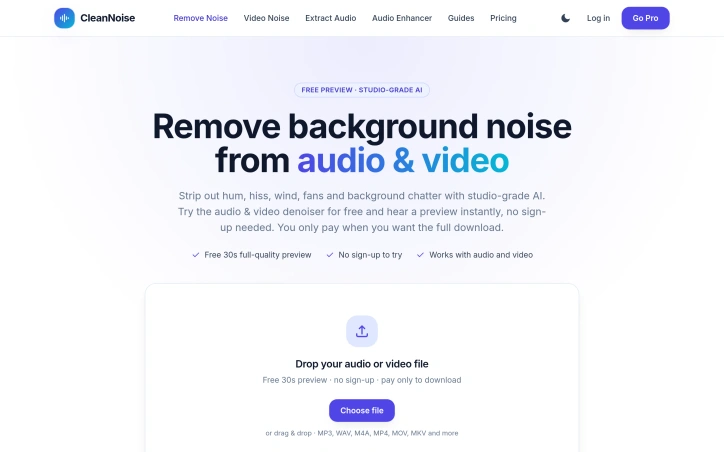
CleanNoise is an online AI tool that removes background noise from audio and video. Drop in an MP3, WAV, M4A, MP4 or MOV file and the AI suppresses hum, hiss, wind, fans, traffic and background chatter while keeping the voice natural. You hear a free 30-second full-quality preview with no sign-up, and only pay if you want the complete cleaned file: from $0.99 per file, with credit packs and a Pro plan for heavier use. Built for podcasters, video creators, remote teams and anyone with a noisy recording. Uploaded files are deleted within 48 hours.
AI Overview
AI-generatedAudio and video quality matters, especially when your recording is full of unwanted noise. This tool addresses a real frustration for creators and professionals: extracting clear voice from messy real-world recordings without expensive software or technical expertise.
The product targets a broad audience. Podcasters can strip room tone and background hum between guests. Video creators can clean wind and traffic noise captured on location. Remote workers can salvage muddy Zoom recordings. Musicians and students benefit too, whether reducing hiss from home demos or making lecture recordings transcribable.
What distinguishes CleanNoise is its approach to discovery and trust. Rather than requiring sign-up or payment to test the service, users upload a file and instantly hear a full-quality 30-second preview. This removes friction and lets users judge the AI's performance before committing money. The actual processing uses an adaptive AI model rather than fixed filters, meaning it learns from the content and preserves natural voice quality—a claim tested across different recording scenarios in the tool's demo.
The interface lives up to the simplicity promise. Users drag and drop files, wait for analysis, and immediately hear results. The tool accepts common formats including MP3, WAV, M4A, and video files up to an hour long. Audio output can be delivered in multiple formats. Video returns with the cleaned audio track intact. A privacy feature auto-deletes uploaded files within 48 hours, addressing concerns many users have about cloud processing of potentially sensitive recordings.
The pricing model is straightforward and removes purchase friction. Single files cost $0.99 with no account required and no sign-up trap. Users pay only for processed files they download. A Pro tier exists for heavier users, offering 15 hours of monthly processing, batch operations, and processing history.
The product identifies a specific use case—voice clarity in noisy environments—and solves it without unnecessary complexity. By proving value through a free preview and charging modestly per file, CleanNoise makes professional-grade audio cleanup accessible to creators without technical skills or large budgets. The combination of simple execution, transparent pricing, and privacy-conscious design positions it as a practical tool rather than complexity for its own sake.
Founder Diary
DevlogThe maker hasn't posted a diary entry yet.
Key Features
Free Preview Without Sign-up
Instantly hear a full-quality 30-second preview of processed audio by uploading a file, no account needed.
Adaptive AI Model
Uses an adaptive AI model that learns from content and preserves natural voice quality rather than relying on fixed filters.
Multi-Format Support
Accepts MP3, WAV, M4A, and video files up to an hour long with output in multiple formats.
Auto-Delete Privacy
Uploaded files are automatically deleted within 48 hours of processing.
Simple Drag-and-Drop Interface
Users drag and drop files, wait for analysis, and immediately hear results without technical expertise required.
Use Cases
-
1
Podcasters
Strip room tone and background hum between guests during editing.
-
2
Video Creators
Remove wind and traffic noise captured during on-location filming.
-
3
Remote Workers
Improve audio quality of Zoom and other video conference recordings.
-
4
Musicians and Students
Reduce hiss from home demo recordings and make lecture audio transcribable.
FAQ
Do I need to create an account to use CleanNoise? ▾
How long can my audio or video files be? ▾
What happens to my uploaded files after processing? ▾
What's the difference between standard pricing and the Pro tier? ▾
Pricing
Free 30-second preview without sign-up; full processing costs $0.99 per file with no account required; Pro tier available with 15 hours monthly processing and batch operations.
Tech Stack & Tags
Discussion
No comments yet — be the first!
Join the conversation — sign up to comment.
Sign up freeCommunity Support
Boost this project on Sell With boost