Grade Curve Calculator
- No match
Machine translation — the English original is authoritative.
The Story
I built this free tool to help teachers fairly adjust student grades without complex math. Grade curving is essential when exams are harder than expected, but many educators struggle with the calculations. My calculator handles multiple proven methods—bell curves, Texas root scaling, linear adjustments—and instantly shows class statistics and distributions.
AI Overview
AI-generatedWhen exam scores come in lower than anticipated, educators face a dilemma: curving grades to reflect reasonable performance or accepting disappointing results across the board. Grade Curve Calculator addresses this tension head-on by providing teachers and professors with a digital tool that implements multiple established curving methodologies, eliminating manual calculation errors and making grade adjustments transparent and defensible.
The target audience is clear: instructors who need to curve grades fairly but lack the mathematical expertise or patience to execute complex statistical calculations by hand. Whether dealing with a single class section or multiple cohorts, the tool automates what would otherwise require spreadsheet formulas or statistical software.
What distinguishes this calculator is its pedagogical pragmatism. Rather than forcing a single curving approach, it offers six distinct algorithms. The Texas curve applies square root scaling to disproportionately boost lower scores while restraining top-end inflation. Linear scaling ties all grades to the highest raw score as a ceiling. Bell curve options include both numerical adjustments targeting a specific mean and standard deviation, and a forced-distribution model that locks percentile brackets to letter grades, ensuring predictable grade distributions. A target mean scale lets instructors anchor curves to specific class averages, while flat-point additions provide the simplest adjustment method.
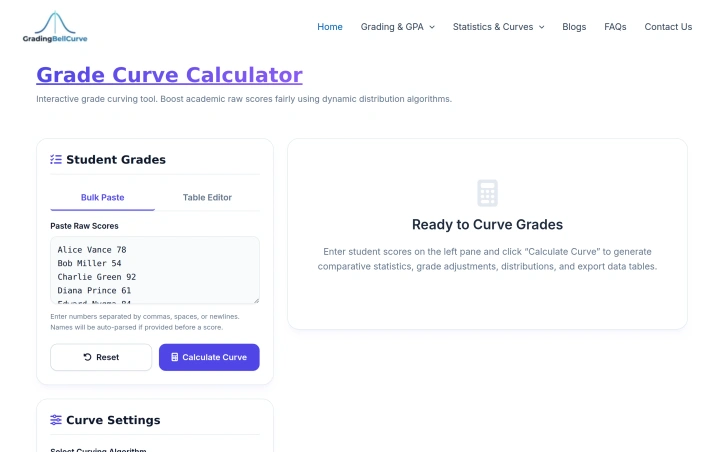
The interface centers on bulk data entry, accepting comma-separated, space-separated, or line-break-separated scores, with optional student names. The system generates immediate comparative statistics—original and curved class means, medians, standard deviations, and pass rates—making the impact of each algorithm visible before committing to results. Export to CSV enables grade book integration.
The tool operates as part of a broader academic calculator ecosystem covering weighted GPA, exam target scoring, and assignment grading. This integration positions it within a more comprehensive suite rather than as an isolated utility.
From a business perspective, the calculator is entirely free, with no premium tier mentioned in the available materials. This aligns with the founder's articulated mission to democratize grade-curving accessibility across educational institutions of varying means.
For educators seeking to apply statistically sound curving methods without specialized training, this tool delivers both transparency and efficiency. The multiple algorithm options prevent over-reliance on any single approach while the immediate statistical feedback ensures informed decision-making about grade adjustments.
Founder Diary
DevlogThe maker hasn't posted a diary entry yet.
Key Features
Multiple Curve Algorithms
Offers six distinct algorithms including Texas curve, linear scaling, bell curve, target mean scale, and flat-point additions
Bulk Data Entry
Accepts comma-separated, space-separated, or line-break-separated scores with optional student names
Comparative Statistics
Displays original and curved class means, medians, standard deviations, and pass rates
CSV Export
Enables integration with grade book systems
Use Cases
-
1
Teachers with single class sections
Automates grade curving without manual spreadsheet formulas or statistical software
-
2
Professors managing multiple cohorts
Handles multiple class sections with consistent algorithmic precision
-
3
Educators lacking mathematical expertise
Applies statistically sound curving methods without specialized training
-
4
Institutions requiring defensible adjustments
Provides transparent and auditable grade modifications
FAQ
What grade curving methods are available? ▾
Can I export curved grades to my grade book? ▾
Is Grade Curve Calculator free? ▾
How do I input class scores? ▾
Pricing
Entirely free with no premium tier mentioned.
Tech Stack & Tags
Discussion
No comments yet — be the first!
Join the conversation — sign up to comment.
Sign up freeCommunity Support
Boost this project on Sell With boost
Meet the Founder

More in Online learning

LangLime
Dear Duolingo, I'm fed up of spending weeks lear...

Ziyo
Ziyo is a 𝘴𝘵𝘶𝘱𝘪𝘥𝘭𝘺 simple Japanese online Kanji...

Pyzit
I built Pyzit to remove friction from learning a...

Study Share
I built Study Share because students waste time...

MCQS ZONE
As an educator with a Computer Science backgroun...
AITestGuide
I noticed beginners felt overwhelmed when learni...