Ideogram 4.5
- No match
Machine translation — the English original is authoritative.
The Story
Ideogram AI 4.5 is an image generator and editor built for precise, drift-free refinement. Create native 2K posters, labels, signs, product shots, and more, then paint exactly what you want to change. Its Pixel Lock feature preserves 94-99% of untouched pixels while keeping lettering accurate across repeated edits - ideal for creators who iterate on posters, packaging, magazine covers, and advertising graphics.
AI Overview
AI-generatedPrecision image editing has long frustrated creators who need to iterate on designs without watching colors shift and textures blur with each revision. Ideogram 4.5 addresses this by anchoring edited pixels while locking everything else in place, letting designers make multiple passes on the same image without the cumulative degradation that plagues most AI image tools.
The product targets creators of visual marketing materials—posters, product labels, packaging, magazine covers, and advertising graphics. Anyone who needs to refine lettering, swap elements, or adjust details across multiple rounds of feedback benefits from the core innovation: Pixel Lock copies unmask pixels back from the source after each edit, preserving 94-99 percent accuracy across passes. This capability distinguishes Ideogram from competitors that re-render entire frames and introduce drift with each iteration.
Three design decisions emerge as standouts. First, the multi-pass architecture is tuned explicitly for refinement rather than generation alone. A creator can edit an image five, ten, or more times without color and position shifts accumulating. Second, text rendering at native 2K resolution sets it apart from tools that struggle with legible lettering inside images. The system accepts text in quotes and positions it as a designer would, then maintains style and placement when the wording changes in subsequent edits. Third, masked editing through a brush-based interface gives creators explicit control—paint the region to change, describe the edit, and only that area regenerates while everything else copies back exactly.
The tool operates in two quality modes. The standard 42 model balances speed and output quality, while the High variant pursues maximum fidelity at presumably greater cost or latency. Users can choose from multiple aspect ratios and adjust prompt detail between Balanced and Expanded settings.
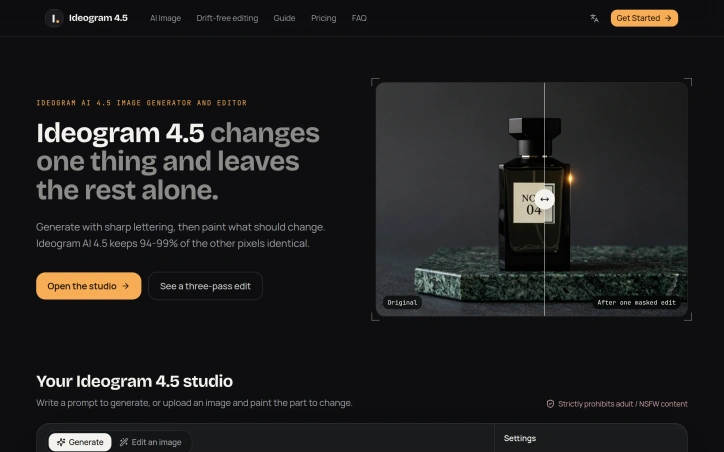
The workspace demonstrates the concept effectively through before-and-after sequences showing a single image edited three times—changing text, swapping a cup, adding a vase—with pixel-by-pixel percentages documenting consistency across passes. Each round maintains 95 percent-plus similarity to its predecessor.
The platform enforces a strict prohibition on adult content. Pricing uses a credit system, though specific costs are not detailed beyond references to a cost guide within the interface. The edit-heavy workflow and iterative design philosophy target professionals who measure value in reduced revision cycles and client approval timelines rather than single-generation speed.
Founder Diary
DevlogThe maker hasn't posted a diary entry yet.
Key Features
Pixel Lock Technology
Preserves 94-99% pixel accuracy across multiple editing passes without degradation.
Multi-Pass Architecture
Enables iterative editing 5+ times on the same image while maintaining consistency.
Native 2K Text Rendering
Renders legible lettering at 2K resolution and maintains text style and placement through edits.
Masked Editing Interface
Brush-based tool lets creators paint regions to change while everything else regenerates exactly.
Multiple Quality Modes
Offers standard 42 model and High variant to balance speed and output fidelity.
Use Cases
-
1
Visual Marketing Creators
Can refine posters, product labels, packaging, and advertising graphics without color and texture drift.
-
2
Design Teams with Client Feedback
Reduce revision cycles by iterating multiple times on the same image without cumulative degradation.
-
3
Typography-Focused Designers
Maintain precise text rendering and placement while adjusting copy across multiple edits.
FAQ
How many times can I edit an image without quality loss? ▾
How does Pixel Lock preserve accuracy across edits? ▾
Can I edit text in images while keeping formatting? ▾
How do I edit only specific parts of an image? ▾
Tech Stack & Tags
Discussion
No comments yet — be the first!
Join the conversation — sign up to comment.
Sign up freeCommunity Support
Boost this project on Sell With boost
Meet the Founder

More by Olivia Ward
More in AI Generative Media

AI Mixer - AI Photo | AI Video | AI Voice. All AI tools in one app!
AI Mixer was built to solve a simple but frustra...
FacelessGenie
We built FacelessGenie to solve the biggest bott...
GeniusAI
We built GeniusAI to make professional AI image...

MyRaxAI
I built MyRaxAI to help creators generate stunni...

Berrioo
We built Berrioo to democratize professional vis...

Seedance
We built Seedance to make cinematic video creati...