
Morse Code Reader
The Story
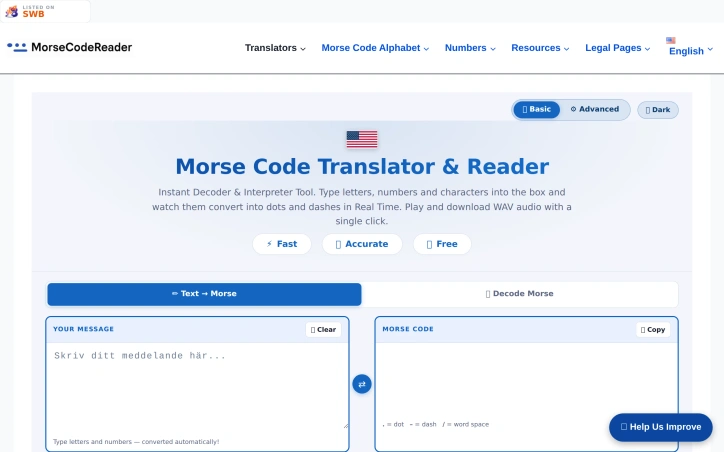
It didn’t look like much at first — just a clean box where you could type text and watch it turn into dots and dashes. But something about it felt different.
People would arrive with a question, a curiosity, or sometimes just boredom. A student trying to decode a secret message for a school project. A hobbyist fascinated by old communication systems. Someone testing how fast they could think in signals instead of words.
They would type a sentence… and instantly, the world would change.
Letters disappeared. Meaning transformed. And in their place came rhythm — short taps and long pauses, like a language only the quiet parts of the internet still remembered.
Some clicked “play” and listened as their words became sound. Others hit “download” and carried the beeps with them like hidden codes. A few discovered the flashlight mode and watched their screens blink like distant ships talking across the dark.
Most people came once.
But a few stayed longer.
They explored deeper pages, tried different languages, switched between basic and advanced modes, and realized something subtle — this wasn’t just a translator. It was a bridge between forms of thinking.
And over time, the site became something unusual for a tool website.
Not just a utility.
But a small place where language slowed down… and meaning learned to blink.
AI Overview
AI-generatedWhat stands out about MorseCodeReader.com is its ability to transform a simple text input into an immersive experience. Users can type a message and instantly see it converted into dots and dashes, hear it played as audio, or even download the corresponding WAV file. The site's clean design and intuitive interface make it easy to navigate, with features such as adjustable speed, real-time beeps, and support for multiple languages, including Arabic, Hebrew, and Cyrillic.
The tool offers two modes: a basic mode for simple conversions and an advanced mode for more nuanced interpretation. In advanced mode, users can fine-tune parameters such as pitch, Farnsworth spacing, and sound type, allowing for a more tailored experience. The site also includes a live signal visualizer, which displays a colored waveform as the Morse code is played.
MorseCodeReader.com is entirely free to use, with no restrictions or limitations mentioned on the site. The absence of any explicit pricing or business model details suggests that the tool is maintained for its inherent value, rather than as a revenue-generating venture. By providing a unique bridge between text and Morse code, MorseCodeReader.com has created a small but dedicated community of users who appreciate its utility and charm. Overall, this website is a valuable resource for anyone looking to explore the world of Morse code.
Key Features
Morse Code Conversion
translates text into Morse code and vice versa
Adjustable Speed
allows users to adjust the speed of Morse code playback
Real-time Beeps
provides real-time audio beeps for Morse code
Advanced Mode
offers fine-tuning of parameters like pitch and Farnsworth spacing
Live Signal Visualizer
displays a colored waveform as Morse code is played
Use Cases
-
1
Students
can use the tool to learn Morse code and its applications
-
2
Hobbyists
can utilize the tool to decode secret messages or explore Morse code
-
3
Language Learners
can benefit from the tool's support for multiple languages
FAQ
Is MorseCodeReader.com free to use? ▾
What languages does MorseCodeReader.com support? ▾
Can I download Morse code audio files? ▾
Pricing
No pricing or business model details are mentioned on the site.
Tech Stack & Tags
Discussion
No comments yet — be the first!
Join the conversation — sign up to comment.
Sign up freeCommunity Support
Boost this project on Sell With boost
