
Outlayr
- No match
Machine translation — the English original is authoritative.
The Story
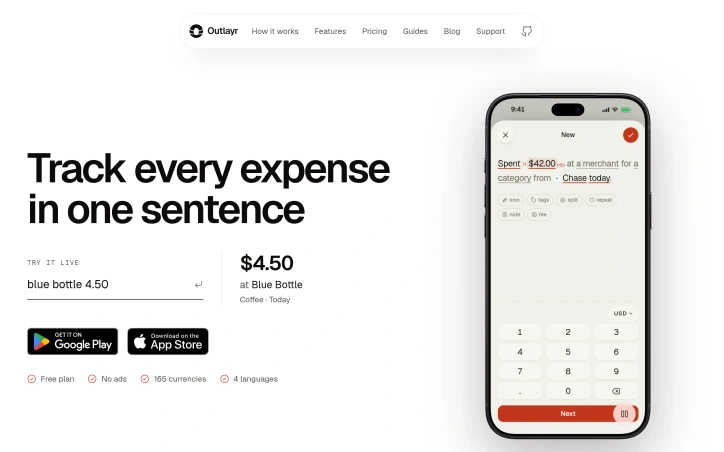
I built Outlayr because most expense trackers ask for six fields just to log one coffee, so people give up after a few days. Outlayr lets you log a purchase in one sentence, by voice, or from a receipt, and it sorts each entry into the right account, category, and budget automatically. No bank linking. Free on iOS and Android.
AI Overview
AI-generatedMost people who try to track spending give up within a few days, and the cause is rarely a lack of discipline. Typical expense trackers ask for an amount, merchant, category, account, date, and note before they will accept a single coffee. Outlayr takes a different approach by reading a plain sentence and turning it into a structured entry. That makes it a strong fit for people who have abandoned spreadsheets and form-heavy apps.
The product targets individuals whose money is spread across several places: a card for groceries, cash for transport, subscriptions billing in the background, transfers to savings, and sometimes a balance in another currency. The site's example, "Spent $42.00 USD at Costco for Groceries from Chase today," shows how much information one line can carry. Each entry is sorted automatically into an account, a category, and a budget, so the user does not have to assign those fields by hand afterward.
The input methods stand out most. Users can type a sentence, speak one aloud, or photograph a receipt, and bank CSV files can be imported with duplicate entries skipped. Recurring bills such as rent and subscriptions are described as logging themselves on their scheduled day, which removes a chore that many trackers leave entirely to the user. The budgeting side is similarly direct. Budgets state in plain language where the current spending pace leads, and the Insights section compares present spending against the user's usual pattern, showing whether they are spending faster or slower than normal.
The app supports 165 currencies and four languages, and the site states that it carries no ads. It does not require linking a bank account, which will appeal to users who are wary of granting account access. A free plan is offered, and the app is available on iOS and Android. The materials do not describe paid tiers, so the full cost beyond the free option is not established here.
The main open question is depth. The published material emphasizes fast capture and automatic sorting but says comparatively little about reporting, sharing, or how the app handles complicated financial situations. For someone who wants a quick, low-effort record of everyday spending, the trade-off is well suited to that goal.
Founder Diary
DevlogThe maker hasn't posted a diary entry yet.
Key Features
Sentence Entry
Turns a plain sentence such as "Spent $42.00 USD at Costco for Groceries from Chase today" into a structured expense entry.
Automatic Sorting
Assigns each entry to an account, category, and budget without manual field entry afterward.
Multiple Input Methods
Accepts typed sentences, spoken sentences, and photographed receipts.
Bank CSV Import
Imports bank CSV files and skips duplicate entries.
Recurring Bill Logging
Logs recurring bills such as rent and subscriptions automatically on their scheduled day.
Spending Pace Insights
Compares current spending against the user's usual pattern and shows whether spending is faster or slower than normal.
Use Cases
-
1
Individuals who have abandoned spreadsheets
Users who find form-heavy expense apps too tedious benefit from logging spending through a single plain sentence.
-
2
People with money spread across several places
Users who pay with a card for groceries, cash for transport, and have subscriptions billing in the background can track all of it in one place.
-
3
Users wary of linking bank accounts
Individuals who do not want to grant account access can use the app because it does not require linking a bank account.
-
4
Users with multi-currency balances
People holding a balance in another currency can use the app's support for 165 currencies.
FAQ
Does Outlayr require linking my bank account? ▾
Is Outlayr free to use? ▾
How do I add an expense in Outlayr? ▾
Which platforms and currencies does Outlayr support? ▾
Pricing
A free plan is offered, but the description does not specify paid tiers or their cost.
Tech Stack & Tags
Discussion
No comments yet — be the first!
Join the conversation — sign up to comment.
Sign up freeCommunity Support
Boost this project on Sell With boost
Meet the Founder

More in Budgeting apps

Arrel: Budget & Money
I built Arrel because I wanted a personal financ...

AI Budget Assistant
I built AI Budget Assistant because spreadsheets...

CoolMeow
CoolMeow is a shared expense journal for couples...

DIYCalcKit
I kept bouncing between different websites tryin...

Cove
We built Cove to give people back control of the...