PolyTimer
- No match
Machine translation — the English original is authoritative.
The Story
The Story Behind PolyTimer
PolyTimer started with a simple frustration. Every time I needed a timer, I ended up on websites filled with distracting ads, pop-ups, autoplay videos, or unnecessary features. A tool that was supposed to help me focus often did the exact opposite.
So I decided to build something different.
The goal was simple: create a timer that is fast, clean, and distraction-free. No clutter. No ads interrupting your workflow. Just a smooth experience that lets you stay focused on what actually matters.
Whether you're studying for an exam, working on a project, cooking, exercising, or using productivity techniques like the Pomodoro method, PolyTimer is designed to be there instantly whenever you need it. It works across devices with a minimal interface that stays out of your way.
PolyTimer isn't trying to become another bloated productivity platform. It's built on the belief that the best tools are often the simplest ones—tools that do one job exceptionally well.
This is only the beginning. I plan to continue improving PolyTimer based on user feedback while keeping its core promise unchanged: a beautiful, reliable, and completely distraction-free timer that anyone can use for free.
AI Overview
AI-generatedFinding the right timer tool online often means wading through cluttered interfaces, intrusive ads, and unnecessary features that distract rather than help. PolyTimer solves this by offering a distraction-free timer that runs entirely in the browser without requiring downloads, account creation, or subscriptions. The product targets anyone who needs reliable timing functionality: students managing study sessions, professionals working on time-blocked tasks, fitness enthusiasts tracking workouts, and anyone practicing productivity techniques like the Pomodoro method.
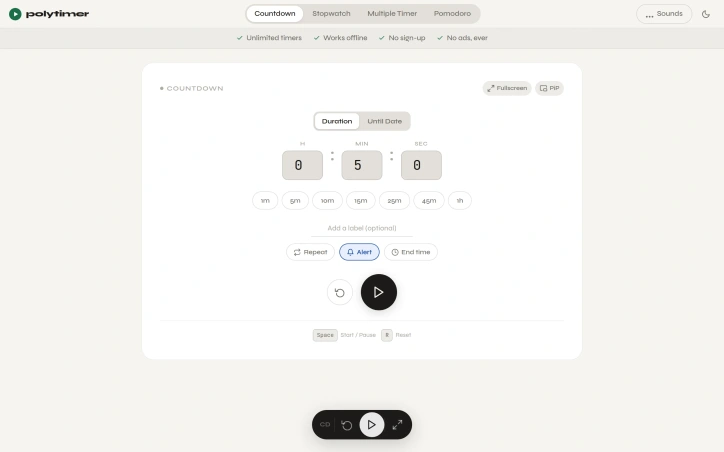
What sets PolyTimer apart is its ruthless commitment to simplicity. The interface prioritizes speed and clarity over feature bloat. Users can start a timer in seconds using one-click preset durations ranging from one minute to one hour, or by entering custom times. The platform supports multiple timer modes: a standard countdown timer with customizable labels and repeat functionality, a digital stopwatch with lap timing and CSV export capabilities, a structured Pomodoro timer with adjustable phase durations, and a grid system for running multiple timers simultaneously. All modes include picture-in-picture and fullscreen options, making the tool adaptable to any workflow.
Offline functionality ensures timers continue working without internet connectivity, while the browser-based architecture means immediate access across desktop, tablet, and mobile devices without installation. Users can customize their experience through alert sounds, ambient soundscapes like rain or ocean ambience, and time-until-completion displays showing the exact clock time when a timer will finish.
The business model is refreshingly transparent: PolyTimer is entirely free with a firm commitment against advertisements. This approach reflects the founder's stated philosophy that the best tools handle one job exceptionally well rather than attempting to become sprawling productivity platforms. The product addresses a genuine pain point—the difficulty of finding a genuinely clean, fast timer online—with a focused solution that doesn't attempt to monetize through ads, paywalls, or feature gatekeeping.
For anyone frustrated by the noise surrounding ordinary web-based tools, PolyTimer delivers exactly what its positioning promises: a functional, accessible timer that remains intentionally simple and perpetually free.
Founder Diary
DevlogThe maker hasn't posted a diary entry yet.
Key Features
One-Click Presets
Start timers in seconds with preset durations from one minute to one hour or enter custom times.
Multiple Timer Modes
Includes countdown timer, digital stopwatch with lap timing and CSV export, Pomodoro timer, and grid system for simultaneous timers.
Picture-in-Picture and Fullscreen
Modes adaptable to any workflow and compatible across desktop, tablet, and mobile devices.
Offline Functionality
Timers continue working without internet connectivity.
Customizable Alerts and Ambience
Users can select alert sounds, ambient soundscapes like rain or ocean ambience, and time-until-completion displays.
Distraction-Free Design
No advertisements, downloads, account creation, or subscriptions required.
Use Cases
-
1
Students
Managing study sessions with reliable timing functionality.
-
2
Professionals
Working on time-blocked tasks and maintaining focus.
-
3
Fitness Enthusiasts
Tracking workouts and exercise intervals.
-
4
Productivity Practitioners
Implementing techniques like the Pomodoro method.
FAQ
Does PolyTimer require installation or account creation? ▾
Does PolyTimer work offline? ▾
What timer modes are available? ▾
Is PolyTimer free and ad-free? ▾
Pricing
Entirely free with no advertisements, paywalls, or feature gatekeeping.
Tech Stack & Tags
Discussion
No comments yet — be the first!
Join the conversation — sign up to comment.
Sign up freeCommunity Support
Boost this project on Sell With boost