Qr Snap
- No match
Machine translation — the English original is authoritative.
The Story
QRSnap was created to make everyday online tasks faster, easier, and more accessible. Many useful online tools are scattered across different websites, often with confusing interfaces, unnecessary steps, or limitations. We wanted to bring essential tools together in one simple, user-friendly platform.
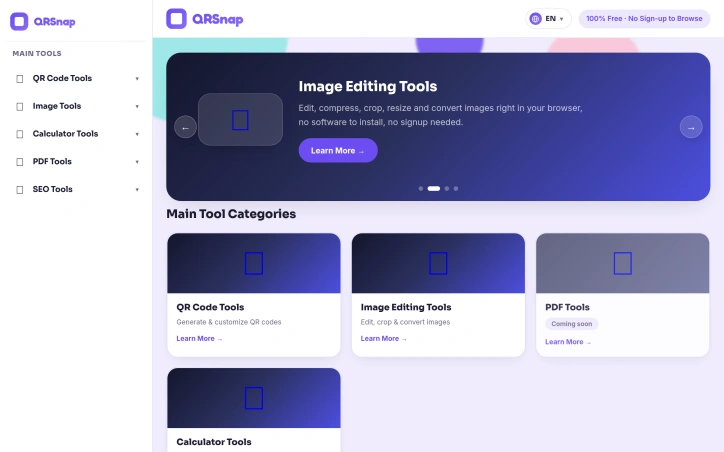
QRSnap offers a growing collection of free online tools, including QR code generators, image editing and conversion tools, PDF tools, calculators, and other utilities. Our goal is to help users create custom QR codes, edit and convert images, work with PDF files, perform calculations, and complete common digital tasks without installing software or navigating multiple websites.
We are continuously expanding QRSnap with more tools for productivity, website owners, developers, SEO, and everyday problem-solving. We focus on practical functionality, a clean interface, accessibility across mobile and desktop devices, and a convenient user experience.
We built QRSnap because simple tasks should not require complicated workflows. Our vision is to create a reliable, all-in-one destination where students, creators, professionals, website owners, and everyday internet users can find useful tools in one place. We are continuing to improve the platform and add more tools based on real user needs.
AI Overview
AI-generatedConsolidating dozens of free online utilities into a single dashboard, QRSnap addresses a fundamental friction point for internet users: tool fragmentation. Rather than bouncing between specialized websites to generate a QR code, compress an image, or calculate loan amortization, users can access everything from one streamlined platform.
The product targets a broad base: students needing quick calculations, small business owners managing digital assets, content creators editing images on the fly, and developers requiring on-demand utilities. The pitch is straightforward—eliminate tool hopping, reduce cognitive load, and speed up routine digital work.
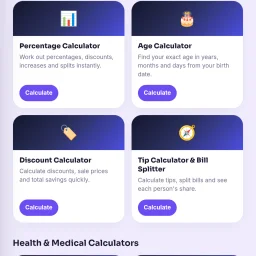
QRSnap's strength lies in the breadth of its initial toolset. The QR code suite extends beyond simple link encoding, offering WiFi QR generation, business card QR codes, and barcode creation with customization options like color, logo insertion, and frame styles. The image editing toolkit covers compression, cropping, resizing, and multi-format conversion (JPG to PNG, WebP conversion, image-to-PDF transformation). A diverse calculator collection spans financial planning (compound interest, loan amortization), health metrics (pregnancy tracking, body fat estimation), and time tracking—categories that appeal to different user segments rather than narrow specialization.
The design philosophy emphasizes accessibility. The browser-based, no-signup approach requires no software installation. This removes traditional friction: users open a link and start working. The interface prioritizes simplicity, positioning the tools as straightforward alternatives to more feature-bloated competitors.
The roadmap includes PDF tools—merging, splitting, compressing, and conversion utilities—currently marked coming soon. The founders envision the platform as extensible. An SEO checker addresses website owners' needs.
Several advertised tools remain incomplete. The PDF suite is not yet live, and the SEO category only includes a website checker. This gap between vision and current functionality matters for users evaluating adoption.
QRSnap occupies a practical niche: it won't replace specialized software for power users, but it eliminates friction in tool discovery and consolidation for casual to moderate users. Free, quick-loading utilities that require zero registration align with how many people actually work online, making simplicity the primary competitive advantage. Whether QRSnap becomes a go-to utility hub depends on execution consistency and continued tool expansion.
Founder Diary
DevlogThe maker hasn't posted a diary entry yet.
Key Features
QR Code Suite
Generates QR codes including WiFi, business card, and barcode formats with customization options.
Image Editing Tools
Provides compression, cropping, resizing, and conversion between multiple image formats.
Calculator Collection
Spans financial planning, health metrics, and time tracking utilities across diverse user segments.
Browser-Based Access
Requires no software installation or account registration to start using tools immediately.
Use Cases
-
1
Students
Need quick calculations and utilities without downloading software or creating accounts.
-
2
Small Business Owners
Can manage digital assets like QR codes and images from a single dashboard.
-
3
Content Creators
Can edit and convert images on the fly for social media and web content.
-
4
Developers
Can access multiple on-demand utilities without switching between specialized websites.
FAQ
Do I need to sign up for QRSnap? ▾
What image formats can I convert with QRSnap? ▾
Does QRSnap have PDF tools available? ▾
How much does QRSnap cost? ▾
Pricing
All utilities are free with no account registration required.
Tech Stack & Tags
Discussion
No comments yet — be the first!
Join the conversation — sign up to comment.
Sign up freeCommunity Support
Boost this project on Sell With boost
Meet the Founder

More in Customer support tools

Achille.ai
Achille.ai is an AI-first customer support solut...

Reevix
I built Reevix to help businesses recover lost c...
TriageAI
As a founder, I was wasting time sorting support...

TWT Chat
I built TWT Chat to unify customer service and i...

Review Gatekeeper
As a restaurant owner constantly hit with one-of...