
VidLaya
- No match
Machine translation — the English original is authoritative.
The Story
We built VidLaya because creating professional product demos used to require expensive video editors or significant editing expertise. Our platform automates the tedious work like adding cinematic zooms, highlights, and blurs, so SaaS teams can transform raw screen recordings into studio-quality walkthroughs in minutes without complex editing skills.
AI Overview
AI-generatedProduct demo creation has traditionally demanded either expensive software licenses or video editing expertise that most product teams don't possess. VidLaya addresses this friction point by automating the post-production work that transforms raw screen recordings into polished, shareable walkthroughs.
The platform targets SaaS teams and product managers who need to communicate features visually without spending hours in complex editing software. The core appeal is straightforward: upload a screen recording, apply cinematic effects, and export studio-quality output. The workflow compresses what might take an editor hours into a three-step process accessible to anyone without technical training.
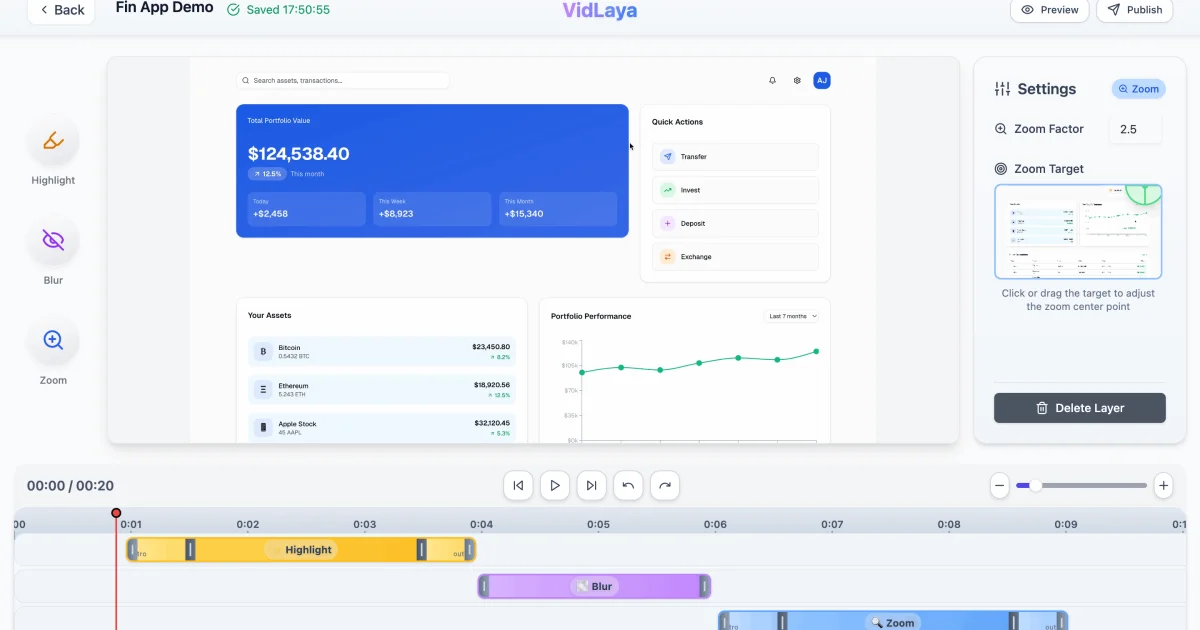
What distinguishes VidLaya is its focus on automation rather than manual control. Rather than requiring users to keyframe animations frame-by-frame, the platform generates cinematic pan-and-zoom sequences automatically when you point to an area of interest. Highlighting features relies on drawing focal points with high-contrast callouts rather than wrestling with overlay tools. The blur functionality handles privacy concerns with a single click, useful for masking API keys or personal information before sharing with stakeholders.
The editing happens in a web browser, removing the friction of desktop software installation. All processing occurs in the cloud, eliminating computational load from users' machines. The company emphasizes that uploads are processed securely, addressing a reasonable concern when dealing with screen recordings containing sensitive product information.
The pricing structure reflects a straightforward freemium model. A free tier lets users test the platform without commitment. Monthly subscriptions cost $12, while annual plans drop to $8.25 per month when paid upfront. Both paid tiers include unlimited exports, watermark-free output, priority cloud rendering, and priority support. The annual discount is meaningful but not aggressive, positioning the product as an ongoing tool rather than a one-time purchase.
For companies that regularly create product walkthroughs, sales enablement materials, or onboarding videos, VidLaya delivers genuine efficiency gains. The product's value hinges on the quality of its automated visual decisions—whether the algorithm-generated pan, zoom, and highlight choices produce results comparable to professional editing. For teams without dedicated video expertise, the convenience and speed VidLaya offers make it a compelling alternative to traditional editing workflows and the technical barriers they present.
Founder Diary
DevlogThe maker hasn't posted a diary entry yet.
Key Features
Automated Post-Production
Transforms raw screen recordings into polished walkthroughs without manual editing.
Cinematic Effects
Applies studio-quality visual effects with automatic pan-and-zoom sequences.
Smart Highlighting
Uses high-contrast callouts to highlight features rather than manual overlay tools.
One-Click Privacy
Blurs sensitive information like API keys and personal data before sharing.
Cloud-Based Editing
Web browser editing with cloud processing, eliminating desktop software installation.
Use Cases
-
1
SaaS Product Teams
Communicate features visually without spending hours in complex editing software.
-
2
Product Managers
Create professional walkthroughs without video editing expertise or technical training.
-
3
Sales Enablement
Generate sales materials and feature demonstrations quickly and efficiently.
-
4
Customer Onboarding
Produce onboarding videos with professional-quality automated editing.
FAQ
How long does it take to create a product demo with VidLaya? ▾
How does VidLaya protect sensitive information in videos? ▾
Is it safe to upload screen recordings with sensitive data? ▾
What editing features does VidLaya offer? ▾
Pricing
Free tier available; annual plans cost $8.25/month upfront with unlimited exports, watermark-free output, and priority support.
Tech Stack & Tags
Discussion
No comments yet — be the first!
Join the conversation — sign up to comment.
Sign up freeCommunity Support
Boost this project on Sell With boost