
Dola AI
- No match
Machine translation — the English original is authoritative.
The Story
Dola AI is a web creative studio plus office crafts. Compose images, stage 3D scenes, edit video, save private projects, and also work with documents, spreadsheets, slides and PDFs. Manual editing and saves use no generation credits; AI generation and AI editing use credits.
AI Overview
AI-generatedCreative professionals wrestling with the gap between their vision and AI output will find a practical solution in this web-based studio. Dola AI addresses a real friction point: AI image and video tools often require detailed prompts to approximate what a creator has clearly imagined, yet a written description rarely captures compositional decisions like framing, scale, lighting, and spatial relationships. The platform inverts this workflow by letting artists compose first, then generate.
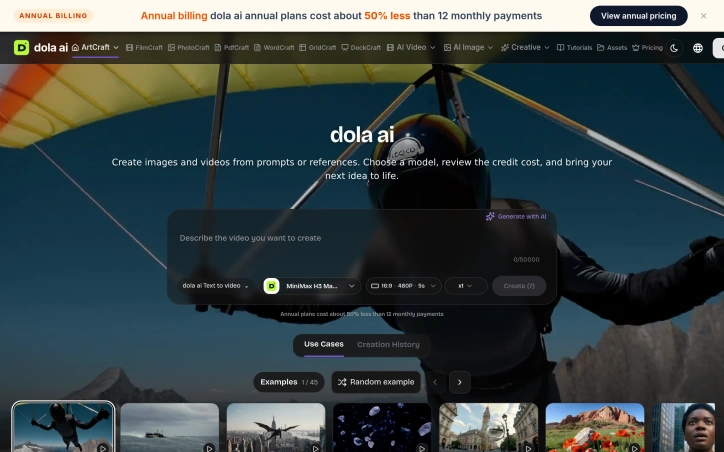
The core distinction is structural. Rather than typing a prompt and hoping for a match, users arrange visual elements in a two-dimensional or three-dimensional workspace before submitting to an AI model. They import reference images, position objects, set camera angles, and layer components—essentially building a storyboard that serves as the actual input to generation. This approach appeals to directors, concept artists, designers, and anyone whose creative thinking is spatial rather than narrative.
The tool integrates editing, composition, timeline management, and reference boards into a single browser workspace. It supports image-to-video and text-to-video workflows across models like MiniMax H3 Max Turbo, with an estimated cost displayed before submission. Critically, local editing and project saving consume no credits, which means iteration and refinement are free; only AI generation jobs trigger the charge. Users can save projects with all compositional choices intact and return later to revise without starting over.
The platform extends beyond visual content. The founder mentions capability with documents, spreadsheets, slides, and PDFs, suggesting it functions as both a creative studio and an office productivity layer. The visual composition method applies primarily to image and video, but the broader positioning hints at a toolkit for knowledge workers.
A structural advantage lies in the open-source foundation. Dola AI leverages upstream tools—World Labs Marble for 3D worlds, Fal for audio and object generation—and integrates them within its own accounts and private storage infrastructure. This approach provides access to specialized models without locking users into a single vendor's ecosystem.
Pricing follows a subscription model with annual plans discounted approximately 50 percent compared to monthly billing. This incentivizes longer commitment and signals that the platform expects sustained, regular use rather than one-off projects.
The product targets creators frustrated by the imprecision of text-alone prompting and the limitations of existing editing software. It succeeds by treating AI as a refinement tool within a composed scene rather than as the primary creative driver.
Founder Diary
DevlogThe maker hasn't posted a diary entry yet.
Key Features
Visual Composition Workspace
Arrange visual elements in 2D or 3D space before submitting to AI generation.
Reference Importing
Import images, position objects, set camera angles, and layer components as generation input.
Free Local Editing
Edit and save projects without consuming credits; only AI generation jobs incur charges.
Multi-Model Integration
Support for image-to-video and text-to-video workflows across models like MiniMax H3 Max Turbo.
Cost Preview
Estimated generation costs are displayed before submission.
Project Persistence
Save compositions with all choices intact and revise later without restarting projects.
Use Cases
-
1
Directors and Concept Artists
Spatial thinkers can compose precise scenes before generation rather than writing detailed text prompts.
-
2
Motion Graphics Designers
Leverage timeline management and reference boards to build complex compositions before AI generation.
-
3
Video Content Creators
Create storyboards with exact framing, lighting, camera angles, and element positioning for video output.
-
4
Frustrated Prompt Engineers
Creators tired of imprecise text prompting can specify all compositional details visually instead.
FAQ
How is Dola AI different from text-based AI video tools? ▾
Do I pay for editing and saving my projects? ▾
What AI models does Dola AI support? ▾
Can I save and revise my projects later? ▾
Pricing
Subscription model with annual plans approximately 50% cheaper than monthly billing.
Tech Stack & Tags
Discussion
No comments yet — be the first!
Join the conversation — sign up to comment.
Sign up freeCommunity Support
Boost this project on Sell With boost
Meet the Founder

More by 朱峰


More in AI Generative Media

AI Mixer - AI Photo | AI Video | AI Voice. All AI tools in one app!
AI Mixer was built to solve a simple but frustra...
FacelessGenie
We built FacelessGenie to solve the biggest bott...

GeniusAI
We built GeniusAI to make professional AI image...

MyRaxAI
I built MyRaxAI to help creators generate stunni...

Berrioo
We built Berrioo to democratize professional vis...

Seedance
We built Seedance to make cinematic video creati...