
Easy Grader
- No match
Machine translation — the English original is authoritative.
The Story
Grades Calculator was created to make grading and academic calculations simpler, faster, and more accessible. We recognized that students and teachers often spend unnecessary time calculating test scores, percentages, and grades manually. Even simple calculations can become repetitive when handling multiple assignments or classroom assessments.
That is why we developed an easy-to-use online Easy Grader that helps users calculate test scores quickly and accurately. Our goal is to provide practical grading tools that remove unnecessary complexity and make everyday academic calculations more convenient.
Whether you are a teacher grading quizzes and tests or a student checking your performance, our tools are designed to save time and provide clear results. We continue to focus on creating simple, useful, and accessible grade-calculation tools for students and educators.
AI Overview
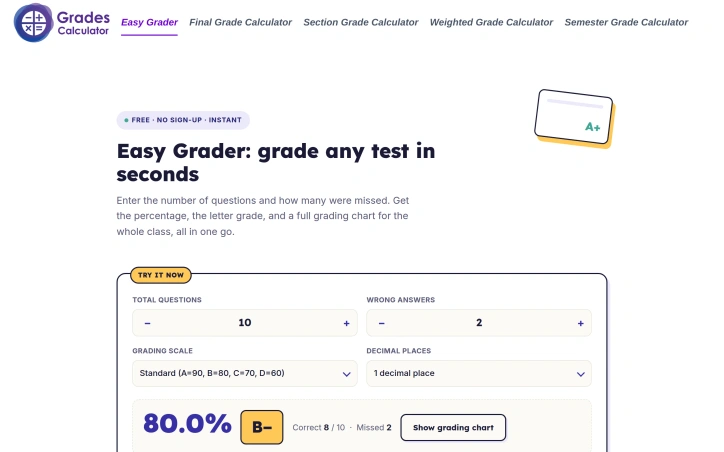
AI-generatedGrading tests by hand consumes far more time than it should. Teachers working through stacks of papers perform the same arithmetic repeatedly, dividing correct answers by total questions and rounding percentages to assign letter grades. Students and parents, meanwhile, struggle to interpret raw scores without manual calculation. Easy Grader addresses this friction point directly by automating grade conversion in seconds.
The product handles a straightforward but necessary task: transform the number of wrong answers into a percentage and corresponding letter grade. Users enter the total question count once, then input wrong answers for each student or check their own performance. The tool instantly displays the percentage, letter grade, and a full grading chart for the entire class. This eliminates the repetitive mental math that eats into grading sessions, particularly when a teacher must score twenty or thirty students on identical assessments.
What distinguishes Easy Grader is its simplicity and accessibility. The interface requires no account creation and imposes no paywall. The tool respects that grading is already a time-intensive task and removes unnecessary barriers to using it. The calculator offers three grading scales—Standard, Strict, and Lenient—to accommodate different institutional standards, and allows users to choose decimal precision for their results.
The product also modernizes what was once a purely analog solution. Teachers historically used sliding paper cards as a quick reference, aligning the total question count with wrong answers to read off scores instantly. Easy Grader replicates this workflow digitally while improving accuracy and speed. It works across subjects and test formats, from math quizzes to spelling tests to multiple-choice exams, making it genuinely flexible for classroom use.
The tool serves both sides of the grading relationship. Teachers gain back time during grading windows, avoiding the calculator for every paper. Students and parents gain transparency when a score returns marked only with the raw count of wrong answers, translating numbers into the percentages and grades they need to track progress. For institutions using non-standard grading scales, the customizable options provide practical flexibility.
Easy Grader positions itself as a specific, utilitarian solution rather than attempting to be a comprehensive classroom management platform. This focus allows it to be fast, free, and genuinely useful at the moment it matters most: when grades must be converted and recorded. Its strength lies in doing one job with clarity and removing an obstacle from a routine task.
Founder Diary
DevlogThe maker hasn't posted a diary entry yet.
Key Features
Grade Conversion
Automatically transforms wrong answer counts into percentages and letter grades.
Multiple Grading Scales
Offers Standard, Strict, and Lenient grading scale options for different institutional standards.
Class Grading Chart
Displays percentages, letter grades, and a full grading chart for all students at once.
No Login Required
Requires no account creation or paywall to access the tool.
Customizable Precision
Allows users to choose decimal precision settings for their grading results.
Universal Test Support
Works across all subjects and test formats including math, spelling, and multiple-choice exams.
Use Cases
-
1
Teachers Grading Tests
Eliminates repetitive mental math when scoring multiple students on identical assessments.
-
2
Students and Parents
Provides transparency by converting raw scores into percentages and grades for tracking progress.
-
3
Schools with Custom Scales
Accommodates non-standard grading scales through customizable options.
FAQ
How does Easy Grader calculate grades? ▾
Is Easy Grader free to use? ▾
What grading scales does Easy Grader support? ▾
What subjects can I use Easy Grader for? ▾
Pricing
Easy Grader is completely free with no account creation requirement or paywall.
Tech Stack & Tags
Discussion
No comments yet — be the first!
Join the conversation — sign up to comment.
Sign up freeCommunity Support
Boost this project on Sell With boost
Meet the Founder

More in Productivity

OkComputer
OkComputer is an AI harness for professionals an...
Syllable Counter
This is a syllable counter tool made by AIWriteK...

NexusAI
NexusAI began with a straightforward observation...

AppDeploy
AppDeploy was built to solve a problem I repeate...

Devpalettes
Devpalettes was built to make everyday developme...

RenderPop
We built RenderPop to democratize AI image and v...