#free tool Startups & Tools
Discover the best free tool startups, tools, and products on SellWithBoost.

PDF cropping remains a friction point for anyone regularly handling document design, printing, or content extraction. Most available solutions force users toward bloated desktop applications or complex workflows that feel overkill for a single task. CropItFast tackles this directly by offering a streamlined browser-based alternative that prioritizes speed and precision without requiring any software installation. The product addresses a specific but genuine need: making batch document processing accessible. Whether you're preparing business cards, cutting out specific sections from longer documents, or preparing files for print, CropItFast handles these jobs without unnecessary complexity. The target audience spans designers, print professionals, content managers, and anyone who frequently manipulates PDF, PostScript, or EPS files. What distinguishes CropItFast from basic crop tools is its feature depth. Automatic margin detection eliminates manual adjustment for documents with uneven white space, a substantial time-saver when processing multiple pages. The multi-region cropping mode lets users extract several independent areas from a single page without relying on workarounds. Equally useful is the template system, which remembers frequently used crop layouts and applies them consistently across pages or even different documents. For users who prefer precision over clicking, exact coordinate input in millimeters or points ensures mathematical accuracy. The platform's output flexibility warrants attention. Users can export to JPG, raster PDF, or vector PDF depending on their downstream needs, with adjustable quality settings for DPI and JPEG compression. This adaptability matters for professionals who might need sharp screen-ready images one day and print-ready files the next. The option to generate shareable download links with time restrictions adds a collaboration layer, allowing users to distribute results without permanently hosting sensitive files. The interface shows thoughtfulness toward modern usage patterns. Vector-based preview rendering ensures crisp text and lines regardless of zoom level, while mobile support acknowledges that PDF handling increasingly happens on phones and tablets. The tool's claimed ability to handle large, multi-page documents smoothly suggests engineering attention to performance. One note: the website references missing JavaScript files required for the interface library. This indicates either outdated documentation or a production concern worth investigating before evaluating the tool. For users tired of desktop PDF editors or struggling through complex alternatives, CropItFast delivers focused functionality optimized for the actual task rather than general document editing.
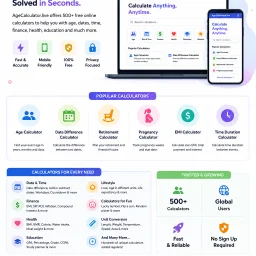
Quick and accurate age calculation from a date of birth remains a surprisingly common need—whether for administrative forms, personal record-keeping, or curiosity about one's precise age down to the day. AgeCalculator.live addresses this straightforward but essential problem by delivering instant results with just a date entry. The product's core value proposition centers on accuracy and simplicity. Rather than struggling through manual date arithmetic across months and leap years, users get exact age calculations in seconds. The founder built this to eliminate the manual calculation errors that plague users attempting to determine their precise age spanning years, months, and days—a calculation simple in concept but error-prone by hand. What distinguishes this offering from a basic calculator is its breadth. The platform bundles the primary age calculator with an extensive ecosystem of related tools: age difference calculations, birthday countdowns, zodiac and Chinese zodiac identifiers, retirement planning utilities, pregnancy due date estimators, menstrual cycle trackers, generational classifiers, and dozens more. This constellation of features transforms a single-purpose calculator into a comprehensive date utility suite addressing different life stages, planning horizons, and interests. The multilingual interface reflects genuine global ambition. Supporting at least eleven languages across multiple language families positions the tool for international use rather than English-speaking markets alone. This design choice acknowledges that age calculation spans cultures and demographic boundaries. The application targets a broad audience: individuals managing personal records, users completing administrative tasks, people planning major life events, parents tracking developmental milestones, and anyone exploring astrology or generational identity. The calculator appeals equally to those seeking quick utility and those wanting deeper exploration through ancillary tools. The product operates on a free model, removing financial barriers to access. This decision maximizes reach in a category where users expect zero-cost friction. The main limitation is inherent to the concept itself—age calculation is a solved problem with minimal competitive differentiation at the core feature level. However, the surrounding toolkit adds practical utility that extends the platform's usefulness beyond the base use case. For users who calculate age occasionally, this works as a quick lookup. For those needing related date utilities repeatedly, the bundled collection justifies repeated visits over single-purpose alternatives.
Content creators and designers working on tight deadlines need text effects fast. Professional design software like Photoshop or Blender carries steep learning curves and licensing costs, while many existing text effect generators either demand subscriptions, require software installation, or deliver subpar results. Text3D Generator addresses this gap by delivering professional-quality animated text effects instantly through a web browser. The tool targets YouTubers, TikTok creators, social media marketers, and designers who need quick visual assets for thumbnails, posts, and video intros. The value proposition is straightforward: high-quality results without friction, subscriptions, or learning curves. What distinguishes Text3D Generator is its accessibility-first design. The workflow takes roughly a minute from start to download: type text, select a style and animation, and export. No account creation, no software installation, and no watermarks cluttering the final output. Users can download unlimited assets forever at zero cost. This matters because friction is often why creators abandon tools midway through projects. The feature set is substantial. The tool offers 20+ text style categories spanning neon, fire, cinematic, retro, candy, and matrix aesthetics. These aren't random templates; they're organized by visual theme, suggesting thoughtful curation. Paired with 23 animation presets (word pop, typewriter, glitch, matrix rain, heartbeat, and others), the combination yields many possible outputs. The 22 included Google Fonts provide typographic variety without forcing users into a limited palette. Export flexibility matters for workflow integration. Users can download transparent GIFs for compositing over existing footage or WebM video files compatible with editing software like Premiere Pro and DaVinci Resolve. Both formats support professional-grade video production, not just social media posting. The technical implementation is solid. Built on Next.js and Vercel infrastructure, the browser-based architecture means no installation, instant preview updates as users customize, and consistent performance across devices. The pricing model is unambiguous: completely free. No freemium tier, no upsells, no payment wall hiding premium features. This straightforwardness removes decision friction and makes the product genuinely useful for hobbyists and professionals alike. Text3D Generator succeeds because it recognizes that creators don't need 90% of Photoshop's features; they need animated text effects in seconds. By narrowing scope ruthlessly and keeping the tool free, it solves a real problem without pretense.
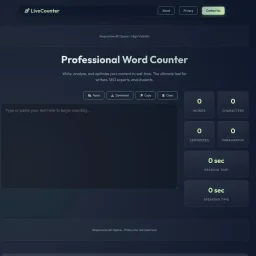
Content analysis tools have become essential for anyone publishing online, whether for search engine optimization, social media, or academic purposes. This word counter addresses a genuine need: writers and creators want instant feedback on their text's metrics without surrendering their privacy to cloud storage. The tool's core strength lies in its comprehensive real-time analysis. It delivers word, character, sentence, and paragraph counts as users type or paste content. Beyond basic metrics, it estimates both reading time using a standard 200 words per minute rate and speaking time at 130 words per minute. This dual-time feature proves particularly valuable for podcasters, presenters, and audiobook creators planning content duration. The readability scoring employs the Flesch-Kincaid scale, helping writers gauge text accessibility on a 0-100 scale where higher scores indicate easier comprehension. Combined with the character-limit tracking for Twitter/X posts, meta descriptions, and meta titles, the tool directly serves SEO practitioners optimizing content for search visibility and social media distribution. The word frequency analysis adds another layer, identifying repeated terms and helping refine content for both readability and keyword targeting. What distinguishes this offering is its commitment to privacy. The application processes all analysis client-side, meaning users' text never touches external servers. For writers working with sensitive material, confidential documents, or simply those concerned about data collection, this approach removes a significant barrier to adoption. The interface includes thoughtfully chosen shortcuts for power users: Ctrl+H for find and replace, Ctrl+Shift+C to copy, and Ctrl+Shift+D to download. The dark and light theme options accommodate different working environments and preferences. Mobile responsiveness ensures the tool functions equally well on phones and tablets, matching how many writers actually compose content today. The product positions itself at the intersection of multiple audiences. Casual Twitter users benefit from character counting. SEO professionals leverage the meta description and title length trackers alongside readability metrics. Students writing essays rely on word count verification. This multi-use approach broadens appeal without diluting focus. No pricing information appears on the site, suggesting the tool operates as a free offering, though the presence of ad space indicates an advertising-supported model rather than a premium subscription approach. For anyone seeking a straightforward, privacy-preserving text analysis solution with solid feature depth, this counter delivers practical value without friction.
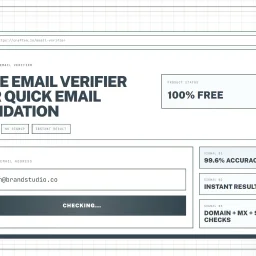
Validating email addresses is a crucial step in maintaining a healthy mailing list and ensuring that messages reach their intended recipients. The Email Verifier tool addresses this need by providing a simple, instant, and accurate way to check whether an email address is valid. This tool is particularly useful for marketers, developers, and sales teams who need to verify email addresses as part of their daily workflow. What stands out about this product is its ease of use and high accuracy rate. The tool is designed to be used directly in the browser, with no installation or account required, making it a convenient solution for quick email checks. The advanced verification engine guarantees an accuracy rate of 99.6%, which is achieved through comprehensive checks including syntax validation, domain verification, MX record lookup, and deliverability assessment. The tool's capabilities are geared towards providing a robust email validation experience. It checks the format of the email address to ensure it conforms to RFC standards, verifies the existence and validity of the domain, and looks for technical signals that indicate whether the address can receive messages. The fact that it processes data securely, without storing or sharing email addresses, is also a notable aspect. Notably, the Email Verifier is free to use, with no signup required, making it an accessible solution for individuals and teams. By using this tool, users can reduce bounce rates, protect their websites from spam registrations, and maintain a healthy mailing list. Overall, the Email Verifier is a reliable and efficient solution for anyone looking to validate email addresses quickly and accurately.

For businesses and individuals looking to securely manage cryptocurrency transactions, a new solution has emerged in the form of a non-custodial wallet. The primary issue this product addresses is the insecurity associated with crypto transactions, providing a safe and confidential environment for users to store their assets and receive cryptocurrency payments on their websites. At its core, this wallet is designed with security and confidentiality in mind, ensuring that users have control over their assets without relying on a third-party custodian. This is particularly significant for entities that wish to maintain the integrity and privacy of their financial transactions. By being non-custodial, it empowers users with full control and agency over their funds. Notably, the wallet's ability to facilitate the acceptance of crypto payments directly on users' websites expands its utility beyond personal asset management, positioning it as a versatile tool for both individuals and businesses. The straightforward option to either create a new wallet or open an existing one suggests a user-friendly approach, potentially easing the onboarding process for new users. While specific details regarding the pricing or business model are not provided, the emphasis on core functionality underscores the product's focus on delivering a fundamental, secure service. This suggests that the developers are prioritizing the establishment of a robust and reliable platform. Overall, the Pecunia Wallet offers a meaningful solution to the problem of insecure cryptocurrency transactions, catering to a demographic that values security, confidentiality, and control over their digital assets. By focusing on these key aspects, it establishes itself as a noteworthy option in the cryptocurrency wallet and payment processing space.
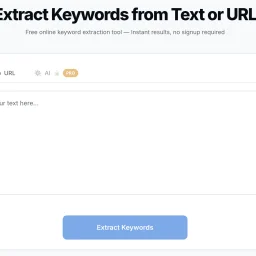
Keyword extraction is a crucial task for businesses and individuals focused on search engine optimization and content analysis, but manually sifting through text to identify key terms can be a tedious and time-consuming process. ExtractKeywords is designed to simplify this task, providing a straightforward solution for extracting keywords from text or URLs. The tool is geared towards individuals and businesses seeking to optimize their content and understand the dominant themes within their text. What stands out about ExtractKeywords is its ability to simplify the keyword extraction process without requiring users to sign up or navigate complex interfaces. The tool is designed to be user-friendly, allowing users to paste their text or enter a URL and receive instant results. The use of artificial intelligence for semantic extraction is also noteworthy, although this feature is reserved for Pro users. The tool's capabilities include word frequency analysis, stop-word filtering, and multi-word phrase detection, providing a comprehensive picture of a text's keyword profile. Users can view results sorted by frequency and density, filter by one-word, two-word, or three-word phrases, and export their findings as a CSV file or copy them to the clipboard. For URL extractions, the tool fetches the publicly accessible HTML of the webpage, respects robots.txt directives, and extracts the main text content before running the same keyword analysis used in text mode. The website does mention a Pro version with AI-powered extraction, indicating a freemium business model, but details on pricing are not provided. Overall, ExtractKeywords offers a valuable resource for those seeking to streamline their keyword extraction process and gain insights into their content.