#security Startups & Tools
Discover the best security startups, tools, and products on SellWithBoost.

API key management is a chronic pain point for software teams. Developers routinely generate credentials they never see again, then scatter them across environment files, messaging apps, and scattered notes. Recovery is tedious; tracking where keys are deployed is often impossible; offboarding team members leaves residual access questions unanswered. Otter Vault addresses this problem with a Chrome extension that automatically intercepts API keys at the moment they appear on provider consoles. The personal vault runs entirely on the user's device. When a key appears, Otter offers to capture it with a single click, encrypting it locally using AES-256-GCM with PBKDF2 key derivation across 600,000 rounds. The passphrase never leaves the device, making recovery by the vendor impossible even if they wanted to provide it. The extension fills keys only on the exact origin they were saved from, rejecting lookalike domains outright. No account creation is required; the entire feature set is free. What distinguishes Otter from similar offerings is its specificity about security mechanics and its testing rigor. The founder details the exact encryption parameters, the clickjacking protection, and the exact-origin matching rule that prevents phishing. The product is backed by 137 unit tests, seeded fuzzing, cryptographic verification checks, and weekly testing across 12 real provider consoles. The code is public for anyone to audit, removing the need to trust claims. For teams, Otter offers a second tier called Teams. It introduces a key map that tracks where every shared credential is deployed—which Vercel variable, which GitHub Actions secret, which .env file. When someone leaves the team, Otter re-encrypts all shared keys and generates a checklist of exactly what that person could access and where it lives. Activity logs of all key operations are signed and cannot be tampered with server-side. The trial period is 21 days free for up to 10 developers; the regular price is 29 dollars per month, though an early-bird rate of 20 dollars per month applies through November 13. The personal vault solves an immediate problem with minimal friction. The team offering adds organizational visibility that most startups lack. For developers who have experienced losing or misplacing credentials, the appeal is straightforward.

Managing numerous software packages on macOS can be a daunting task, with multiple updates to track and install across various sources. Version Tracker addresses this challenge by providing a unified solution to monitor and update over 100,000 packages, ensuring users stay current with the latest software versions. The developer's primary goal is to simplify the update process, catering to individuals who value staying up-to-date with the latest software releases. By doing so, Version Tracker brings efficiency and security to the forefront, verifying code signing, notarization, and known vulnerabilities for every app. One of the standout aspects of Version Tracker is its comprehensive coverage of various package sources, including package managers, development runtimes, and app updaters. The app integrates data from 47 sources, encompassing Adobe Creative Cloud, npm, pip, Cargo, and many more. This breadth of coverage allows users to manage their entire software ecosystem within a single dashboard. Key features of Version Tracker include a real-time dashboard displaying outdated counts, charts, and categories, as well as one-click updates with progress tracking and auto-removal from the outdated list. The app also prioritizes security, with Apple code signing verification, notarization validation, and CVE database enrichment. Users can try Version Tracker free for 7 days, with no sign-up required. The app is signed and notarized by Apple, ensuring a secure user experience. The developer also highlights that Version Tracker is a natural replacement for MacUpdater, which is now discontinued. Overall, Version Tracker offers a robust solution for managing software updates on macOS, making it an attractive option for individuals seeking to streamline their update process.
Encrypted file access loss represents a genuine problem for individuals and businesses storing sensitive data in compressed or password-protected formats. Catpasswd targets users who have forgotten passwords or lost access to RAR, ZIP, Microsoft Office, and Excel files—a surprisingly common scenario that often leaves people believing their data is permanently inaccessible. The core value proposition centers on cloud-based password recovery without requiring technical expertise. The platform maintains a database of tens of millions of password combinations, which it uses to attempt recovery matches against users' encrypted files. This crowdsourced password collection approach increases recovery success rates compared to brute-force alternatives, though it also raises implicit trust questions about how these password collections were sourced and secured. The product's standout features are its accessibility and speed. The recovery process appears straightforward enough for non-technical users, with testimonials indicating the service succeeds where other password-cracking tools fail. The existence of a free recovery mode acknowledges users in genuine need, differentiating it from competitors who monetize all recovery attempts. The platform claims to serve over 100,000 users globally, suggesting meaningful product-market fit in an underserved niche. A notable limitation is the scope restriction to specific file formats. Users needing recovery for database files, disk images, or other encrypted containers fall outside Catpasswd's coverage. The reliance on password database matching also means recovery depends on whether the password exists in the company's collection—unusual or recently created passwords may never be recovered, leaving users unaware of this constraint upfront. Pricing details remain absent from available materials. The 100,000-user metric indicates growth, though without churn or retention context it is unclear whether these represent active users or cumulative accounts created. The platform occupies a defensible position in the legitimate password recovery space, distinct from malicious credential-cracking tools. For users facing genuine file access loss, particularly with common passwords, Catpasswd offers a practical alternative to data resignation.
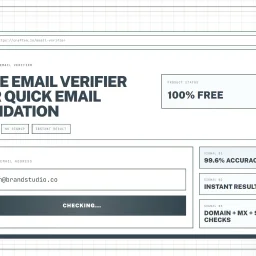
Validating email addresses is a crucial step in maintaining a healthy mailing list and ensuring that messages reach their intended recipients. The Email Verifier tool addresses this need by providing a simple, instant, and accurate way to check whether an email address is valid. This tool is particularly useful for marketers, developers, and sales teams who need to verify email addresses as part of their daily workflow. What stands out about this product is its ease of use and high accuracy rate. The tool is designed to be used directly in the browser, with no installation or account required, making it a convenient solution for quick email checks. The advanced verification engine guarantees an accuracy rate of 99.6%, which is achieved through comprehensive checks including syntax validation, domain verification, MX record lookup, and deliverability assessment. The tool's capabilities are geared towards providing a robust email validation experience. It checks the format of the email address to ensure it conforms to RFC standards, verifies the existence and validity of the domain, and looks for technical signals that indicate whether the address can receive messages. The fact that it processes data securely, without storing or sharing email addresses, is also a notable aspect. Notably, the Email Verifier is free to use, with no signup required, making it an accessible solution for individuals and teams. By using this tool, users can reduce bounce rates, protect their websites from spam registrations, and maintain a healthy mailing list. Overall, the Email Verifier is a reliable and efficient solution for anyone looking to validate email addresses quickly and accurately.

Fraudulent signups remain a persistent issue in the digital landscape, bleeding resources from businesses through unnecessary transactional emails and wasted onboarding efforts. TrueUser offers a solution to this problem with its email verification API, specifically designed for businesses suffering from fake and disposable signups. By integrating TrueUser into their signup flow, companies can verify the authenticity of user email addresses in under 80 milliseconds. What stands out about TrueUser is its comprehensive approach to email verification, checking 14 signals that include disposable domain matching, MX and SMTP probing, and batch-velocity fingerprinting. This robust verification process enables businesses to identify not only disposable email addresses but also coordinated batch signup attacks. The company's dedication to staying ahead of emerging threats is evident in its active tracking of disposable domains, with over 5,439 domains monitored and a list that is updated regularly to include new providers. TrueUser provides businesses with a flexible system, allowing them to either directly use the verdict provided by the API or create their own policy based on the raw signals returned. Every API call is streamed to the company's dashboard, facilitating replay and tuning. The live verification stream demonstrates the API's effectiveness in real-time, showcasing its ability to quickly identify and block suspicious signups. The service starts free, with 1,000 free checks available, indicating a freemium model that allows potential customers to test the API before committing to a paid plan. Overall, TrueUser presents a compelling solution for businesses seeking to mitigate the financial and operational impacts of fake signups.
Professionals handling sensitive documents need a reliable and secure way to manage their PDFs without compromising on speed or functionality. PDF Pro addresses this need by offering a comprehensive suite of online PDF tools that are not only free but also prioritize user privacy and security. The platform is particularly suited for individuals and businesses looking for a secure alternative to Adobe Acrobat, providing features such as merging, compressing, and editing PDFs directly in the browser. What stands out about PDF Pro is its commitment to maintaining user privacy through robust security measures. It utilizes AES-256 encryption and ensures that files are automatically deleted from servers after two hours, reinforcing its "Privacy First" promise. The use of WebAssembly technology allows for instant processing of PDF tasks locally within the browser, eliminating the need for cloud uploads and thereby enhancing both speed and security. Key features of PDF Pro include a range of standard PDF tools such as merging, compressing, and editing, as well as more specialized AI-powered tools like the Medical Report Analyzer, Bank Statement Analyzer, and Resume Scanner. These tools cater to various professional needs, from document management to in-depth analysis. The platform also offers E-Sign capabilities that are ESIGN and eIDAS compliant, adding a layer of legal validity to electronically signed documents. Notably, PDF Pro operates on a completely free model with no signup required and no limits on usage, at least for the time being as indicated by a limited-time offer. This approach, combined with its robust feature set and emphasis on privacy, positions PDF Pro as a compelling option for those seeking a secure, efficient, and cost-effective PDF solution.

The online proxy market is crowded and complex, making it difficult for users to identify the best proxy services for their specific needs. A new resource has emerged to tackle this issue, providing a comprehensive comparison of top proxy providers. The website is designed for individuals seeking reliable and high-performance proxy services, including those requiring residential, mobile, or datacenter proxies. What stands out about this resource is its curated selection of top proxy providers, hand-picked and ranked based on performance, uptime, and value. The website showcases a diverse range of proxy services, each with its unique features and pricing models. For instance, some providers offer city-level targeting and unlimited threads, while others specialize in 4G/5G mobile proxies or enterprise-grade proxy networks. The website's comparison feature allows users to instantly evaluate top proxy providers based on various criteria, such as location, type, and pricing. The resource also extends beyond proxy services, offering insights into related topics like web hosting and virtual private servers (VPS). The website features a range of hosting options, including lightning-fast SSD hosting, Linux VPS, and Windows VPS, with prices starting at $3.99 per month. Pricing for the proxy services varies, with costs ranging from $1 per IP to $8 per GB, depending on the provider and the specific service. The website's business model is not explicitly stated, but it is clear that it earns revenue through affiliate marketing or referrals, as it promotes various proxy providers and web hosting services. Overall, this resource is a valuable tool for anyone seeking to navigate the complex world of online proxies and related services.
Cybersecurity is a complex and often daunting task for small businesses, which typically lack the resources and expertise to effectively protect themselves against ever-evolving threats. EdgeIQ Labs addresses this challenge by providing practical, business-first security monitoring solutions that help small businesses identify and address vulnerabilities before they can be exploited. The company's tools are designed to be easy to use, with simple onboarding and real support, making them accessible to business owners, security professionals, and developers alike. What stands out about EdgeIQ Labs is its focus on delivering lightweight, functional utilities that integrate seamlessly into existing workflows, avoiding the complexity and overhead often associated with enterprise security solutions. The company's approach prioritizes action-focused reporting, providing monthly summaries with prioritized fixes rather than alert spam, making it easier for small teams to manage their security posture. EdgeIQ Labs offers a range of free tools, including an SSL security scanner, headers analyzer, XSS quick scan, and subdomain scanner, which provide instant insights into potential security risks. For businesses requiring more comprehensive monitoring, the company offers paid plans, including SMB Essentials and Plus, with instant Stripe checkout. The free tools are complemented by a 13-step SMB cybersecurity checklist, which is available for free and provides a clear roadmap for improving security. The company's commitment to privacy-first practices is evident in its assurance that free scans are never stored, and its use of Stripe-secured payments provides an additional layer of security for transactions. Overall, EdgeIQ Labs provides a compelling solution for small businesses seeking to enhance their cybersecurity without the burden of complex and costly enterprise solutions.

Managing PDF files can be a daunting task, especially when online tools compromise security by uploading documents to their servers for processing. GoPDFGo addresses this issue by providing a suite of PDF management tools that operate directly within the user's web browser, ensuring the security and privacy of sensitive documents. The creator's primary motivation is to offer a convenient and secure solution for managing PDF files, free from the risks associated with traditional online PDF tools. What stands out about GoPDFGo is its innovative use of advanced technologies like WebAssembly to process files locally on the user's device, eliminating the need for server uploads. This approach not only enhances security but also enables the tools to function offline once loaded. As a result, users can merge, split, compress, and convert PDFs without exposing their data to potential risks. The platform offers a range of features catering to diverse user needs, including students, professionals, and government aspirants. Users can compress PDFs without losing quality, merge multiple documents into one, extract specific pages, and even convert images to PDF. Additionally, the website provides image editing capabilities, such as resizing, cropping, and converting between various formats. GoPDFGo's user-centric design and robust feature set make it an attractive solution for individuals seeking a secure and reliable PDF management tool. By processing files locally and avoiding server uploads, GoPDFGo delivers on its promise of providing a safer alternative to traditional online PDF tools. The absence of explicit pricing details suggests that the platform is committed to offering its services free from the constraints of paid software, aligning with the creator's vision of providing a convenient and secure solution.

The headaches of outfitting a home or small business with enterprise-grade surveillance come down to cost, complexity, and false alarms. Sentinel neutralises all three by turning cheap webcams and IP cameras you already own into rule-based AI sentinels—no bloated NVR hardware, no recurring cloud fees, just a downloadable application that runs locally on Windows PCs. The sweet spot sits with residential caregivers, solo security managers, and lean startups that need hospital-grade vigilance without hospital-grade budgets. Where competing products flood users with generic motion bursts, Sentinel narrows the signal to highly specific events—falls, head slumps, motionless stretches, waving gestures, and even questionable neck angles—then issues instant desktop or phone alerts. Layer on top a zone painter and a human-count gate, and the software becomes context-aware, ignoring pets, rustling trees, and passing cars unless they step into a delineated area or violate a crowd count you set. Stand-out depth shows in the Care Assistance module. Fall detection and neck posture tracking are surgical counters to the two biggest risks in aged or desk-bound populations: sudden drop and long-term ergonomic injury. Add posture classification—standing, sitting, leaning, lying—and automated inactivity timers, and you have a system that doubles as a remote wellbeing nurse. These rules coexist with standard perimeter functions such as vehicle, animal, fire, face, and licence-plate recognition, each toggleable so a nursery play area can watch only for toppled toddlers while the loading dock next door worries exclusively about forklifts and tailgate thefts. Version 2.5 released April 2026 refines speed; early builds handle multiple 1080p streams without the GPU load associated with most AI diagnostics. Download the trial gratis straight from Ceynax’s site. When you decide to keep it, a one-time activation key ends the nagging—no subscriptions, no hidden camera limits, just an honest perpetual licence.

Protecting sensitive information in documents has become a compliance necessity for enterprises, yet traditional redaction workflows remain cumbersome and error-prone. PDF Redaction addresses this by combining artificial intelligence with local processing to identify and remove personally identifiable and health information without sending full documents to external servers. The product targets organizations handling confidential data—particularly in regulated sectors like healthcare, finance, government, and defense—where both data protection and operational efficiency matter equally. The platform's core differentiator is its hybrid workflow. Rather than relying entirely on automation, it gives users final authority over redactions detected by its AI engine. The system identifies sensitive information across fifty-plus categories using machine learning-powered optical character recognition, but the actual removal of data remains a human decision. Users can review AI-suggested redactions, adjust boxes, search for specific terms, or add manual redactions before exporting the final document. This balance between intelligent automation and human oversight addresses the real concern that purely automated approaches sometimes overcorrect or miss context. Deployment flexibility sets it apart further. The platform exists in three forms: a free web-based tool limited to twenty-five pages per document, an on-premise enterprise version called PDF Redaction Studio positioned for air-gapped security environments, and a REST API for developers integrating redaction into larger systems. This tiered approach accommodates organizations across the spectrum, from smaller operations to those with strict data sovereignty requirements. The on-premise option explicitly targets sectors like defense and government, suggesting the vendor understands the particular security architecture some institutions require. The technical foundation rests on open-source technologies—specifically Spark-PDF and ScaleDP—which the company highlights as evidence of reliability and transparency. This choice also suggests the product benefits from community scrutiny rather than proprietary black-box architecture. Beyond standard redaction, the platform offers a custom rule engine, allowing organizations to protect data patterns unique to their industry, and professional consulting services drawing on claimed expertise in machine learning, natural language processing, and document processing. Pricing transparency is minimal on the public website. The free tier allows unlimited documents with a twenty-five-page-per-document ceiling, positioning it as a viable starting point for testing. Enterprise and API pricing requires direct engagement. This model encourages adoption at smaller scales while reserving detailed pricing for conversations with accounts teams handling larger deployments.

Automated security testing has long been a tedious and time-consuming process for cybersecurity teams, bug bounty hunters, and auditors alike. Strix offers a solution to this problem by providing an open-source AI hacking agent that streamlines vulnerability discovery, validation, and reporting. What stands out about Strix is its ability to automate penetration testing in hours instead of weeks, as claimed by its founders. This is a significant improvement over traditional methods, which often involve manual labor-intensive processes. The tool's effectiveness is likely due to its AI-powered capabilities, allowing it to efficiently identify real security vulnerabilities and generate detailed reports. Strix's features worth noting include its ability to find and validate security vulnerabilities with proof-of-concepts (PoCs) and produce comprehensive reports. This level of detail can help teams prioritize remediation efforts and provide valuable insights for improving overall security posture. The tool's open-source nature also implies a community-driven approach, where users can contribute to the development and improvement of the platform. One notable aspect of Strix is its use by top security teams, bug bounty hunters, and auditors, indicating its potential effectiveness in real-world scenarios. However, pricing or business model details are not explicitly mentioned on the website, leaving users to explore those aspects further. Despite this, Strix's innovative approach to automated security testing makes it a promising solution for organizations seeking to streamline their vulnerability management processes.