#notes Startups & Tools
Discover the best notes startups, tools, and products on SellWithBoost.

Record any meeting on macOS. Speakers labelled, transcript searchable. No bot joins the call, and your recordings stay on your Mac. No third participant ever joins

Track your motorcycle, fuel, mileage, maintenance, and ownership costs. Explore and compare 18,000+ motorcycles in one digital garage.

Handwriting is having a moment, at least in the digital age. One solo founder from Nepal has spotted an unusual niche: the demand for handwritten-looking text in an era when everyone types. Aipen.ink addresses this by converting plain text, ChatGPT responses, mathematical equations, and other written content into realistic handwriting styles, exportable as PDFs or SVG files. The product targets three distinct audiences. Students and educators can transform messy digital answers into clean, legible handwritten notes complete with rendered math and graphs, potentially useful for study materials or assignments. Founders and business professionals can convert written communications—emails, letters, financial projections—into text that reads as authentically human-written. A third segment involves technical audiences: engineers and researchers dealing with complex mathematics, quantum mechanics, and computational fluid dynamics who need these concepts rendered in handwriting rather than standard fonts. What distinguishes aipen.ink is its approach to a problem most would consider solved. While handwriting fonts exist, generating realistic handwriting at scale, especially with technical content, isn't trivial. The product leverages Google's Gemini API to handle the intelligence layer and employs twenty private Unicode variations to produce authentic-looking output. The tool runs entirely in the browser, meaning no user text is stored on servers, addressing privacy concerns. Users can select from existing handwriting styles or upload their own custom font. The feature set is practical. PDF and SVG export options provide flexibility across different workflows. Support for European languages broadens accessibility beyond English-speaking markets. The founder mentions video note generation as a forthcoming feature, suggesting active product development. The free trial removes friction for trying the product, though no explicit pricing model or revenue structure is disclosed. The sole founder status raises questions about sustainability and roadmap execution, but the technical foundation appears sound and the problem, if niche, is clearly defined. Aipen.ink occupies an interesting middle ground: not essential infrastructure but genuinely useful for specific workflows. Whether handwritten-style text becomes a mainstream requirement or remains a novelty depends heavily on adoption, but the product demonstrates that AI-powered writing interfaces can serve aesthetic and practical needs beyond traditional text generation.

B2B lead generation is a challenging task, especially when relying on outdated databases that often yield stale or irrelevant results. Surfaced tackles this problem head-on by utilizing AI-powered live web searches to deliver targeted, up-to-date leads. This is particularly beneficial for businesses seeking to connect with newer, niche, or regional companies that may not be listed in traditional databases. What sets Surfaced apart is its ability to search the live web in real-time, rather than relying on static databases that can be months out of date. This approach ensures that the leads generated are current and relevant, giving users a significant advantage in their outreach efforts. The AI-driven search process is also refined through a series of clarifying questions, ensuring that the results closely match the user's specific needs. The platform's functionality is streamlined into a three-step process: describing the target market and industry segment, launching an AI-powered search, and receiving a structured list of leads. The resulting list includes essential company information, such as website, contact details, location, and a relevance score, which can be easily exported to a CRM or cold email sequence. Notably, Surfaced's business model includes a fair pricing structure, where unused credits are returned if a search yields no results, and a built-in mail bounce checker to ensure that only valid email addresses are suggested. Overall, Surfaced offers a robust solution for businesses seeking to identify and connect with their target audience in a more efficient and effective manner.
Amazon device users have long struggled with limited storage capacity, particularly on the Fire TV Stick. A new app aims to alleviate this issue by enabling seamless file transfers between devices over local WiFi. TransferPro allows users to send files from their Android phones, tablets, or PCs to their Fire TV without relying on cloud uploads or cumbersome USB cables. The app's simple three-step process makes it easy to connect devices and initiate transfers. Notably, the connection process is facilitated by a QR code, eliminating the need to manually enter IP addresses. The app is designed with a TV-optimized interface, making it navigable using the Fire TV remote. Key features include the ability to transfer files of any size, a built-in file manager, and functionality that works offline, making it suitable for travel or areas with poor internet connectivity. By providing a convenient, internet-free file transfer solution, TransferPro has the potential to be a valuable tool for Fire TV users, as well as for individuals in various other contexts, such as cord cutters, travelers, and professionals.

Privacy-conscious writers tired of storing manuscripts in cloud services designed around data extraction will find a different proposition in CipherWrite. The application explicitly positions itself against the surveillance model embedded in mainstream writing tools, offering what the founder describes as a secure sanctuary for creative work—a space where commercial data extraction and AI training harvesting do not occur. Built initially as a personal project to organize private thoughts and early manuscripts, CipherWrite combines a diary, note-taking, and book-writing environment with encryption that locks content on the user's device before transmission. The architecture distinguishes itself through its approach to key management: encryption keys generate locally and never leave the user's machine. The service maintains no server logs, metadata tracking, or search history, and users write anonymously without providing personal information. Beyond its security infrastructure, the product includes a privacy analysis tool that flags potentially sensitive content before publication—addressing a particular concern for writers working with personal or controversial material. The application also features an AI-powered editor that evaluates clarity and depth, plus a reader fatigue predictor that visualizes precisely where reader attention drops within manuscripts. The founder's origin story emphasizes authenticity over growth theater. Developed across weekends and free time, the tool evolved from a personal diary into a comprehensive writing suite as the creator identified his own needs for additional features. This incremental approach, positioned as perpetually unfinished rather than fully optimized, reflects a product built around actual user problems rather than speculated ones. The business model follows a freemium structure, with free access to core writing features and paid upgrades for professional tools. No specific pricing is publicly disclosed. The founder's explicit rejection of what he calls predatory growth hacks and algorithmic surveillance represents a deliberate choice to abandon the dominant monetization model in productivity software—declining data extraction in favor of direct revenue from premium features. CipherWrite occupies a specific market niche rather than pursuing mainstream adoption. Writers who view manuscripts as proprietary intelligence or whose work touches sensitive subjects will recognize the product's utility. For casual writers, the security emphasis represents an expensive solution to an unfelt problem.
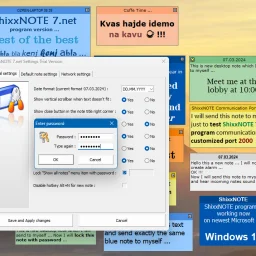
In environments where simplicity and speed are crucial, a clutter-free productivity solution is essential. ShixxNOTE addresses this need by offering a straightforward and efficient platform for managing notes, reminders, and internal communication. The software is tailored for professional settings such as offices, schools, and organizations that require fast, reliable, and private communication within a local network. What stands out about ShixxNOTE is its focus on being lightweight and uncomplicated, directly countering the trend of feature-heavy productivity apps that often come with slow interfaces and unnecessary distractions. By streamlining note-taking and communication, it enables users to capture information quickly and stay organized without the complexity associated with larger productivity platforms. The key features of ShixxNOTE include its ability to create and manage desktop sticky notes, facilitate instant messaging over a local network, and enable note sharing directly to other users' desktops. It is compatible with a range of Windows operating systems, from Windows XP to Windows 11, making it a versatile option for various environments. The application's multithreaded client/server architecture ensures that communication is immediate and effective, with notes being delivered straight to the recipient's desktop. Notably, ShixxNOTE prioritizes data privacy by operating entirely within the local network, eliminating the need for an internet connection. This aspect, combined with its offline functionality, makes it an attractive option for those seeking secure notes software. A 30-day free trial is available, allowing potential users to test the full functionality of the software before committing to a purchase. The trial version is fully functional, with the only limitation being the trial period itself.

Capturing web content at scale without sacrificing privacy or simplicity is a persistent friction point for knowledge workers. Web Clipper targets this gap by offering a browser extension that lets users save text, links, and images through a single keyboard shortcut, eliminating the common workflow of bookmarking, copying, or screenshotting scattered across multiple tools. The extension is built for researchers, students, designers, and anyone who mines the web for ideas and reference material. Its core appeal lies in speed and simplicity—content capture happens in under a second, with no configuration required. Rather than forcing users into account creation or cloud syncing, the product keeps all data local, meaning users maintain complete privacy and offline access to their collected material. The feature set addresses the common pain point of digital hoarding: the ability to save selected text, full web pages, links, and images directly into a side panel accessible from any tab. A search function lets users navigate their collection without the organizational overhead that plagues other capture tools. The interface supports both dark and light themes, catering to different usage contexts and reducing friction during extended browsing sessions. What distinguishes Web Clipper from competitors like Evernote or cloud-based clippers is philosophical. Rather than positioning itself as a complex note-taking platform or knowledge management system requiring subscriptions, it prioritizes a single job done well: fast, offline, privacy-preserving capture. The developer explicitly designed around the pain of feature bloat and recurring subscription costs, positioning the tool as an antidote to the complexity users encounter elsewhere. Upcoming functionality includes Spaces, a feature for organizing clips into collections, suggesting the roadmap will gradually introduce structure without compromising the core principle of simplicity. The extension is currently free, with no monetization layer disclosed, making it an accessible entry point for users skeptical of yet another subscription service. The product's positioning on privacy, speed, and local-first architecture creates a clear niche. It serves users frustrated by the gatekeeping of cloud-based alternatives and willing to sacrifice cloud synchronization and advanced collaboration for agency over their own data.

Visual learning is gaining traction in education, yet many educators lack the technical infrastructure to monetize their expertise. Pathmind addresses this gap by allowing creators to convert mind maps directly into sellable courses without requiring video production, editing expertise, or complex course-building knowledge. The platform targets course creators, educators, and subject matter experts who want to package and distribute knowledge through a visual-first format rather than traditional lectures or text-heavy materials. The core innovation lies in its simplicity: creators map out topics as interactive nodes, enrich them with text, videos, images, and documents, then publish the entire structure as a course. Learners navigate these mind maps as interactive learning paths, creating an engaging alternative to linear course formats. This approach eliminates the high friction points that prevent many experts from becoming educators—no recording sessions, no post-production editing, no platform complexity. The setup process takes approximately fifteen minutes, a deliberately low barrier designed to encourage adoption among non-technical users. Pathmind's node-based system extends beyond basic mind mapping. The platform includes an interactive scripting layer that allows creators to add conditional logic and dynamic functionality to their maps, enabling more sophisticated course design than static diagrams alone. This technical depth is concealed beneath an accessible interface, allowing both non-technical content creators and those seeking advanced customization to work within the same tool. The business model reflects a creator-friendly philosophy. The platform operates free of charge, supporting both free course distribution and paid offerings. Creators retain full control over pricing and access, with the revenue model supporting recurring income as new learners discover and purchase courses. This removes financial barriers to entry for emerging educators while enabling established instructors to reach audiences without expensive course development platforms. The founder's evolution from browser-based productivity extension to education-focused platform indicates iterative customer discovery and willingness to pivot toward market demand. The transition to Pathmind Courses in July 2025 suggests stronger market validation in online education than in general productivity tools. Pathmind faces competition from established players like MindMeister and Miro, which offer broader collaboration features, though neither emphasizes course monetization. The platform's focus on educational content packaging distinguishes it, though may limit adoption among users seeking general-purpose diagramming tools. The interactive node system with scripting capabilities provides genuine product depth, yet market education will be crucial—users must understand how this visual approach meaningfully differs from and improves upon traditional course platforms.

Capturing memories for future reflection has become increasingly common, but most solutions treat time capsules as an afterthought. This app tackles the specific use case of sealing away meaningful moments—photos, videos, voice recordings, notes, and files—to be opened at a predetermined date, preserved exactly as they were locked away. The target audience is broad but specific: people marking milestones who want to freeze a moment in time. This includes high school graduates saving photos and letters for their adult selves, parents recording a child's early moments to be revisited at 18, friend groups documenting shared trips, and individuals tracking personal goals for yearly review. What distinguishes this offering is its uncompromising stance on privacy. The application stores everything on-device using AES-256 encryption, avoids cloud servers entirely, requires no account creation, and collects no analytics or user data. This approach appeals to users skeptical of tech companies' data practices, though it carries a trade-off: responsibility for manually backing up capsules as encrypted files to prevent device loss from becoming data loss. The interface emphasizes simplicity. Users name a capsule, choose an unlock date ranging from one day to decades away, add their content, and press and hold to seal it. A countdown timer displays time remaining until each capsule unlocks. The app supports flexible content types, from imported media to built-in voice recording and text composition. Sharing encrypted capsules with others requires a premium subscription. The service operates on a freemium model with in-app purchases. Core capsule creation and storage is free, while premium access unlocks capsule sharing and some advanced features. The documentation doesn't clearly distinguish what exactly requires payment, which prospective users should clarify before relying on the app for long-term memory storage. One practical consideration: since everything is local and unsynced, device loss means capsule loss unless backups exist as external encrypted files. The developer emphasizes this backup requirement, suggesting they understand the inherent risks of an entirely on-device architecture. For users prioritizing privacy over convenience, who accept responsibility for backups, and who find meaning in time-delayed memory capture, this fills a genuine gap in the app ecosystem.

For businesses struggling to manage disconnected tools, repetitive manual processes, and outdated systems, CodeSol Technologies positions itself as a modernization partner for companies across industries. The Austin-based software development firm targets mid-market and enterprise clients seeking to streamline operations through digital transformation, with particular focus on healthcare, professional services, and home improvement sectors, though it claims to serve organizations of all sizes. The company's core offering centers on eliminating operational friction through automation and system consolidation. Rather than positioning itself as a single-product vendor, CodeSol emphasizes custom solutions tailored to specific workflow challenges. Their service portfolio spans custom website development, e-commerce platforms, workflow automation, and cloud infrastructure setup. This breadth suggests they function more as a systems integrator and development shop than a SaaS platform provider. What distinguishes their approach is an explicit emphasis on measurable business outcomes. The company references improvements in e-commerce checkout completion rates of 20 to 30 percent and explicitly frames solutions around efficiency gains and error reduction rather than technology for its own sake. Their marketing language consistently connects technical implementations back to business KPIs—reduced manual work translates to team capacity freed for revenue-generating activities, and data integration enables better decision-making. The company maintains a 5/5 Trustpilot rating, though the website doesn't specify review volume or time period, making this metric difficult to independently verify. Their claimed target regions include Texas and nationwide, suggesting both local and remote engagement capability. One notable limitation is the absence of transparent pricing information. All service offerings are presented as custom engagements requiring a consultation to quote, which is typical for professional services but leaves prospective clients without cost benchmarks. Similarly, the website lacks specific case studies with concrete metrics, customer testimonials beyond ratings, or details on typical project timelines and team composition. The company's positioning as a "data-driven" transformation partner is somewhat generic—most modern development firms make similar claims. However, their focus on workflow-specific automation and system integration rather than off-the-shelf solutions suggests genuine specialization. For businesses with genuine operational inefficiencies and budget for custom development, CodeSol appears to target a real need. Whether they deliver measurable ROI depends on execution and team expertise, factors the marketing materials don't adequately demonstrate.

Learning from YouTube videos presents a common challenge: how to capture meaningful notes and timestamps without relying on external services that harvest your data. JumpNotes addresses this directly with a Chrome extension that keeps all note-taking activity local to the browser, eliminating cloud dependencies and privacy concerns entirely. The product targets students, educators, and anyone seeking to extract knowledge from video content while maintaining full control over their information. The extension distinguishes itself through its uncompromising privacy stance. Rather than syncing data across servers, JumpNotes stores everything in the browser's local storage, with no tracking infrastructure or third-party access. This design choice reflects a broader commitment to user autonomy that informs the entire product architecture. The feature set reflects careful attention to the learning workflow. Chapter Autopilot automatically detects native YouTube chapters and imports them into a jump-list, providing instant structural context for any video. The timestamp system allows single-click note capture tied to exact video moments, with instant navigation back to those points. A Smart Archive feature groups all notes by video, making it easy to browse past learning sessions. Comment Detection extracts useful timestamps from YouTube's comment section and incorporates them into personal notes, leveraging community insights without manual curation. For those who work across multiple tools or prefer different formats, the extension offers text export in both plain text and Markdown formats. The interface prioritizes keyboard efficiency, allowing users to pause, note, and continue without touching a mouse. This optimization pays dividends for power users and those seeking to maintain focus during learning sessions. JumpNotes succeeds because it solves a specific problem with minimal friction and no privacy tradeoffs. For learners unwilling to compromise data security for functionality, it represents a rare product that delivers both without compromise. The extension avoids the bloat and surveillance mechanisms common in competing solutions, instead betting that students and educators value control over convenience.

Meetings are a crucial part of modern work, but taking accurate and detailed notes can be a daunting task. Krisp's mobile app aims to alleviate this problem by providing an AI-powered meeting assistant that records conversations, transcribes audio, and delivers summaries in multiple languages. The app is designed for professionals who need to stay organized and follow up quickly on meetings held anywhere, whether online or offline. With Krisp Mobile, users can record in-person meetings with a single tap, upload voice notes or audio files for instant transcription, and view their entire meeting history on their mobile device. The app also allows users to send the Krisp AI bot to virtual calls on popular platforms like Zoom, Google Meet, and Microsoft Teams. What stands out about Krisp Mobile is its seamless integration with existing Krisp accounts and its ability to work offline or online. The app's features are intuitive and easy to use, making it an ideal solution for solo founders, remote teams, and hybrid meeting leaders who need to capture insights from meetings in real-time. Key features worth noting include the app's AI-powered transcription capabilities, which can deliver summaries and action items in 16+ languages. Users can also join virtual calls with the Krisp Bot or tap to capture live voice notes. All transcripts sync to desktop for easy access and management. Pricing details are not explicitly mentioned in the provided content, but the app is free to download and integrates with existing Krisp accounts. The mobile app extends Krisp's powerful meeting assistant to wherever users go, making it an essential tool for modern professionals who need to stay organized and follow up quickly on meetings held anywhere.

For individuals who spend a significant amount of time in meetings, conducting research, and juggling multiple projects simultaneously, managing one's thoughts and ideas can be a daunting task. Mem 2.0 aims to alleviate this burden by capturing these ephemeral moments and presenting them when needed. What stands out about Mem is its straightforward approach. Unlike some AI-powered productivity tools that promise more than they deliver, Mem's pitch is refreshingly honest: it helps you remember key points from meetings and research sessions. This focus on a specific pain point suggests that the developers understand their target audience's needs and have crafted a solution tailored to those requirements. Mem 2.0 is available across multiple platforms – Mac, Windows, Web, and iOS – making it accessible to users who prefer different environments. This broad compatibility also implies that Mem can integrate with various workflows and existing tools. While specific features or capabilities are not explicitly mentioned in the provided content, the promise of capturing ideas "exactly when you need them" suggests a sophisticated approach to information retrieval and organization. It's likely that Mem utilizes some form of natural language processing (NLP) and machine learning algorithms to identify key points and prioritize relevant information. The website does mention the necessity of an updated browser version to function properly, implying that the application relies on JavaScript for its core functionality. This may be a turn-off for users who prefer to stick with older browsers or have concerns about compatibility. No pricing details are mentioned in the provided content.

The notion of leveraging AI to streamline work processes has been gaining traction in recent years, but the vast majority of tools on the market lack a crucial component: context. Granola's new feature, Recipes, seeks to address this limitation by combining expert-written prompts with real-time meeting notes and conversations. For professionals who rely heavily on collaboration and feedback, Granola's solution offers a significant advantage. The platform can now provide tailored guidance and support during critical work phases, such as brainstorming sessions or sales meetings. This is particularly beneficial for teams that struggle to integrate AI into their workflow due to the lack of contextual understanding. What sets Recipes apart from other AI-powered tools is its ability to bring together expertise and context in a seamless manner. The platform's incorporation of prompts written by industry experts, such as Lenny Rachitsky and Matt Mochary, provides users with actionable advice and recommendations that are grounded in real-world experience. Key features worth noting include the "Coach me" and "Prep me" functions, which utilize meeting notes to offer personalized guidance and support. The platform's flexibility also allows users to create their own custom Recipes or share them with colleagues. As for pricing and business model details, there is no explicit mention in the provided content. It appears that Granola operates on a subscription-based model, but further information would be necessary to confirm this assumption.