
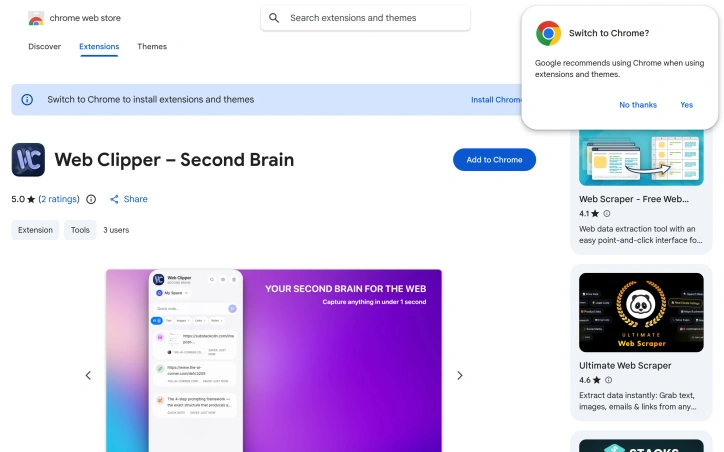
Web Clipper - Second Brain
- No match
Machine translation — the English original is authoritative.
The Story
As someone who spends 10+ hours a day in the browser, I was tired of losing brilliant ideas I stumbled across in the moment. Bookmarks turned into chaos, Evernote felt too bloated, and monthly subscriptions were eating my budget. I built Web Clipper to fix this once and for all — capture any content in under a second, organize it into Spaces, Currently it's free.
AI Overview
AI-generatedCapturing web content at scale without sacrificing privacy or simplicity is a persistent friction point for knowledge workers. Web Clipper targets this gap by offering a browser extension that lets users save text, links, and images through a single keyboard shortcut, eliminating the common workflow of bookmarking, copying, or screenshotting scattered across multiple tools.
The extension is built for researchers, students, designers, and anyone who mines the web for ideas and reference material. Its core appeal lies in speed and simplicity—content capture happens in under a second, with no configuration required. Rather than forcing users into account creation or cloud syncing, the product keeps all data local, meaning users maintain complete privacy and offline access to their collected material.
The feature set addresses the common pain point of digital hoarding: the ability to save selected text, full web pages, links, and images directly into a side panel accessible from any tab. A search function lets users navigate their collection without the organizational overhead that plagues other capture tools. The interface supports both dark and light themes, catering to different usage contexts and reducing friction during extended browsing sessions.
What distinguishes Web Clipper from competitors like Evernote or cloud-based clippers is philosophical. Rather than positioning itself as a complex note-taking platform or knowledge management system requiring subscriptions, it prioritizes a single job done well: fast, offline, privacy-preserving capture. The developer explicitly designed around the pain of feature bloat and recurring subscription costs, positioning the tool as an antidote to the complexity users encounter elsewhere.
Upcoming functionality includes Spaces, a feature for organizing clips into collections, suggesting the roadmap will gradually introduce structure without compromising the core principle of simplicity. The extension is currently free, with no monetization layer disclosed, making it an accessible entry point for users skeptical of yet another subscription service.
The product's positioning on privacy, speed, and local-first architecture creates a clear niche. It serves users frustrated by the gatekeeping of cloud-based alternatives and willing to sacrifice cloud synchronization and advanced collaboration for agency over their own data.
Founder Diary
DevlogThe maker hasn't posted a diary entry yet.
Key Features
Quick Capture
Browser extension saves text, links, and images via keyboard shortcut in under a second
Local Storage
All captured data stored locally with offline access and no cloud syncing required
Side Panel Access
Organized side panel for quick access to saved content from any tab
Search Function
Built-in search to navigate captured content without organizational overhead
Theme Customization
Dark and light theme support for different usage contexts
Use Cases
-
1
Researchers
Quickly capture and organize web sources for reference without cloud dependency
-
2
Students
Save study materials, articles, and web content for offline review and research
-
3
Designers
Collect visual references and links for design inspiration without complexity
-
4
Privacy-Conscious Users
Maintain complete control over personal data without relying on cloud storage
FAQ
Does Web Clipper require an account or cloud syncing? ▾
Can I access my saved clips offline? ▾
Is my data private with Web Clipper? ▾
What types of content can I save? ▾
Pricing
Currently free with no announced monetization plans.
Tech Stack & Tags
Discussion
No comments yet — be the first!
Join the conversation — sign up to comment.
Sign up freeCommunity Support
Boost this project on Sell With boost
Meet the Founder

More by Artem K.



More in Note and writing apps

JumpNotes — The missing notebook for Youtube
A lightweight Chrome extension for time-stamped...

Time Capsule - Memory Vault
I built Time Capsule because most memories get l...
Markbin
We built Markbin to make sharing markdown effort...

Mind Elixir
I built Mind Elixir to supercharge creativity wi...

UTEX SAVE
UTex Save is a local software application dedica...
ShixxNOTE 7.net
Modern note-taking and productivity apps are oft...