#chrome extensions Startups & Tools
Discover the best chrome extensions startups, tools, and products on SellWithBoost.

YouTube's pervasive advertising ecosystem has long frustrated viewers who simply want uninterrupted content consumption. SkipPlay directly addresses this frustration by offering an ad-light alternative that requires no account creation or browser extensions for basic use. The core value proposition centers on simplicity and accessibility. Users paste any YouTube link into the web player or, for enhanced functionality, integrate the Chrome extension and watch without commercial interruptions. The extension further automates sponsor skipping through SponsorBlock integration, a community-driven database that identifies and removes sponsored segments, intros, and subscription reminders from videos. This appeals strongly to viewers who consume substantial video content and grow weary of both platform-inserted ads and creator-embedded sponsor interruptions. What distinguishes SkipPlay from competing solutions involves its layered approach to functionality and device coverage. The free web player works seamlessly across desktop, mobile, and smart TV browsers without requiring installation or authentication, significantly lowering barriers to entry. Mobile users gain background audio playback, a feature enabling listening with the screen locked or while using other applications—functionality that YouTube Premium typically reserves for paying subscribers. For power users seeking additional features, the platform includes a DJ Dual Mixer Deck for mixing tracks side-by-side and offers optional cloud synchronization that persists playlists, favorites, and viewing progress across devices. The business model reveals deliberate positioning within the ad-blocking market. The free web player remains entirely free, monetizing through an optional $9 lifetime extension that enables one-click playback directly from YouTube and automatically skips ads on the native platform itself. This pricing sits significantly below YouTube Premium's $15.99 monthly subscription, positioning SkipPlay as a permanent alternative to recurring fees. The feature comparison presented prominently on the site directly acknowledges YouTube Premium, suggesting confidence in competitive positioning. Beyond standard ad removal, SkipPlay differentiates through SponsorBlock integration and free mobile background play—capabilities that even YouTube Premium and traditional ad-blockers do not consistently deliver. SkipPlay targets viewers frustrated by YouTube's aggressive monetization rather than those seeking premium content access or exclusive features. Its design emphasis on reducing friction through simple URL pasting and one-click extension deployment reveals focus on a specific, well-defined pain point. For viewers averse to advertising and subscription costs, the combination of free web access and affordable permanent licensing presents a genuine alternative to traditional premium models.

Debugging consumes far more time than it should, and developers have gotten used to it. The typical workflow involves spotting an error in the browser console, manually opening Chrome DevTools to gather context, copying fragments into ChatGPT or Claude, re-explaining the problem when the AI's first response falls flat, then repeating the cycle dozens of times per day. Each context switch costs focus and momentum. DebugClip addresses this friction by automating the bridge between where errors happen and where developers get help. The Chrome extension captures console errors, network failures, and security violations as they occur, then compiles them into a structured prompt ready to send to Claude or ChatGPT with a single click. Rather than manual transcription, developers get stack traces, request headers, response bodies, and HTTP status codes included automatically. What sets this approach apart is elimination of context switching. The extension runs silently in the background and notifies developers when issues occur, presenting everything alongside the problems themselves in a clean dashboard. The promised result is moving from discovery to actionable fix in under ten seconds, replacing workflows that consume five to ten minutes per error. The feature set mirrors what DevTools already exposes but streamlines access and AI integration. It captures every console error and warning, unhandled promise rejections, failed API calls with network details, broken resource loads, and CORS or CSP violations. This breadth ensures developers rarely need to jump back into DevTools to gather missing context. The business model is straightforward. The extension is free to use indefinitely on all websites, with a paid tier at four dollars monthly for presumably enhanced functionality. The developer emphasizes local processing, meaning captured errors remain on device and do not transmit to DebugClip servers. For developers who spend significant time debugging or testing in the browser, the extension removes a well-documented source of wasted motion. The positioning is narrow and focused, targeting a single pain point without attempting to replace DevTools or become an all-in-one solution. Chrome and Edge support is available now, with Firefox and Safari compatibility planned. The free tier makes adoption frictionless.

Browser tabs containing bank logins, client files, and sensitive emails remain completely unprotected throughout the workday. Locksy solves this by adding encryption and automatic locking directly within the browser, eliminating the need for traditional password managers or manual security rituals. The product targets anyone who handles confidential information in a browser but finds existing security tools either invasive or inconvenient—remote workers, consultants, and professionals dealing with sensitive client materials fall into this category. Locksy's defining characteristic is its refusal to rely on cloud infrastructure. All encryption happens locally on the user's device, meaning data never leaves the browser itself. This architecture eliminates an entire category of risk that cloud-based competitors cannot escape: the possibility of a central breach, subpoenaed logs, or a company pivoting toward data monetization. The product functions offline, removing dependency on internet connectivity for basic security operations. Auto-locking addresses the behavioral side of security—where users fail to manually protect information. By making protection automatic rather than optional, the product closes the gap between intention and action. The company's bootstrapped foundation shapes its entire approach differently than venture-backed security startups. While competitors pile on features to justify premium subscriptions, Locksy provides free access to core functionality. This reflects confidence in the value proposition and an emphasis on removing adoption friction rather than maximizing revenue per user immediately. The founders articulate their philosophy clearly: they built Locksy out of frustration with security products that sacrifice usability in the name of safety. That focus on combining practical convenience with actual security distinguishes the positioning. Rather than attempting to replace password managers or become an identity platform, Locksy tackles one specific problem exceptionally rather than many problems adequately. The product mentions military-grade encryption, though specifics on cryptographic standards or implementation details aren't disclosed in available materials. For a security product, greater technical transparency would strengthen confidence among informed users, though the offline-first architecture already eliminates major attack surfaces that cloud competitors face. Locksy represents a meaningful attempt to solve a real problem—unprotected browser tabs—without the surveillance capitalist undertones that plague many privacy-focused tools.

Watching long YouTube videos consumes hours that busy professionals and learners often don't have. SkipBait tackles this friction by letting viewers extract essential information without sitting through entire runtime. The Chrome extension generates AI-powered summaries, searchable transcripts, and an interactive chat interface that grounds answers in both video content and web search results. The product's core innovation lies in its approach to summarization. Rather than generic bullet points, SkipBait produces "honest titles" that capture what the video is actually about, paired with one-sentence summaries and topic-by-topic breakdowns anchored to exact timestamps. This timestamping is crucial: viewers can jump directly to relevant sections rather than scrubbing through minutes of content. The actionables feature goes further, converting speaker recommendations into concrete to-dos tied to specific quotes and moments in the video. What distinguishes SkipBait from simpler transcript tools is its AI chat functionality. Users ask questions and receive answers grounded in both the video's content and current web search results. This prevents the hallucinations and generic responses that plague transcript-only search, delivering answers that connect video insights to real-world context. Chat operates across 50+ languages, removing language barriers for global audiences. The feature set addresses multiple workflows. Students reviewing lectures benefit from timestamped breakdowns and actionables. Professionals researching industry talks gain searchable transcripts and web-informed Q&A. Content creators analyzing competitor videos access viewing history for quick reference. The expanded view mode offers focused reading without video distractions, while transcripts are available in 20+ languages for non-English content. The extension works across all Chromium-based browsers—Chrome, Brave, Edge, Arc, Opera, and Vivaldi—expanding accessibility beyond Chrome alone. Live videos and content without transcript data won't work, a natural limitation given YouTube's transcript availability. On pricing, SkipBait offers a free tier providing 2 AI summary bundles daily, unlimited transcript access, and monthly quotas for chat and translation. This freemium model lets casual users test value with real videos before committing to paid tiers. The product solves a genuine problem for a large audience: anyone tired of watching entire videos to extract a few useful insights. By combining honest summaries, timestamped breakdowns, actionable takeaways, and grounded AI chat, SkipBait makes long-form video consumption efficient rather than time-taxing. For information workers and students drowning in video content, this delivers a meaningful productivity unlock.

Millions of hours get consumed in video watching that nobody has time for. ekstrakt tackles this friction by offering AI-powered summaries of YouTube content, transforming lengthy videos into digestible insights. The service addresses a recognizable pain point: the two-hour lecture you need to understand, the three-hour podcast everyone's discussing but you can't fit into your week, the tutorials stuffed with filler, or the growing graveyard of saved videos you'll realistically never watch. The product distinguishes itself through flexible summary options rather than forcing viewers into a single format. Users can choose from four summary types depending on their immediate need. A quick skim mode provides the fastest overview. A detailed summary offers more comprehensive coverage. The "Straight to Answer" function targets users hunting for specific information in lengthy instructional content. The most interactive option lets users interrogate summaries by asking follow-up questions, with the system returning exact video moments and context rather than paraphrased text. Multi-language support spans 22 languages, removing the barrier of foreign-language content without requiring manual translation workflows. The platform's reach extends across web browsers, a Chrome extension that enables single-click summarization directly on YouTube, and forthcoming mobile applications. This multi-channel availability means users can engage with summaries wherever they consume content. The business model lowers friction to adoption with a free tier offering five summaries without requiring a credit card. This allows users to evaluate the service before commitment and sidesteps the common objection that summarization tools demand upfront payment for unproven value. The specifics of how summaries transition from free to paid usage remains unstated in available materials. ekstrakt competes in a growing space of video summarization tools, but its strength lies in offering user control rather than imposing a fixed output. By allowing multiple summary depths on the same content and providing query-based exploration rather than read-only text, the product acknowledges that different use cases demand different approaches. Whether someone needs a 60-second overview or wants to extract a specific claim from a 90-minute discussion, the tool adapts rather than forcing a single lens. The value proposition anchors on time savings, a compelling argument in a content-saturated world where viewers face genuine scarcity of hours. For knowledge workers, students, and anyone maintaining an aspirational backlog of educational content, ekstrakt offers a practical solution to stay informed without the time tax.
Web pages rarely look the way you want them to. Designers, content creators, and power users constantly grab screenshots, open DevTools, or drop designs into Figma just to preview the same page with a warmer palette, higher contrast, or an alternate color theme. SFM short-circuits that dance by embedding a full creative suite directly into any browser tab. Install the extension, open a site, and the page becomes your canvas—no separate editor, no third-party server, no code pushed live. Instead of forcing one universal filter, SFM gives granular control. Interactive selection boxes let you darken just the hero banner or sepia-tone the article body while leaving the navigation untouched. A slider-driven panel adjusts brightness, saturation, or vintage intensity in real time; hit save and the settings persist next time you return. If the goal is drama rather than subtle polish, animated border frames wrap elements in pulsing neon, cascading matrix characters, or glowing fire waves, all rendered on the fly with standard web APIs. Advanced users switch to the code layer. A lightweight editor accepts custom CSS or JavaScript that executes only on your machine, letting you swap fonts, add hover micro-animations, or prototype new components without touching the real codebase. Combine that with gradient map overlays or blend modes like multiply and screen and you can push a page from stock Bootstrap into surreal digital art within minutes. The absence of any mention of subscriptions, enterprise tiers, or even a paywall implies that SFM is currently offered as a free extension distributed from its Netlify site. Whether that model holds or shifts to a paid license the team has not disclosed, but for now the barrier to experimentation is exactly zero. In practice, anyone who remixes visuals for moodboards, pitch decks, or social media will find SFM a rapid-fire entry point; traditional designers gain an inspection playground; casual users can finally stop squinting at white backgrounds on dark-themed laptops.

Capturing web content at scale without sacrificing privacy or simplicity is a persistent friction point for knowledge workers. Web Clipper targets this gap by offering a browser extension that lets users save text, links, and images through a single keyboard shortcut, eliminating the common workflow of bookmarking, copying, or screenshotting scattered across multiple tools. The extension is built for researchers, students, designers, and anyone who mines the web for ideas and reference material. Its core appeal lies in speed and simplicity—content capture happens in under a second, with no configuration required. Rather than forcing users into account creation or cloud syncing, the product keeps all data local, meaning users maintain complete privacy and offline access to their collected material. The feature set addresses the common pain point of digital hoarding: the ability to save selected text, full web pages, links, and images directly into a side panel accessible from any tab. A search function lets users navigate their collection without the organizational overhead that plagues other capture tools. The interface supports both dark and light themes, catering to different usage contexts and reducing friction during extended browsing sessions. What distinguishes Web Clipper from competitors like Evernote or cloud-based clippers is philosophical. Rather than positioning itself as a complex note-taking platform or knowledge management system requiring subscriptions, it prioritizes a single job done well: fast, offline, privacy-preserving capture. The developer explicitly designed around the pain of feature bloat and recurring subscription costs, positioning the tool as an antidote to the complexity users encounter elsewhere. Upcoming functionality includes Spaces, a feature for organizing clips into collections, suggesting the roadmap will gradually introduce structure without compromising the core principle of simplicity. The extension is currently free, with no monetization layer disclosed, making it an accessible entry point for users skeptical of yet another subscription service. The product's positioning on privacy, speed, and local-first architecture creates a clear niche. It serves users frustrated by the gatekeeping of cloud-based alternatives and willing to sacrifice cloud synchronization and advanced collaboration for agency over their own data.

Combining password management with note-taking in a single application addresses a genuine friction point in how people organize sensitive information today. Most users juggle separate tools for these tasks, copying and pasting credentials next to setup instructions or duplicating sensitive data across multiple platforms. Claspt consolidates this workflow by letting users store passwords, write notes, and encrypt sensitive fragments within the same interface—all kept offline on their computer rather than synced to cloud servers. The product targets privacy-conscious users and those skeptical of subscription lock-in. By design, Claspt requires no account, no credit card, and remains free indefinitely on desktop. This eliminates a common pain point with password managers: the feeling of data entrapment. Users gain the ability to export their vault and own their information completely, with data ownership positioned as a core differentiator. What distinguishes Claspt is its flexibility in how users structure sensitive data. Rather than forcing rigid fields (username, password, URL) that feel inadequate for real-world scenarios—like WiFi credentials with router notes or software licenses with installation instructions—the product lets users write freely within a rich text editor and selectively encrypt portions of their notes. This approach mirrors how people naturally organize information: as prose with protected sections rather than form-filling exercises. The feature set reflects this philosophy. The interface supports headings, bold, links, tables, checklists, and code blocks with syntax highlighting. Sensitive data unlocks via fingerprint, Face ID, or a master password, with bank-grade encryption applied at the item level. The product runs on macOS, Windows, and Linux, with browser extensions for Chrome, Edge, Brave, and Arc providing autofill functionality. Mobile apps for iOS and Android are listed as coming soon. The business model is transparent. The desktop app remains free perpetually with no friction. Mobile access and cross-device sync require a Pro subscription tier, though specific pricing is not detailed on the site. This creates a natural upgrade path without compromising the core value proposition for desktop-centric users. Claspt occupies a practical middle ground: more flexible than rigid password managers, more secure than keeping credentials scattered across notes apps, and more private than cloud-synced alternatives. It solves a real coordination problem that most users encounter but rarely address directly.
Automating social media outreach and lead generation across multiple platforms is a time-consuming challenge for growing businesses. DataScrapify addresses this directly by bundling data extraction, email scraping, and social media automation into a single cloud-based platform. The product targets businesses and digital marketers who need to collect contact information and execute bulk messaging campaigns across Facebook, LinkedIn, Instagram, Twitter, and YouTube without managing separate tools. The platform's architecture centers on lead generation and automation. Its toolkit includes email extraction from websites and social directories, bulk message sending across social channels, scraper tools for follower and group member data, and phone number collection capabilities. These features work across major social platforms, making it possible for users to consolidate operations rather than juggling multiple specialized services. A notable differentiator is the cloud-based infrastructure, which eliminates installation and platform dependencies. Users access all tools through a web interface, removing friction for businesses that want quick onboarding. The pricing model is straightforward: a monthly subscription at $100 includes access to all 21 automation tools with unlimited campaigns and unlimited results, positioning it as cost-effective for SMBs and agencies seeking an alternative to point solutions. The platform also emphasizes accessibility through its support structure, claiming 24-hour resolution for customer issues. However, the product documentation is sparse and the website copy suggests room for improvement in presentation and clarity. The tool appears functional for its core use cases, but prospective customers should verify whether the platform's scraping capabilities align with their specific social media channels and compliance requirements. The target audience seems to be growth teams, lead generation agencies, and marketing departments seeking affordability without complexity. DataScrapify makes a clear value proposition around consolidation and cost-effectiveness. Its strength ultimately depends on the reliability and accuracy of the underlying scraping technology—details not evident from public positioning alone.
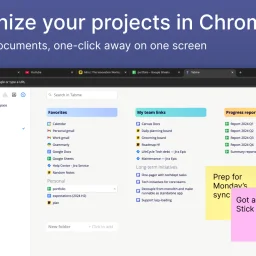
Organizing browser tabs has long been a point of friction for users who accumulate dozens of open pages and bookmarks scattered across multiple locations. Tabme, a Chrome extension, addresses this by consolidating tab management, bookmarking, and note-taking into a single interface with straightforward drag-and-drop controls. The extension handles several common browser headaches. Users can save individual tabs or entire sessions into folders with a single drag-and-drop action, reducing friction compared to manual bookmarking. Duplicate tab detection removes redundant pages with one click, directly addressing browser memory bloat that slows performance. Search functionality spans across open tabs, saved bookmarks, and recently closed tabs, eliminating the need to manually scroll through dozens of entries. A sticky notes feature lets users attach quick annotations directly to projects or collections. The product operates on a straightforward freemium model. The free tier maintains all data locally on the device, preserving privacy for users who prefer to avoid cloud dependencies. The Pro plan enables cross-device cloud synchronization and includes a web application for accessing bookmarks from any browser or phone. This structure caters to both casual users managing tabs on a single device and power users working across multiple machines. The "Mini" variant offers all features without overriding the new tab page, giving users control over how prominently the extension integrates with their workflow. User reviews emphasize simplicity and effectiveness. Comments praise the ease of organization, clean interface design, and productivity improvements. Reddit mentions suggest organic adoption and word-of-mouth traction. The extension maintains a top rating in the Chrome Store, reflecting consistent positive reception. Dark mode support and web-based access round out the feature set. Tabme serves both light organizers managing a handful of bookmarks and power users juggling dozens of projects across multiple devices.

Orchestrating AI across multiple devices remains a friction point for knowledge workers juggling web browsers, desktops, and mobile workflows. BlackEagle AI Control Center positions itself as a unified command center for this fragmented landscape, offering a four-part ecosystem spanning web, desktop, browser extension, and Android applications. The core proposition is direct: issue a command once and let every connected endpoint collaborate to deliver results. The product's architecture reflects a pragmatic grasp of distributed work. The browser extension handles web automation and data collection with human-like interactions—automating form fills, scraping content, and parsing web pages. The desktop client processes private files and executes complex tasks requiring local computing power. The Android application bridges mobile workflows, capturing documents and executing remote operations. A centralized web interface orchestrates everything, providing command and visibility across all connected devices simultaneously. What distinguishes BlackEagle from simpler automation tools is its emphasis on true multi-endpoint collaboration rather than isolated task execution. Connected devices operate as a coordinated team rather than independent agents. A research task can simultaneously gather web data via the browser extension, process documents locally on desktop, and capture mobile evidence via Android—all orchestrated from a single dashboard. This capability addresses a genuine gap: most automation platforms force workflow decomposition across tools. The product also privileges privacy through local-first processing and hardware-backed encryption. This resonates with users handling sensitive data or operating in regulated environments where cloud-only solutions create compliance friction. The desktop client's emphasis on private file handling and the Android client's on-device processing reinforce this stance. The company demonstrates conviction through educational content addressing concrete workflows: automation tutorials, content curation strategies, and integration pathways with productivity platforms like Notion. This signals confidence in adoption beyond early adopters. The public materials do not disclose pricing, subscription tiers, or trial availability, which limits assessment of market positioning. The absence of user counts, deployment statistics, or customer case studies leaves the value proposition somewhat aspirational—the capability is clearly scoped, but evidence of operational scale remains opaque. For teams managing sensitive information across heterogeneous devices or executing automation-intensive workflows spanning web and local environments, BlackEagle offers a substantive alternative to tool fragmentation. Whether multi-device synergy translates into seamless operation hinges on execution depth, a dimension the public presentation does not fully expose.

Productivity seekers and Chrome users in search of a distraction-free new tab experience will find solace in Enhance, a free Chrome extension that streamlines their browsing habits. By addressing the cluttered new tab page, Enhance solves a common problem faced by many users: staying focused amidst an abundance of digital stimuli. What sets Enhance apart is its thoughtful approach to feature integration and user customization. Rather than overwhelming users with a laundry list of tools, Enhance presents a clean and minimal design that allows individuals to focus on what matters most. Daily backgrounds, for instance, provide a visually appealing backdrop that can help stimulate the mind, while Minimal Notes offers a straightforward way to jot down quick thoughts without getting bogged down in unnecessary features. Enhance also boasts a robust set of productivity tools, including Shortcut Dock and Built-in Tasks. The former allows users to easily access their favorite websites and frequently used shortcuts, saving time and reducing clutter on their browser toolbar. Meanwhile, the latter enables users to capture, organize, and manage their tasks directly from the new tab page. The extension's commitment to user privacy is another notable aspect of its design. By storing all notes, tasks, and preferences securely on the user's own device, Enhance ensures that sensitive information remains confidential. This emphasis on data protection will likely appeal to users who value their online anonymity. Pricing or business model details are not explicitly mentioned in the provided content, so it is assumed that Enhance operates as a free service with no premium features or subscription models available at this time.