#knowledge base software Startups & Tools
Discover the best knowledge base software startups, tools, and products on SellWithBoost.

Watching long YouTube videos consumes hours that busy professionals and learners often don't have. SkipBait tackles this friction by letting viewers extract essential information without sitting through entire runtime. The Chrome extension generates AI-powered summaries, searchable transcripts, and an interactive chat interface that grounds answers in both video content and web search results. The product's core innovation lies in its approach to summarization. Rather than generic bullet points, SkipBait produces "honest titles" that capture what the video is actually about, paired with one-sentence summaries and topic-by-topic breakdowns anchored to exact timestamps. This timestamping is crucial: viewers can jump directly to relevant sections rather than scrubbing through minutes of content. The actionables feature goes further, converting speaker recommendations into concrete to-dos tied to specific quotes and moments in the video. What distinguishes SkipBait from simpler transcript tools is its AI chat functionality. Users ask questions and receive answers grounded in both the video's content and current web search results. This prevents the hallucinations and generic responses that plague transcript-only search, delivering answers that connect video insights to real-world context. Chat operates across 50+ languages, removing language barriers for global audiences. The feature set addresses multiple workflows. Students reviewing lectures benefit from timestamped breakdowns and actionables. Professionals researching industry talks gain searchable transcripts and web-informed Q&A. Content creators analyzing competitor videos access viewing history for quick reference. The expanded view mode offers focused reading without video distractions, while transcripts are available in 20+ languages for non-English content. The extension works across all Chromium-based browsers—Chrome, Brave, Edge, Arc, Opera, and Vivaldi—expanding accessibility beyond Chrome alone. Live videos and content without transcript data won't work, a natural limitation given YouTube's transcript availability. On pricing, SkipBait offers a free tier providing 2 AI summary bundles daily, unlimited transcript access, and monthly quotas for chat and translation. This freemium model lets casual users test value with real videos before committing to paid tiers. The product solves a genuine problem for a large audience: anyone tired of watching entire videos to extract a few useful insights. By combining honest summaries, timestamped breakdowns, actionable takeaways, and grounded AI chat, SkipBait makes long-form video consumption efficient rather than time-taxing. For information workers and students drowning in video content, this delivers a meaningful productivity unlock.
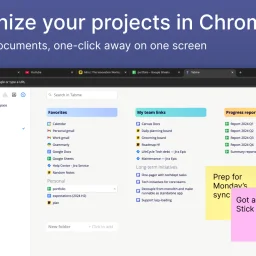
Organizing browser tabs has long been a point of friction for users who accumulate dozens of open pages and bookmarks scattered across multiple locations. Tabme, a Chrome extension, addresses this by consolidating tab management, bookmarking, and note-taking into a single interface with straightforward drag-and-drop controls. The extension handles several common browser headaches. Users can save individual tabs or entire sessions into folders with a single drag-and-drop action, reducing friction compared to manual bookmarking. Duplicate tab detection removes redundant pages with one click, directly addressing browser memory bloat that slows performance. Search functionality spans across open tabs, saved bookmarks, and recently closed tabs, eliminating the need to manually scroll through dozens of entries. A sticky notes feature lets users attach quick annotations directly to projects or collections. The product operates on a straightforward freemium model. The free tier maintains all data locally on the device, preserving privacy for users who prefer to avoid cloud dependencies. The Pro plan enables cross-device cloud synchronization and includes a web application for accessing bookmarks from any browser or phone. This structure caters to both casual users managing tabs on a single device and power users working across multiple machines. The "Mini" variant offers all features without overriding the new tab page, giving users control over how prominently the extension integrates with their workflow. User reviews emphasize simplicity and effectiveness. Comments praise the ease of organization, clean interface design, and productivity improvements. Reddit mentions suggest organic adoption and word-of-mouth traction. The extension maintains a top rating in the Chrome Store, reflecting consistent positive reception. Dark mode support and web-based access round out the feature set. Tabme serves both light organizers managing a handful of bookmarks and power users juggling dozens of projects across multiple devices.