#note and writing apps Startups & Tools
Discover the best note and writing apps startups, tools, and products on SellWithBoost.

Maintaining meaningful relationships requires intentionality in an age of constant distraction. Ville™ addresses a real friction point: the gap between wanting to stay close to people who matter and actually remembering to show up for them. The app targets busy professionals and introverts who care deeply about their connections but struggle with the logistics of consistency. What distinguishes ville™ from basic contact management is its philosophical foundation. Rather than treating relationships as data to be organized, the app frames connection as a practice of sustained attention. Users define their own cadence for each relationship—weekly check-ins with a close friend, monthly touchpoints with a mentor, quarterly reconnections with colleagues—then receive gentle reminders when it's time to reach out. This customizable rhythm prevents the guilt-ridden scramble of remembering someone's birthday last-minute while respecting that different relationships need different frequencies. The feature set supports this philosophy without overcomplicating things. Users can log interactions as they happen, capturing notes and memories alongside the bare fact that a conversation occurred. Birthday notifications ensure no one is forgotten on their day. Optional nudges provide timely reminders, and the ability to snooze them prevents the app from becoming another source of pressure when life gets hectic. Data syncs across iPhone and iPad. Privacy receives prominent positioning in the product's design. All relationship data, notes, and goals encrypt on the user's device before leaving it, and the company emphasizes that encrypted payloads remain unreadable even on its own servers. Users retain full control to export or delete their data. Ville™ explicitly states that user data is never sold, used for AI training, or shared for advertising—a commitment that stands out when many digital health tools monetize user information. The product targets a specific emotional need rather than trying to be all things to all people. It won't appeal to those who prefer spontaneous, unstructured friendships or who already have elaborate relationship-tracking systems. But for people who recognize that maintaining their most important connections requires intention and systematic follow-through, ville™ offers a straightforward path that respects both their relationships and their privacy.

Watching long YouTube videos consumes hours that busy professionals and learners often don't have. SkipBait tackles this friction by letting viewers extract essential information without sitting through entire runtime. The Chrome extension generates AI-powered summaries, searchable transcripts, and an interactive chat interface that grounds answers in both video content and web search results. The product's core innovation lies in its approach to summarization. Rather than generic bullet points, SkipBait produces "honest titles" that capture what the video is actually about, paired with one-sentence summaries and topic-by-topic breakdowns anchored to exact timestamps. This timestamping is crucial: viewers can jump directly to relevant sections rather than scrubbing through minutes of content. The actionables feature goes further, converting speaker recommendations into concrete to-dos tied to specific quotes and moments in the video. What distinguishes SkipBait from simpler transcript tools is its AI chat functionality. Users ask questions and receive answers grounded in both the video's content and current web search results. This prevents the hallucinations and generic responses that plague transcript-only search, delivering answers that connect video insights to real-world context. Chat operates across 50+ languages, removing language barriers for global audiences. The feature set addresses multiple workflows. Students reviewing lectures benefit from timestamped breakdowns and actionables. Professionals researching industry talks gain searchable transcripts and web-informed Q&A. Content creators analyzing competitor videos access viewing history for quick reference. The expanded view mode offers focused reading without video distractions, while transcripts are available in 20+ languages for non-English content. The extension works across all Chromium-based browsers—Chrome, Brave, Edge, Arc, Opera, and Vivaldi—expanding accessibility beyond Chrome alone. Live videos and content without transcript data won't work, a natural limitation given YouTube's transcript availability. On pricing, SkipBait offers a free tier providing 2 AI summary bundles daily, unlimited transcript access, and monthly quotas for chat and translation. This freemium model lets casual users test value with real videos before committing to paid tiers. The product solves a genuine problem for a large audience: anyone tired of watching entire videos to extract a few useful insights. By combining honest summaries, timestamped breakdowns, actionable takeaways, and grounded AI chat, SkipBait makes long-form video consumption efficient rather than time-taxing. For information workers and students drowning in video content, this delivers a meaningful productivity unlock.
Millions of hours get consumed in video watching that nobody has time for. ekstrakt tackles this friction by offering AI-powered summaries of YouTube content, transforming lengthy videos into digestible insights. The service addresses a recognizable pain point: the two-hour lecture you need to understand, the three-hour podcast everyone's discussing but you can't fit into your week, the tutorials stuffed with filler, or the growing graveyard of saved videos you'll realistically never watch. The product distinguishes itself through flexible summary options rather than forcing viewers into a single format. Users can choose from four summary types depending on their immediate need. A quick skim mode provides the fastest overview. A detailed summary offers more comprehensive coverage. The "Straight to Answer" function targets users hunting for specific information in lengthy instructional content. The most interactive option lets users interrogate summaries by asking follow-up questions, with the system returning exact video moments and context rather than paraphrased text. Multi-language support spans 22 languages, removing the barrier of foreign-language content without requiring manual translation workflows. The platform's reach extends across web browsers, a Chrome extension that enables single-click summarization directly on YouTube, and forthcoming mobile applications. This multi-channel availability means users can engage with summaries wherever they consume content. The business model lowers friction to adoption with a free tier offering five summaries without requiring a credit card. This allows users to evaluate the service before commitment and sidesteps the common objection that summarization tools demand upfront payment for unproven value. The specifics of how summaries transition from free to paid usage remains unstated in available materials. ekstrakt competes in a growing space of video summarization tools, but its strength lies in offering user control rather than imposing a fixed output. By allowing multiple summary depths on the same content and providing query-based exploration rather than read-only text, the product acknowledges that different use cases demand different approaches. Whether someone needs a 60-second overview or wants to extract a specific claim from a 90-minute discussion, the tool adapts rather than forcing a single lens. The value proposition anchors on time savings, a compelling argument in a content-saturated world where viewers face genuine scarcity of hours. For knowledge workers, students, and anyone maintaining an aspirational backlog of educational content, ekstrakt offers a practical solution to stay informed without the time tax.

Combining password management with note-taking in a single application addresses a genuine friction point in how people organize sensitive information today. Most users juggle separate tools for these tasks, copying and pasting credentials next to setup instructions or duplicating sensitive data across multiple platforms. Claspt consolidates this workflow by letting users store passwords, write notes, and encrypt sensitive fragments within the same interface—all kept offline on their computer rather than synced to cloud servers. The product targets privacy-conscious users and those skeptical of subscription lock-in. By design, Claspt requires no account, no credit card, and remains free indefinitely on desktop. This eliminates a common pain point with password managers: the feeling of data entrapment. Users gain the ability to export their vault and own their information completely, with data ownership positioned as a core differentiator. What distinguishes Claspt is its flexibility in how users structure sensitive data. Rather than forcing rigid fields (username, password, URL) that feel inadequate for real-world scenarios—like WiFi credentials with router notes or software licenses with installation instructions—the product lets users write freely within a rich text editor and selectively encrypt portions of their notes. This approach mirrors how people naturally organize information: as prose with protected sections rather than form-filling exercises. The feature set reflects this philosophy. The interface supports headings, bold, links, tables, checklists, and code blocks with syntax highlighting. Sensitive data unlocks via fingerprint, Face ID, or a master password, with bank-grade encryption applied at the item level. The product runs on macOS, Windows, and Linux, with browser extensions for Chrome, Edge, Brave, and Arc providing autofill functionality. Mobile apps for iOS and Android are listed as coming soon. The business model is transparent. The desktop app remains free perpetually with no friction. Mobile access and cross-device sync require a Pro subscription tier, though specific pricing is not detailed on the site. This creates a natural upgrade path without compromising the core value proposition for desktop-centric users. Claspt occupies a practical middle ground: more flexible than rigid password managers, more secure than keeping credentials scattered across notes apps, and more private than cloud-synced alternatives. It solves a real coordination problem that most users encounter but rarely address directly.
Privacy-focused audio transcription has become increasingly important as cloud-based services dominate the market, and Echosy addresses this gap directly by delivering professional-grade transcription entirely on macOS devices. The product targets professionals, educators, and content creators who need reliable transcription without surrendering their audio to external servers. The standout differentiator is its commitment to local processing. All transcription, summarization, and dictation happens on the user's Mac, eliminating latency and privacy concerns associated with cloud uploads. Rather than locking users into a single transcription model, Echosy supports multiple ASR engines including Qwen3-ASR and MLX Whisper, with GPU acceleration to optimize performance on Apple Silicon and Intel chips. This flexibility in model selection distinguishes it from more rigid competitors. Core capabilities span three major use cases. Live transcription captures both system audio and microphone input simultaneously with real-time timestamps, suitable for recording calls, lectures, and presentations. System-wide dictation activates anywhere on macOS via hotkey, with an Editor Mode that automatically inserts line breaks during pauses and supports voice-controlled formatting. File transcription accepts common audio and video formats for batch processing existing content libraries. What sets Echosy apart further is its integration with multiple LLM providers for summarization. Rather than forcing dependency on a single service, the platform supports OpenAI, Gemini, Ollama, and compatible APIs, allowing users flexibility in how they handle summarization workflows. Beyond summaries, users can chat directly with transcripts, extracting insights and action items. The service maintains searchable session history with audio replay, creating an archive of past recordings that remains fully accessible. The product is positioned as free-to-use software for macOS 14 and above, supporting both Apple Silicon and Intel architectures, with iOS availability as well. The emphasis on "no cloud, no latency, no compromises" clearly resonates with privacy-conscious users fatigued by default transcription workflows that involve external servers. For users skeptical of cloud-dependent transcription tools, Echosy offers genuine autonomy. It removes the friction of uploading files and waiting for remote processing, instead delivering instant results locally. The combination of multiple ASR models, flexible LLM integration, and comprehensive session management positions it as a credible alternative to cloud-centric competitors.
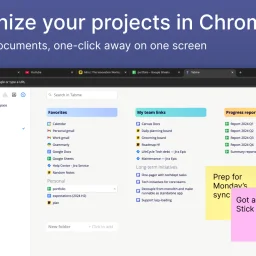
Organizing browser tabs has long been a point of friction for users who accumulate dozens of open pages and bookmarks scattered across multiple locations. Tabme, a Chrome extension, addresses this by consolidating tab management, bookmarking, and note-taking into a single interface with straightforward drag-and-drop controls. The extension handles several common browser headaches. Users can save individual tabs or entire sessions into folders with a single drag-and-drop action, reducing friction compared to manual bookmarking. Duplicate tab detection removes redundant pages with one click, directly addressing browser memory bloat that slows performance. Search functionality spans across open tabs, saved bookmarks, and recently closed tabs, eliminating the need to manually scroll through dozens of entries. A sticky notes feature lets users attach quick annotations directly to projects or collections. The product operates on a straightforward freemium model. The free tier maintains all data locally on the device, preserving privacy for users who prefer to avoid cloud dependencies. The Pro plan enables cross-device cloud synchronization and includes a web application for accessing bookmarks from any browser or phone. This structure caters to both casual users managing tabs on a single device and power users working across multiple machines. The "Mini" variant offers all features without overriding the new tab page, giving users control over how prominently the extension integrates with their workflow. User reviews emphasize simplicity and effectiveness. Comments praise the ease of organization, clean interface design, and productivity improvements. Reddit mentions suggest organic adoption and word-of-mouth traction. The extension maintains a top rating in the Chrome Store, reflecting consistent positive reception. Dark mode support and web-based access round out the feature set. Tabme serves both light organizers managing a handful of bookmarks and power users juggling dozens of projects across multiple devices.