#browser automation Startups & Tools
Discover the best browser automation startups, tools, and products on SellWithBoost.

YouTube's pervasive advertising ecosystem has long frustrated viewers who simply want uninterrupted content consumption. SkipPlay directly addresses this frustration by offering an ad-light alternative that requires no account creation or browser extensions for basic use. The core value proposition centers on simplicity and accessibility. Users paste any YouTube link into the web player or, for enhanced functionality, integrate the Chrome extension and watch without commercial interruptions. The extension further automates sponsor skipping through SponsorBlock integration, a community-driven database that identifies and removes sponsored segments, intros, and subscription reminders from videos. This appeals strongly to viewers who consume substantial video content and grow weary of both platform-inserted ads and creator-embedded sponsor interruptions. What distinguishes SkipPlay from competing solutions involves its layered approach to functionality and device coverage. The free web player works seamlessly across desktop, mobile, and smart TV browsers without requiring installation or authentication, significantly lowering barriers to entry. Mobile users gain background audio playback, a feature enabling listening with the screen locked or while using other applications—functionality that YouTube Premium typically reserves for paying subscribers. For power users seeking additional features, the platform includes a DJ Dual Mixer Deck for mixing tracks side-by-side and offers optional cloud synchronization that persists playlists, favorites, and viewing progress across devices. The business model reveals deliberate positioning within the ad-blocking market. The free web player remains entirely free, monetizing through an optional $9 lifetime extension that enables one-click playback directly from YouTube and automatically skips ads on the native platform itself. This pricing sits significantly below YouTube Premium's $15.99 monthly subscription, positioning SkipPlay as a permanent alternative to recurring fees. The feature comparison presented prominently on the site directly acknowledges YouTube Premium, suggesting confidence in competitive positioning. Beyond standard ad removal, SkipPlay differentiates through SponsorBlock integration and free mobile background play—capabilities that even YouTube Premium and traditional ad-blockers do not consistently deliver. SkipPlay targets viewers frustrated by YouTube's aggressive monetization rather than those seeking premium content access or exclusive features. Its design emphasis on reducing friction through simple URL pasting and one-click extension deployment reveals focus on a specific, well-defined pain point. For viewers averse to advertising and subscription costs, the combination of free web access and affordable permanent licensing presents a genuine alternative to traditional premium models.

Browser tabs containing bank logins, client files, and sensitive emails remain completely unprotected throughout the workday. Locksy solves this by adding encryption and automatic locking directly within the browser, eliminating the need for traditional password managers or manual security rituals. The product targets anyone who handles confidential information in a browser but finds existing security tools either invasive or inconvenient—remote workers, consultants, and professionals dealing with sensitive client materials fall into this category. Locksy's defining characteristic is its refusal to rely on cloud infrastructure. All encryption happens locally on the user's device, meaning data never leaves the browser itself. This architecture eliminates an entire category of risk that cloud-based competitors cannot escape: the possibility of a central breach, subpoenaed logs, or a company pivoting toward data monetization. The product functions offline, removing dependency on internet connectivity for basic security operations. Auto-locking addresses the behavioral side of security—where users fail to manually protect information. By making protection automatic rather than optional, the product closes the gap between intention and action. The company's bootstrapped foundation shapes its entire approach differently than venture-backed security startups. While competitors pile on features to justify premium subscriptions, Locksy provides free access to core functionality. This reflects confidence in the value proposition and an emphasis on removing adoption friction rather than maximizing revenue per user immediately. The founders articulate their philosophy clearly: they built Locksy out of frustration with security products that sacrifice usability in the name of safety. That focus on combining practical convenience with actual security distinguishes the positioning. Rather than attempting to replace password managers or become an identity platform, Locksy tackles one specific problem exceptionally rather than many problems adequately. The product mentions military-grade encryption, though specifics on cryptographic standards or implementation details aren't disclosed in available materials. For a security product, greater technical transparency would strengthen confidence among informed users, though the offline-first architecture already eliminates major attack surfaces that cloud competitors face. Locksy represents a meaningful attempt to solve a real problem—unprotected browser tabs—without the surveillance capitalist undertones that plague many privacy-focused tools.

Extracting contact information from Google Maps typically involves opening dozens of business listings, manually copying phone numbers and addresses into spreadsheets, and hoping you don't lose track of which ones you've already documented. Google Maps Scraper directly addresses this friction point, targeting sales professionals, marketing agencies, and business owners who build prospect lists from local search results. The product distinguishes itself through its no-installation approach. Rather than requiring a browser plugin or software download, the tool operates entirely through a web browser, making it accessible from any device. The core appeal is speed: the tool extracts over one thousand leads in under three minutes, including phone numbers, email addresses, business websites, and ratings. For teams that traditionally spend six or more hours on this task, even a fraction of that time saved represents meaningful efficiency gains. The feature set covers the essentials for outreach workflows. Leads export directly to Excel format with minimal formatting required, and the data arrives pre-organized for immediate use in CRM systems or email campaigns. The tool integrates with Google Maps directly through the browser without requiring an API key for the basic web interface, lowering the barrier to entry. Pricing follows a freemium model. New users receive ten free searches without providing a credit card, allowing exploration before commitment. The platform offers multiple access points: the web-based tool, a free browser extension for direct extraction from Google Maps pages, a developer API for programmatic access, and AI agent skills for integration with tools like Claude and ChatGPT. This multi-channel approach accommodates different workflows, from one-off searches to embedded automation. User feedback backs the public rating of 4.88 out of 5 stars across over one thousand customer responses. The company emphasizes the verified nature of extracted phone numbers and the clean formatting of results, suggesting attention to data quality rather than raw volume. The positioning centers on time reclamation: shifting work from manual copying to strategic outreach. For teams struggling with lead research bottlenecks, particularly those operating without dedicated research staff or budget constraints on tools, the free tier serves as a low-friction entry point to evaluate whether the tool reduces their actual workload.

Repetitive form-filling is a fact of work life — whether you're processing customer intake, managing vendor data, or shuffling through billing portals — and most existing solutions either force your sensitive data into cloud AI services or only work with fixed, unchanging information. TextsBert addresses both problems by letting users automate form entry without leaving their device or surrendering control. The product splits its approach into two complementary workflows. Smart Auto Fill caters to stable, repeatable data: business details, company addresses, and billing information that users enter frequently. It works with saved profiles and URL-specific rules, pulling from locally stored records without interference from native browser autofill. Magical Auto Fill handles the messier side of real work — emails with inconsistent formatting, portal exports, and loosely structured notes that change from submission to submission. It analyzes copied text, maps it to the right fields, and waits for user approval before filling anything. What distinguishes TextsBert from competitors is its privacy architecture. The extension processes form data entirely on the user's device, sidestepping the regulatory and compliance headaches that arise when customer or supplier information travels to external AI services. The company explicitly grounds this in European data protection guidelines and international transfer restrictions. Sync across devices is available for users who need it, but it's encrypted, optional, and off by default — the default posture keeps everything local. The product respects user agency throughout. There is no auto-submit; before any form gets filled, users see exactly what will change and can reject the action. This review step is central to the pitch, particularly for workflows involving sensitive customer or internal data. The founder's underlying frustration is clear: existing tools either sacrifice privacy or fail on variable, real-world inputs. TextsBert was built to solve both constraints simultaneously. Features like saved profiles for recurring identities and snippet storage for approved language reduce the daily overhead. The extension also handles fillable PDFs, not just browser forms. The business model includes a free tier for Smart Auto Fill with paid PRO tier unlocking encrypted sync, positioned as founder pricing for early adopters. For teams processing customer data, managing supplier information, or handling billing workflows where privacy compliance matters, TextsBert offers a genuine alternative to cloud-dependent form fillers. Its willingness to sacrifice convenience for control — review before submit, processing stays on-device — represents a deliberate architectural choice rather than a limitation.
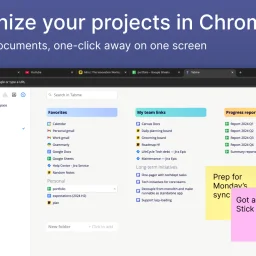
Organizing browser tabs has long been a point of friction for users who accumulate dozens of open pages and bookmarks scattered across multiple locations. Tabme, a Chrome extension, addresses this by consolidating tab management, bookmarking, and note-taking into a single interface with straightforward drag-and-drop controls. The extension handles several common browser headaches. Users can save individual tabs or entire sessions into folders with a single drag-and-drop action, reducing friction compared to manual bookmarking. Duplicate tab detection removes redundant pages with one click, directly addressing browser memory bloat that slows performance. Search functionality spans across open tabs, saved bookmarks, and recently closed tabs, eliminating the need to manually scroll through dozens of entries. A sticky notes feature lets users attach quick annotations directly to projects or collections. The product operates on a straightforward freemium model. The free tier maintains all data locally on the device, preserving privacy for users who prefer to avoid cloud dependencies. The Pro plan enables cross-device cloud synchronization and includes a web application for accessing bookmarks from any browser or phone. This structure caters to both casual users managing tabs on a single device and power users working across multiple machines. The "Mini" variant offers all features without overriding the new tab page, giving users control over how prominently the extension integrates with their workflow. User reviews emphasize simplicity and effectiveness. Comments praise the ease of organization, clean interface design, and productivity improvements. Reddit mentions suggest organic adoption and word-of-mouth traction. The extension maintains a top rating in the Chrome Store, reflecting consistent positive reception. Dark mode support and web-based access round out the feature set. Tabme serves both light organizers managing a handful of bookmarks and power users juggling dozens of projects across multiple devices.

Orchestrating AI across multiple devices remains a friction point for knowledge workers juggling web browsers, desktops, and mobile workflows. BlackEagle AI Control Center positions itself as a unified command center for this fragmented landscape, offering a four-part ecosystem spanning web, desktop, browser extension, and Android applications. The core proposition is direct: issue a command once and let every connected endpoint collaborate to deliver results. The product's architecture reflects a pragmatic grasp of distributed work. The browser extension handles web automation and data collection with human-like interactions—automating form fills, scraping content, and parsing web pages. The desktop client processes private files and executes complex tasks requiring local computing power. The Android application bridges mobile workflows, capturing documents and executing remote operations. A centralized web interface orchestrates everything, providing command and visibility across all connected devices simultaneously. What distinguishes BlackEagle from simpler automation tools is its emphasis on true multi-endpoint collaboration rather than isolated task execution. Connected devices operate as a coordinated team rather than independent agents. A research task can simultaneously gather web data via the browser extension, process documents locally on desktop, and capture mobile evidence via Android—all orchestrated from a single dashboard. This capability addresses a genuine gap: most automation platforms force workflow decomposition across tools. The product also privileges privacy through local-first processing and hardware-backed encryption. This resonates with users handling sensitive data or operating in regulated environments where cloud-only solutions create compliance friction. The desktop client's emphasis on private file handling and the Android client's on-device processing reinforce this stance. The company demonstrates conviction through educational content addressing concrete workflows: automation tutorials, content curation strategies, and integration pathways with productivity platforms like Notion. This signals confidence in adoption beyond early adopters. The public materials do not disclose pricing, subscription tiers, or trial availability, which limits assessment of market positioning. The absence of user counts, deployment statistics, or customer case studies leaves the value proposition somewhat aspirational—the capability is clearly scoped, but evidence of operational scale remains opaque. For teams managing sensitive information across heterogeneous devices or executing automation-intensive workflows spanning web and local environments, BlackEagle offers a substantive alternative to tool fragmentation. Whether multi-device synergy translates into seamless operation hinges on execution depth, a dimension the public presentation does not fully expose.