#privacy-focused Startups & Tools
Discover the best privacy-focused startups, tools, and products on SellWithBoost.
Privacy-conscious users have long faced a dilemma with web-based utilities: gain convenience or protect data. Toolbantu resolves this tension by running common utility functions entirely within the browser, eliminating the upload and storage concerns that plague most online tool sites. The platform targets everyday users who need to compress images, format JSON, generate QR codes, and perform other routine tasks without surrendering files to third-party servers. This applies equally to privacy-sensitive individuals and organizations handling even mildly confidential data. What distinguishes Toolbantu most clearly is its uncompromising approach to data handling. Every tool processes information exclusively on the user's device, with no data transmission to external servers. The site articulates this commitment explicitly on each tool page, removing ambiguity about what happens to user files. This transparency extends to the broader design: no account creation, no tracking, no hidden data collection. The approach simplifies the experience while reinforcing the privacy promise. The feature set covers practical ground. Image tools handle compression, resizing, and format conversion between formats like JPG, PNG, and WebP. A developer tools section includes JSON formatting, Base64 encoding, URL encoding, UUID generation, and favicon generation. Additional utilities span password generation, QR code creation, word counting, and typing speed testing. The platform groups these into workflows that chain multiple tools sequentially, allowing users to resize an image and compress it in a single operation without leaving the interface. The toolkit feature lets users pin favorite tools for quick access, while a history section tracks recently opened tools, storing only tool names rather than files or content. This balances convenience with the privacy-first philosophy. Toolbantu operates as completely free software with no paid tier, subscription model, or premium features mentioned. The absence of account requirements and the explicit statement that nothing gets sent anywhere underscores the frictionless positioning. The main limitation lies in scope. Toolbantu serves routine utility needs competently but doesn't challenge specialized tools. Someone needing advanced image editing, complex data transformation, or sophisticated development features would look elsewhere. Yet for the specific use case of quick, private processing of everyday files, Toolbantu removes friction and legitimate privacy concerns from the equation. The execution feels considered rather than haphazard, suggesting a genuinely motivated project rather than a privacy-washing marketing angle.

An image rotation tool that processes entirely in your browser, Image Flipper addresses a persistent friction point for anyone who needs to mirror or flip photos without uploading to servers or managing watermarks. The service eliminates account creation, daily limits, and file restrictions that plague most free web alternatives. The core strength rests on privacy and speed. Because all processing happens client-side using the browser's native canvas, images never leave your device. This architectural choice delivers instant results without the typical upload delays and processing bars that frustrate users of cloud-based competitors. The instantaneous preview shows exactly what users are getting before they commit to a download. The feature set covers both common flip operations. Horizontal mirroring corrects reversed selfies and adjusts composition, while vertical flipping creates upside-down effects and reflection patterns. Users can apply both simultaneously, and the interface makes switching between options intuitive. The tool handles batch operations across up to 30 images, with downloads available as a single ZIP file rather than requiring individual file management. Format flexibility distinguishes it from single-format alternatives. Users can save in PNG for lossless quality with transparency, JPG for smaller files, or WebP for minimal file sizes. The option to retain the original format appeals to users seeking quick conversions without reformatting entire libraries. The interaction model favors efficiency throughout. Drag-and-drop support, keyboard paste shortcuts, and a hold-to-compare function keep the workflow frictionless. It accepts PNG, JPG, WebP, GIF, and AVIF files, covering virtually every format users encounter. With no cost, no signup requirement, and no watermarks, Image Flipper competes entirely on speed and convenience. The product strips away every conventional obstacle between users and their flipped files. The business model remains implicit from the website, revealing no subscription tiers, advertisements, or premium features. For casual image flipping or batch corrections, the tool delivers exactly what it promises: a straightforward browser utility that completes its single task without friction, landing page complexity, or hidden catches.
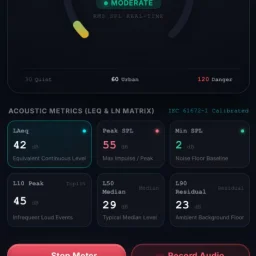
Documenting noise complaints remains one of the most frustrating aspects of residential disputes. When a neighbor plays loud music at 2 a.m. or construction hammers through the night, verbal complaints to landlords and property managers rarely stick without documented evidence. Soundtest addresses this gap by providing a browser-based acoustic measurement and recording tool designed to create tamper-proof documentation of noise incidents. The platform targets anyone caught in a noise dispute across multiple scenarios: neighbors, construction sites, bars and street disturbances, rental habitability disputes, and traffic complaints. Users select their specific situation, and the tool loads pre-calibrated acoustic thresholds and evidence standards appropriate to their case, simplifying what would otherwise require acoustic expertise. What distinguishes Soundtest is its emphasis on local privacy and evidence integrity. All processing happens directly on the user's device with zero cloud exposure, eliminating concerns about data leakage or external storage of sensitive recordings. The platform timestamps measurements with GPS coordinates and applies SHA-256 cryptographic hashing to prevent tampering, creating documentation that could withstand scrutiny from property managers or legal advisors. The core capabilities span real-time measurement and formal documentation. The decibel meter displays live sound levels in multiple formats—standard dB readings, A-weighted dBA, peak levels, and percentile measurements including LAeq and L5/L10/L50/L90/L95 statistics. Users can simultaneously record audio with waveform and spectrum visualization, establishing a complete acoustic record. Automatic time and location stamping happens with permission granted, and the tool exports structured evidence reports in PDF, CSV, and JSON formats. Soundtest also includes Night Sentry mode for overnight monitoring and supports continuous logging, addressing disputes that unfold unpredictably across multiple days. The browser-based delivery means no installation friction; users access the tool directly from a web link without managing apps or permissions on their device beyond microphone access. The tool occupies a practical niche in the intersection of acoustic measurement and legal documentation. Rather than selling professional sound engineering, it democratizes the ability to create evidence-grade acoustic records for everyday noise complaints where traditional approaches like calling management or police produce no results.

Photographers managing client proofs and mood boards typically face friction: commercial software requires installation, signup barriers delay work, and uploading images to remote servers raises privacy concerns. Contact Sheet Maker addresses these pain points directly by offering browser-based contact sheet generation without registration or server uploads. The core differentiation lies in its local-first architecture. Images are processed entirely in the browser, never transmitted to external servers. This design choice protects photographer intellectual property and client confidentiality while enabling instant workflow integration. For studios managing sensitive work, this privacy-by-default approach eliminates a significant compliance and security worry. The feature set balances simplicity with professional control. Users configure layouts through an intuitive grid system with adjustable columns, rows, gutter spacing, and gap sizing. Alignment options cover both horizontal and vertical positioning, while image scaling choices—cover, contain, or fill—accommodate different aspect ratio needs. Export flexibility spans three formats: PDF for printing, PNG for lossless digital proofing, and WebP for file-size optimization. Watermarking functionality protects proofs. Rather than a single stamp, Contact Sheet Maker tiles text diagonally across sheets, with adjustable opacity to balance visibility against image clarity. The watermark strength slider lets studios calibrate between subtle branding and obvious protection. A preset system enables template reuse. Studios save their preferred layouts, naming conventions, and watermark settings as reusable presets stored locally on the device. This reduces repetitive configuration for high-volume shoots while maintaining complete independence from cloud infrastructure. Additional customization includes caption display with font sizing and text alignment, background color control, and file naming strategies that propagate from input files through to frame captions. These details appeal to studios maintaining consistent deliverable formatting. The business model is straightforwardly free, with no paywalls or signup requirements. This accessibility removes barriers to trial and adoption, particularly valuable for freelancers and small studios evaluating new tools. Contact Sheet Maker targets photographers seeking to reclaim workflow efficiency and data control. By eliminating traditional software friction—installation, licensing, authentication—and server-dependent processing, it positions itself as the fastest route from shoot to proof delivery.

Spam infiltration remains a persistent frustration for email users, despite decades of filter improvements. Klar addresses this gap by applying machine learning directly on the user's Mac rather than relying on cloud servers. This approach prioritizes privacy while handling computational work locally, requiring no account setup or data transmission to external services. The spam problem Klar targets is genuine. Standard email filters from major providers miss substantial amounts of unwanted mail, leaving users manually sorting through clutter. The product targets anyone using Apple Mail who finds existing filters inadequate—whether they use iCloud, Gmail, Outlook, or other IMAP-based email services. What distinguishes Klar is its architectural choice to run the AI model on-device. This design decision carries meaningful implications: messages never leave the user's machine for processing, eliminating concerns about data privacy or third-party access. The absence of mandatory account creation further removes friction and reduces the attack surface for credential theft or data harvesting. The product integrates with multiple email providers, making it accessible to users across different ecosystems. Running locally on macOS means the filter operates within the user's existing email client rather than requiring a separate interface or app switching. The seamless integration reflects Klar's design philosophy—the filter is meant to fade into the background and simply work. The free pricing model removes barriers to adoption. There are no subscription costs, trial periods, or upsells mentioned. This approach prioritizes user acquisition and might reflect confidence in the core filtering technology, though it raises natural questions about long-term sustainability and development resources. The offering is notably straightforward. Klar doesn't claim to reorganize email, learn user preferences through feedback loops, or provide detailed analytics. It does one thing: filter spam with an AI model running locally on your Mac. This focus appeals to users who find existing filters ineffective and want to avoid cloud-based solutions or account requirements. For someone frustrated with Gmail's spam folder or Apple Mail's built-in filter missing obvious junk, Klar presents a technically interesting alternative. The privacy-first local processing model and lack of account friction are genuine advantages. Whether the on-device AI actually performs better than server-side models remains a question only testing can answer, but the architectural approach is sound and user-respecting.

In an era of instant notifications and performance-driven messaging, Carrier Pidge inverts the urgency. It solves the problem of meaningful messages getting lost in the noise of constant connectivity by introducing deliberate delay as a feature, not a limitation. The platform targets anyone seeking to reclaim the lost art of correspondence—people who want their written thoughts to be read as something worth receiving rather than something to respond to immediately. The core concept rests on an elegant metaphor: messages travel between friends as digital carrier pigeons following a visible route across a map. This transforms waiting from a frustration into part of the experience. When you compose a note, you designate one confirmed friend as the recipient, release your pigeon, and watch its progress in real time. The system calculates an estimated arrival based on the distance between approximate roost locations—regions rather than exact addresses—allowing you to track the journey without compromising privacy. What makes Carrier Pidge distinctive is how it removes the psychological burden of instant messaging. There are no read receipts, no expectation of immediate response. A message lands at its destination and finally gets a moment of genuine attention. This philosophy extends to the interaction model itself: one-to-one exchanges with confirmed friends only, eschewing the broadcast nature of most modern platforms. The feature set supports this slower tempo thoughtfully. Users write a note, select a recipient, and release it. The flight path appears on a map with real-time tracking and changing ETAs, giving the distance between friends narrative weight rather than treating it as an obstacle. The approximate location system preserves meaningful geography—you see broad regions where friends are based—without exposing precise coordinates or enabling live tracking. The product operates globally with multi-language support and integrates friend discovery through existing social platforms or username lookups. Once someone requests to connect, the sending friend must confirm, establishing a mutual relationship before messages can flow in either direction. Carrier Pidge addresses a specific human need overlooked by the urgency economy: the desire to write something personal and have it genuinely received rather than merely consumed. Whether it resonates depends on whether users embrace slowness as a feature worth their time.

Privacy-conscious content creators have long faced an uncomfortable choice when using online media editing tools: upload their work to remote servers, risking data exposure, or settle for desktop software limited by their system's resources. Voxora AI eliminates that trade-off by bringing a comprehensive suite of 26 tools directly into the browser, with all processing happening on the user's device and zero data sent to servers. The core innovation is architectural. The entire platform runs on client-side WebAssembly, meaning compression, silence removal, format conversion, and other processing tasks execute directly on a user's CPU or GPU. This delivers practical benefits beyond privacy: creators can work offline once the tools load, avoid upload and download delays, and retain complete control over their media throughout editing. The feature set addresses routine media workflows comprehensively. Audio professionals get silence removal with visual waveform controls and batch export in multiple formats. Video and audio compression leverage FFmpeg via WebAssembly to reduce file sizes by up to 90 percent without quality degradation. The platform extracts audio from multiple video formats, converts PDFs to Word and EPUB documents, optimizes images, generates QR codes, and includes developer utilities. The breadth spans six categories and appeals to podcasters, video editors, and anyone handling media files regularly. What distinguishes Voxora from existing cloud-based editors is not novelty—tools like Kapwing and Clipchamp offer comparable features deployed to servers. Rather, the distinction lies in rejecting server-side processing entirely. This appeals to professionals bound by data protection regulations, creators uncomfortable with standard SaaS privacy policies, and anyone working with sensitive content who treats local processing as non-negotiable. The platform is entirely free with no apparent monetization mechanism. The founder's stated motivation—removing the privacy sacrifice inherent in online tooling—suggests this is positioned as a genuine alternative rather than a freemium funnel toward paid tiers. For budget-conscious creators who prioritize privacy and accept WebAssembly's performance ceiling, Voxora delivers real utility. The realistic limitation is performance compared to dedicated desktop applications or cloud services leveraging server-grade hardware. But for routine media editing, silence removal, and format conversion, the privacy guarantee and zero cost make a direct pitch to a specific audience: those for whom privacy is not a secondary concern but a primary requirement.

Mobile phishing campaigns have moved beyond simple email tricks. They arrive as text messages that impersonate banks, QR codes that redirect to credential-harvesting pages, notifications from seemingly trusted apps, and links embedded in screenshots shared across messaging platforms. EdgePhishGuard tackles this expanding threat surface by placing a security checkpoint directly on the user's Android device, where the decision happens fastest. The product addresses a genuine gap in mobile security. Most anti-phishing solutions operate on the server side, requiring users to upload suspicious content to cloud services before they get a verdict. EdgePhishGuard inverts this model. Its core analysis runs locally using TensorFlow Lite models that identify linguistic and structural phishing patterns without leaving the device. The approach protects privacy while reducing latency and eliminating friction. What distinguishes this tool is its breadth of input modes. Users can paste suspicious links or text directly, scan QR codes through the camera, extract URLs from screenshots via OCR, or share content from notification bars and messaging apps. This multi-modal design acknowledges how phishing actually reaches people in practice: rarely as a bare URL, often embedded in context that requires extraction or interpretation. The OCR and QR reading capabilities transform the app from a link validator into a content analyzer that handles the obfuscation tactics modern attackers use. The product doesn't attempt to make decisions for users. Instead, it surfaces the reasoning behind its risk assessment, showing detected language, identified patterns, domain reputation signals, and specific recommendations. Users can adjust the alert threshold themselves, creating a control mechanism rather than an on-off switch. This approach aligns with security best practices that favor informed decision-making over black-box automation. Support for multiple languages, with language detection routing content to the appropriate local model, suggests consideration for non-English-speaking populations who may face phishing tailored to their linguistic and cultural context. This practical detail distinguishes EdgePhishGuard from larger security platforms that often overlook regional variations in attack patterns. The absence of pricing information on the landing page leaves questions about the business model unanswered. Whether this will be free, subscription-based, or ad-supported matters to potential users considering adoption. Regardless, the local-processing architecture and transparent risk scoring represent a meaningful departure from the surveillance-heavy approach many mobile security tools take. For users skeptical of uploading sensitive information to cloud services, EdgePhishGuard offers a credible alternative.

Developers seeking a distraction-free media solution have an increasingly rare option in C Media Player, which sidesteps feature bloat and monetization schemes in favor of straightforward playback. The cross-platform application—available on Windows and Android—delivers essential media capabilities without the advertising and telemetry tracking that encumber many consumer players. The feature set reflects practical design priorities. Users access standard codecs, subtitle handling through both embedded and external sources, multi-track audio selection, and customizable playback controls including variable-speed playback and aspect ratio modification. The inclusion of equalizer controls and video effects distinguishes it from minimalist competitors, while hardware acceleration addresses performance on resource-constrained devices. The philosophy prioritizes user agency over corporate data extraction. Network stream support and playlist functionality accommodate both casual consumption and demanding use cases. The development team explicitly acknowledges user input as a roadmap driver, positioning the project as responsive to community needs. Limitations warrant acknowledgment: platform availability remains restricted to two major operating systems, and the absence of published benchmarks leaves performance claims unverified. Furthermore, standalone media players face structural headwinds from bundled offerings in mainstream operating systems. Still, in a landscape increasingly dominated by surveillance-enabled alternatives, C Media Player's commitment to core functionality without data harvesting represents meaningful differentiation. Whether this positioning sustains commercial viability depends on cultivating sufficient user loyalty to overcome platform incumbency.

The modern web development landscape is cluttered with bloated software that prioritizes revenue over user needs. In response, a suite of online tools has emerged to cater to the needs of developers and business professionals. 360 Solution is a curated collection of utilities designed to be lightweight and privacy-focused, addressing the issue of inaccessible and cumbersome software. At its core, 360 Solution is built around the philosophy that software should be accessible, transparent, and respectful of the user's intent. This is evident in the design and functionality of its tools, which are geared towards solving specific problems without unnecessary features. The tools are browser-based, ensuring that data remains on the user's machine, and there is no requirement to create an account or provide an email address to access them. Notable tools include an Image Slug Generator for SEO-friendly image renaming, an Expo App Icon Generator for React Native app assets, and a CSV Viewer & Editor for analyzing and manipulating data files. These tools react quickly, with no loading screens or spinners, and are designed with a clean and tactical interface focused on productivity. The absence of tracking, cookies, and advertisements underscores the commitment to user privacy, making it an attractive option for those seeking straightforward, effective solutions. By being completely free and open-source, 360 Solution positions itself as a developer-centric resource, aligning with its mission to empower the next generation of web builders. With its emphasis on instant usability and zero ads, 360 Solution presents a compelling alternative to traditional software models.

Managing API costs for AI coding tools is a practical concern developers face regularly. When integrating Claude, Codex, Z.ai, or Minimax into your workflow, exceeding your usage limit or hitting rate ceilings can disrupt development or trigger unexpected charges. Code Meter addresses this problem by delivering real-time usage monitoring in the macOS menu bar, giving developers visibility into consumption before issues occur. The product's core value is immediate and simple: install it, authenticate with your chosen provider, and see usage metrics without checking dashboards or guessing remaining capacity. Setup completes in seconds, and the app supports four major AI coding providers, making it relevant across different tool preferences. What distinguishes Code Meter is its privacy architecture. Rather than funneling credentials through intermediary services, the application reads credentials locally from macOS Keychain and communicates directly with each provider's API—Anthropic, OpenAI, Z.ai, or Minimax. Credentials never leave your device. Usage history stores locally via SwiftData, and widget data remains isolated in App Group containers. This design choice appeals to developers concerned about credential exposure, especially in regulated industries or security-sensitive environments. The privacy commitment extends to analytics. Code Meter uses PostHog for anonymous product telemetry—recording only app version, OS version, and feature interactions—hosted on EU Cloud infrastructure with IP capture and device fingerprinting disabled. It represents a transparent approach to usage analytics; the company documents what it collects and explicitly discloses why. The feature set covers essentials: the menu bar widget shows usage at a glance, additional widgets provide supplementary views, and historical charts enable tracking over time. Alerts flag overages before they compound. The product is a free download from the Mac App Store, requiring macOS 26 or later. RevenueCat infrastructure suggests potential premium features, though none are documented currently. Code Meter solves a concrete problem for developers managing multiple AI APIs with a privacy-first architecture that rejects the surveillance model prevalent in developer tools. Its strength lies in restrained functionality delivered without data extraction. Developers get visibility where it matters—their own usage—without surrendering credentials or behavioral data to another platform.