#batch processing Startups & Tools
Discover the best batch processing startups, tools, and products on SellWithBoost.
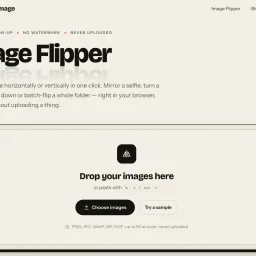
An image rotation tool that processes entirely in your browser, Image Flipper addresses a persistent friction point for anyone who needs to mirror or flip photos without uploading to servers or managing watermarks. The service eliminates account creation, daily limits, and file restrictions that plague most free web alternatives. The core strength rests on privacy and speed. Because all processing happens client-side using the browser's native canvas, images never leave your device. This architectural choice delivers instant results without the typical upload delays and processing bars that frustrate users of cloud-based competitors. The instantaneous preview shows exactly what users are getting before they commit to a download. The feature set covers both common flip operations. Horizontal mirroring corrects reversed selfies and adjusts composition, while vertical flipping creates upside-down effects and reflection patterns. Users can apply both simultaneously, and the interface makes switching between options intuitive. The tool handles batch operations across up to 30 images, with downloads available as a single ZIP file rather than requiring individual file management. Format flexibility distinguishes it from single-format alternatives. Users can save in PNG for lossless quality with transparency, JPG for smaller files, or WebP for minimal file sizes. The option to retain the original format appeals to users seeking quick conversions without reformatting entire libraries. The interaction model favors efficiency throughout. Drag-and-drop support, keyboard paste shortcuts, and a hold-to-compare function keep the workflow frictionless. It accepts PNG, JPG, WebP, GIF, and AVIF files, covering virtually every format users encounter. With no cost, no signup requirement, and no watermarks, Image Flipper competes entirely on speed and convenience. The product strips away every conventional obstacle between users and their flipped files. The business model remains implicit from the website, revealing no subscription tiers, advertisements, or premium features. For casual image flipping or batch corrections, the tool delivers exactly what it promises: a straightforward browser utility that completes its single task without friction, landing page complexity, or hidden catches.

Batch image processing typically forces a choice between privacy and convenience. Desktop software requires installation and maintenance, while online tools demand uploading files to remote servers. MyImgLite eliminates that friction by moving the entire workflow into the browser, processing images locally on the user's device without server uploads or account creation. The product targets a specific recurring problem: teams and creators who regularly handle dozens of images—e-commerce vendors standardizing product photos, content publishers preparing batches of article images, and marketers resizing graphics for multiple channels. Rather than treating each image individually or wrestling with command-line tools, users upload a folder, configure one set of output parameters, and process the entire batch in a single operation. What distinguishes MyImgLite is its commitment to local processing and simplicity. The interface follows a three-step model: select a task, configure images and output settings, then download the results. No queue management, no waiting for remote processing, no surveillance of file contents. The technical approach—running everything in the browser—trades off some performance potential for absolute data privacy. The feature set covers the core image optimization tasks. Compression reduces file sizes across supported formats. Resizing preserves proportions or enforces exact dimensions, useful for adhering to platform templates. The conversion capabilities span modern web formats like WebP and AVIF alongside established standards like JPEG and PNG. Each format option includes relevant quality and encoding controls; advanced settings appear only where they matter. Users can compare original and output sizes before committing, reducing surprises. The 30-image limit per batch constrains enterprise-scale workflows but aligns with typical creator needs. The format coverage addresses practical scenarios: converting PNG to WebP for web delivery, standardizing JPEG dimensions for product catalogs, testing AVIF for smaller payloads on supported systems. Pricing presents no friction—the tool is free with no account requirement. This accessibility removes a barrier for one-off users and casual creators, though it raises questions about sustainability that the product page does not address. MyImgLite succeeds because it recognizes that not every image task requires cloud infrastructure or expensive software licenses. For creators and small teams handling regular but modest-scale batch work, local processing in the browser offers real convenience without compromising privacy.

PDF cropping remains a friction point for anyone regularly handling document design, printing, or content extraction. Most available solutions force users toward bloated desktop applications or complex workflows that feel overkill for a single task. CropItFast tackles this directly by offering a streamlined browser-based alternative that prioritizes speed and precision without requiring any software installation. The product addresses a specific but genuine need: making batch document processing accessible. Whether you're preparing business cards, cutting out specific sections from longer documents, or preparing files for print, CropItFast handles these jobs without unnecessary complexity. The target audience spans designers, print professionals, content managers, and anyone who frequently manipulates PDF, PostScript, or EPS files. What distinguishes CropItFast from basic crop tools is its feature depth. Automatic margin detection eliminates manual adjustment for documents with uneven white space, a substantial time-saver when processing multiple pages. The multi-region cropping mode lets users extract several independent areas from a single page without relying on workarounds. Equally useful is the template system, which remembers frequently used crop layouts and applies them consistently across pages or even different documents. For users who prefer precision over clicking, exact coordinate input in millimeters or points ensures mathematical accuracy. The platform's output flexibility warrants attention. Users can export to JPG, raster PDF, or vector PDF depending on their downstream needs, with adjustable quality settings for DPI and JPEG compression. This adaptability matters for professionals who might need sharp screen-ready images one day and print-ready files the next. The option to generate shareable download links with time restrictions adds a collaboration layer, allowing users to distribute results without permanently hosting sensitive files. The interface shows thoughtfulness toward modern usage patterns. Vector-based preview rendering ensures crisp text and lines regardless of zoom level, while mobile support acknowledges that PDF handling increasingly happens on phones and tablets. The tool's claimed ability to handle large, multi-page documents smoothly suggests engineering attention to performance. One note: the website references missing JavaScript files required for the interface library. This indicates either outdated documentation or a production concern worth investigating before evaluating the tool. For users tired of desktop PDF editors or struggling through complex alternatives, CropItFast delivers focused functionality optimized for the actual task rather than general document editing.

Developers spend countless hours processing files one at a time when bulk operations would save them significant time. FreeToolDev solves this problem by offering a free suite of utility tools built specifically for batch processing—everything from images to data formats to SEO metadata—all running directly in the browser. The product's core value proposition rests on three pillars: speed through parallel processing of dozens of files at once, privacy through client-side execution with no server uploads, and frictionless access requiring no installation, signup, or account creation. This combination addresses real friction points for developers who have either struggled with clunky command-line workflows or avoided online tools due to privacy concerns about uploading sensitive files. The feature set is impressively broad. Image tools handle batch resizing, conversion, and compression across PNG, JPG, and WebP formats. Data utilities cover CSV-to-JSON conversion, JSON-YAML bidirectional conversion, and JSON validation and formatting. For SEO professionals and developers, there's a site crawler that auto-generates sitemaps, RSS feeds, and llms.txt files while detecting broken links. Security-focused users get tools for bulk IP and DNS lookups, SSL expiry checks, and JWT decoding. The toolkit also includes niche utilities like QR code and barcode generators, bulk URL encoding and decoding, and meta title and description length checkers—the kinds of repetitive tasks developers typically cobble together from scattered tools. What distinguishes FreeToolDev from competitor tools is the genuine commitment to batch processing as a first-class feature rather than an afterthought. Most developer utilities handle one file or string at a time. FreeToolDev is architected around the assumption that users need to process multiple items in parallel. The browser-based architecture with client-side processing removes friction and addresses legitimate privacy concerns, ensuring files never leave the user's machine. The product positions itself squarely at developers and designers who regularly handle bulk file operations. The breadth of tools suggests the creator understood their own workflow bottlenecks and built solutions for each one. While the feature set is extensive, the unifying principle remains clear: take tedious, repetitive file processing and make it genuinely bulk-first. FreeToolDev operates on a pure free model with no indicated paid tier or monetization strategy. For developers seeking straightforward, privacy-first bulk utilities, the combination of breadth, accessibility, and zero cost makes this worth evaluating.

For professionals in the creative industry, managing metadata across a vast library of files is a daunting task. Photographers, archivists, and digital asset managers need a reliable tool to edit EXIF, IPTC, and XMP metadata with precision and control. MetaScope is a native macOS app that simplifies metadata management, allowing users to accurately edit and batch process metadata across 50+ file formats, including RAW files. What stands out about MetaScope is its comprehensive approach to metadata management, offering nine focused capabilities within a single app. The app's capabilities range from image and video viewing with advanced rendering and color management, to metadata browsing and editing with a 125-field registry and integrated search. The metadata editing feature is particularly noteworthy, allowing for inline field editing, template management, and batch application to thousands of files. The app's intelligence features, such as on-device NLP enrichment and smart keyword suggestions, further enhance its capabilities. The automation features, including keyword rules and transformation rules, enable users to streamline their workflow and ensure consistency across their metadata. The export system also offers a range of formats, including PDF and HTML portfolio generation with custom branding. Built for libraries with hundreds of thousands of files, MetaScope is designed to handle large-scale metadata management tasks with ease. While pricing details are available on the MetaScope website, the app's developer has clearly focused on creating a robust tool that meets the needs of professionals who require accuracy, scale, and control over their metadata. Overall, MetaScope is a powerful solution for creative professionals seeking to simplify their metadata management workflow.