CropItFast
- No match
Machine translation — the English original is authoritative.
The Story
I built CropItFast because I was tired of clunky PDF editors that made simple cropping tasks complicated.
With automatic margin detection, crop templates, and support for multiple regions in one page, I wanted to give everyone a fast, precise way to crop PDFs online without needing to download software.
AI Overview
AI-generatedPDF cropping remains a friction point for anyone regularly handling document design, printing, or content extraction. Most available solutions force users toward bloated desktop applications or complex workflows that feel overkill for a single task. CropItFast tackles this directly by offering a streamlined browser-based alternative that prioritizes speed and precision without requiring any software installation.
The product addresses a specific but genuine need: making batch document processing accessible. Whether you're preparing business cards, cutting out specific sections from longer documents, or preparing files for print, CropItFast handles these jobs without unnecessary complexity. The target audience spans designers, print professionals, content managers, and anyone who frequently manipulates PDF, PostScript, or EPS files.
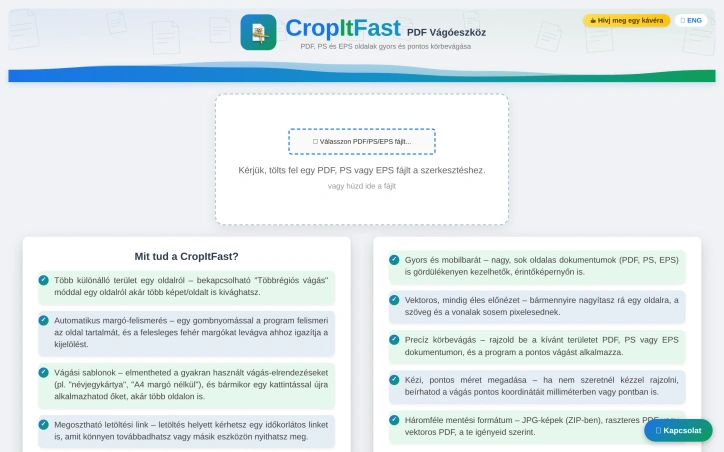
What distinguishes CropItFast from basic crop tools is its feature depth. Automatic margin detection eliminates manual adjustment for documents with uneven white space, a substantial time-saver when processing multiple pages. The multi-region cropping mode lets users extract several independent areas from a single page without relying on workarounds. Equally useful is the template system, which remembers frequently used crop layouts and applies them consistently across pages or even different documents. For users who prefer precision over clicking, exact coordinate input in millimeters or points ensures mathematical accuracy.
The platform's output flexibility warrants attention. Users can export to JPG, raster PDF, or vector PDF depending on their downstream needs, with adjustable quality settings for DPI and JPEG compression. This adaptability matters for professionals who might need sharp screen-ready images one day and print-ready files the next. The option to generate shareable download links with time restrictions adds a collaboration layer, allowing users to distribute results without permanently hosting sensitive files.
The interface shows thoughtfulness toward modern usage patterns. Vector-based preview rendering ensures crisp text and lines regardless of zoom level, while mobile support acknowledges that PDF handling increasingly happens on phones and tablets. The tool's claimed ability to handle large, multi-page documents smoothly suggests engineering attention to performance.
One note: the website references missing JavaScript files required for the interface library. This indicates either outdated documentation or a production concern worth investigating before evaluating the tool. For users tired of desktop PDF editors or struggling through complex alternatives, CropItFast delivers focused functionality optimized for the actual task rather than general document editing.
Founder Diary
Devlog-
This week I launched CropItFast, a tool I built to make cropping PDF, PS and EPS files faster and easier.
What started as a simple cropping tool has grown to include precise cropping, multiple crop regions, automatic margin detection, reusable templates, and export to JPG, raster PDF or vector PDF.
I also made sure it works smoothly on mobile, not just desktop.
There’s still plenty to improve, but the first public version is live. 🚀
Excited to keep building, improving, and seeing where CropItFast goes next.
Key Features
Automatic Margin Detection
Eliminates manual adjustment for documents with uneven white space
Multi-Region Cropping
Lets users extract several independent areas from a single page without workarounds
Template System
Remembers frequently used crop layouts and applies them consistently across pages or documents
Exact Coordinate Input
Supports precision entry in millimeters or points for mathematical accuracy
Output Flexibility
Export to JPG, raster PDF, or vector PDF with adjustable DPI and compression settings
Vector-Based Preview
Ensures crisp text and lines regardless of zoom level
Use Cases
-
1
Designers
Preparing business cards and manipulating PDF files without complex workflows
-
2
Print Professionals
Batch document processing and preparing files for print
-
3
Content Managers
Extracting specific sections from documents for various purposes
-
4
Mobile Users
Handling PDF cropping on phones and tablets
FAQ
Can I crop multiple areas from one PDF page? ▾
What file formats does CropItFast support? ▾
Do I need to install software to use CropItFast? ▾
Can I save and reuse crop settings? ▾
Tech Stack & Tags
Discussion
No comments yet — be the first!
Join the conversation — sign up to comment.
Sign up freeCommunity Support
Boost this project on Sell With boost
Meet the Founder

More in PDF Editor

PDF Redaction
We built this because companies were sending sen...

SimpliConvert
We built SimpliConvert to solve the frustration...

HEICPDF.TO
I built HEICPDF.TO to solve the problem of incom...
QuickDocs
One Suite for All Your Document Conversions. 🛡...
ChangeMyFile
ChangeMyFile is a free, no-signup toolbox for ev...

Toolmatic
We built Toolmatic to give professionals and dev...