
HEICPDF.TO
- No match
Machine translation — the English original is authoritative.
The Story
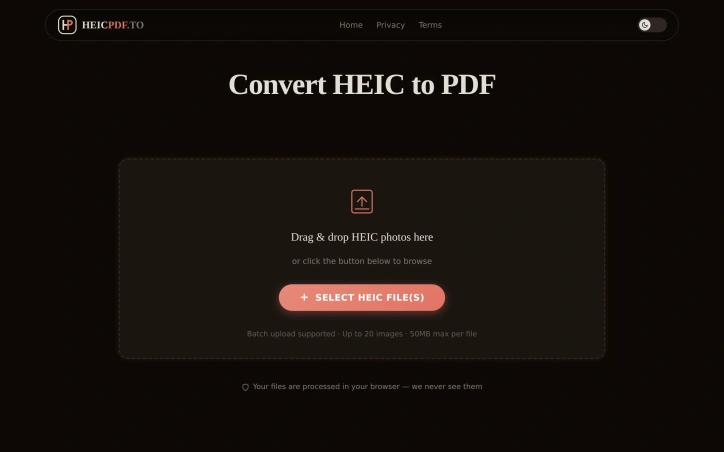
I built HEICPDF.TO to solve the problem of incompatible HEIC files from iPhones. It converts HEIC photos to high-quality PDFs, making them universally accessible. No registration or installation is required.
AI Overview
AI-generatedThe widespread adoption of HEIC image format by iPhone users has created a compatibility issue when sharing photos with others using different devices or operating systems. HEICPDF.TO addresses this problem by providing a straightforward solution to convert HEIC files to PDFs, a widely accepted and compatible format. The site is particularly useful for iPhone users who frequently share photos with others using Windows or Android devices.
What stands out about HEICPDF.TO is its simplicity and ease of use. The conversion process is entirely browser-based, ensuring that users' files are processed locally and remain private. The site allows users to drag and drop HEIC files, reorder them, and customize the output PDF's layout before exporting it. The live preview feature gives users full control over the final output.
The site's capabilities are worth noting, particularly its support for batch uploads of up to 20 images, with a maximum file size of 50MB. Users can also import files directly from cloud storage services like Dropbox or Google Drive. The conversion process is quick, and users can download the resulting PDF or save it directly to cloud storage.
The fact that HEICPDF.TO does not require registration or installation makes it an attractive solution for occasional users. The site's business model is not explicitly stated, but the lack of any mention of pricing or subscription suggests that it is free to use. Overall, HEICPDF.TO is a convenient and user-friendly solution for iPhone users to share their photos with others without worrying about compatibility issues. Its browser-based approach and robust feature set make it an effective tool for converting HEIC files to PDFs.
Founder Diary
DevlogThe maker hasn't posted a diary entry yet.
Key Features
Batch Upload
Supports up to 20 images with a maximum file size of 50MB
Cloud Import
Allows importing files directly from Dropbox or Google Drive
Live Preview
Gives users full control over the final output PDF
Customizable Layout
Enables users to reorder HEIC files and customize the output PDF's layout
Browser-Based Conversion
Ensures files are processed locally and remain private
Use Cases
-
1
iPhone users
Frequently share photos with others using Windows or Android devices
-
2
Occasional users
Don't require registration or installation for one-time conversions
-
3
Users with multiple files
Can batch upload and reorder HEIC files for conversion
FAQ
Is HEICPDF.TO free to use? ▾
How do I import files to HEICPDF.TO? ▾
What is the maximum file size for HEICPDF.TO? ▾
Tech Stack & Tags
Discussion
No comments yet — be the first!
Join the conversation — sign up to comment.
Sign up freeCommunity Support
Boost this project on Sell With boost
Meet the Founder

More by 杨肃观

More in PDF Editor

CropItFast
I built CropItFast because I was tired of clunky...

PDF Redaction
We built this because companies were sending sen...

SimpliConvert
We built SimpliConvert to solve the frustration...
QuickDocs
One Suite for All Your Document Conversions. 🛡...
ChangeMyFile
ChangeMyFile is a free, no-signup toolbox for ev...

Docultra
Docultra was born out of the daily digital fatig...