#online tool Startups & Tools
Discover the best online tool startups, tools, and products on SellWithBoost.
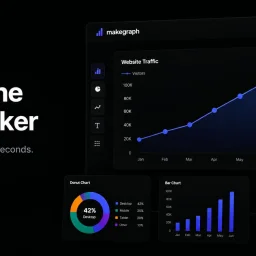
Data visualization is a crucial step in understanding and presenting complex information, but creating clear and compelling charts can be a tedious task, especially for those without extensive design or technical expertise. MakeGraph addresses this issue by providing a straightforward online chart maker that allows users to quickly transform their data into visually appealing charts. The tool is designed for individuals who need to generate charts for reports, presentations, and dashboards, and is particularly useful for those working with Excel or CSV data. What stands out about MakeGraph is its simplicity and versatility. The platform offers a range of chart types, including line charts, scatter charts, radar charts, and various bar chart configurations, such as stacked and waterfall charts. Users can upload their data or paste it directly into the tool, customize labels and colors, and preview their charts instantly. The ability to export charts as PNG or SVG files adds to the tool's convenience, making it easy to integrate the visualizations into various applications. The key features of MakeGraph include its ease of use, instant preview capabilities, and support for multiple chart types. The fact that it is completely free, with no signup or registration required, makes it an attractive option for users who need to create charts on the fly. The tool's flexibility in handling different data formats and its customization options further enhance its utility. Overall, MakeGraph is a valuable resource for anyone looking to simplify their data visualization process and create high-quality charts without fuss.

The widespread adoption of HEIC image format by iPhone users has created a compatibility issue when sharing photos with others using different devices or operating systems. HEICPDF.TO addresses this problem by providing a straightforward solution to convert HEIC files to PDFs, a widely accepted and compatible format. The site is particularly useful for iPhone users who frequently share photos with others using Windows or Android devices. What stands out about HEICPDF.TO is its simplicity and ease of use. The conversion process is entirely browser-based, ensuring that users' files are processed locally and remain private. The site allows users to drag and drop HEIC files, reorder them, and customize the output PDF's layout before exporting it. The live preview feature gives users full control over the final output. The site's capabilities are worth noting, particularly its support for batch uploads of up to 20 images, with a maximum file size of 50MB. Users can also import files directly from cloud storage services like Dropbox or Google Drive. The conversion process is quick, and users can download the resulting PDF or save it directly to cloud storage. The fact that HEICPDF.TO does not require registration or installation makes it an attractive solution for occasional users. The site's business model is not explicitly stated, but the lack of any mention of pricing or subscription suggests that it is free to use. Overall, HEICPDF.TO is a convenient and user-friendly solution for iPhone users to share their photos with others without worrying about compatibility issues. Its browser-based approach and robust feature set make it an effective tool for converting HEIC files to PDFs.