#free Startups & Tools
Discover the best free startups, tools, and products on SellWithBoost.
Privacy-conscious users have long faced a dilemma with web-based utilities: gain convenience or protect data. Toolbantu resolves this tension by running common utility functions entirely within the browser, eliminating the upload and storage concerns that plague most online tool sites. The platform targets everyday users who need to compress images, format JSON, generate QR codes, and perform other routine tasks without surrendering files to third-party servers. This applies equally to privacy-sensitive individuals and organizations handling even mildly confidential data. What distinguishes Toolbantu most clearly is its uncompromising approach to data handling. Every tool processes information exclusively on the user's device, with no data transmission to external servers. The site articulates this commitment explicitly on each tool page, removing ambiguity about what happens to user files. This transparency extends to the broader design: no account creation, no tracking, no hidden data collection. The approach simplifies the experience while reinforcing the privacy promise. The feature set covers practical ground. Image tools handle compression, resizing, and format conversion between formats like JPG, PNG, and WebP. A developer tools section includes JSON formatting, Base64 encoding, URL encoding, UUID generation, and favicon generation. Additional utilities span password generation, QR code creation, word counting, and typing speed testing. The platform groups these into workflows that chain multiple tools sequentially, allowing users to resize an image and compress it in a single operation without leaving the interface. The toolkit feature lets users pin favorite tools for quick access, while a history section tracks recently opened tools, storing only tool names rather than files or content. This balances convenience with the privacy-first philosophy. Toolbantu operates as completely free software with no paid tier, subscription model, or premium features mentioned. The absence of account requirements and the explicit statement that nothing gets sent anywhere underscores the frictionless positioning. The main limitation lies in scope. Toolbantu serves routine utility needs competently but doesn't challenge specialized tools. Someone needing advanced image editing, complex data transformation, or sophisticated development features would look elsewhere. Yet for the specific use case of quick, private processing of everyday files, Toolbantu removes friction and legitimate privacy concerns from the equation. The execution feels considered rather than haphazard, suggesting a genuinely motivated project rather than a privacy-washing marketing angle.

Browsing for online tools that actually work without friction remains a frustration for many users. ToolSuite Pro addresses this by curating a hand-picked directory of free, browser-based tools designed for immediate use. The service targets productivity-conscious professionals, content creators, and business users who prioritize speed and accessibility over feature-rich but cumbersome desktop applications. The product's core strength lies in its minimalist philosophy. Rather than aggregating every tool available online, the founder has selected a focused collection and organized it by category. Each tool requires no installation or account creation—users simply open them in a browser and begin working immediately. This friction-free approach directly counters the problem that sparked its creation: wasting time navigating paywalls, sign-up walls, and software installations just to accomplish basic tasks. Currently, the directory contains eleven tools spread across multiple categories. Productivity tools dominate the collection, followed by offerings in marketing and SEO, writing, and business software. Developer tools, chatbots, text utilities, and 3D viewers round out the selection. Notably, several categories featured prominently in the platform's positioning—including PDF, image, AI, and social media tools—contain no entries at all, revealing either rigorous curation standards or a directory still in its early stages. The site accepts user submissions, inviting the community to propose tools for inclusion. The platform's business model is transparent: the directory is completely free to access with no subscription fees, premium tiers, or upselling. This commitment aligns with the founder's stated mission to eliminate barriers between users and useful tools. What distinguishes ToolSuite Pro from broad tool aggregators and directories is its ruthless selectivity and resistance to bloat. Rather than attempting an exhaustive catalog of every available web tool, the site prioritizes quality through human curation. The interface reflects this philosophy: straightforward categorization, no recommendation algorithms, no feature-stuffing. The current catalog's modest size functions as both limitation and potential quality signal. As the directory expands and attracts more submissions, the sustainability of hand-picked curation will become its defining challenge. For now, ToolSuite Pro serves users seeking immediate, frictionless access to a vetted starter set of productivity tools.

Word games traditionally test how much you know. Krillion Infinite inverts that formula, rewarding players not for recalling correct answers but for finding answers that few others think to type. The game serves a specific audience: people fatigued by vocabulary-based competition who seek a daily mental challenge centered on originality and lateral thinking. The core mechanic sets it apart instantly. Each day at UTC midnight, Krillion presents the same seven prompts to its entire player base. Answer "Cheddar" to "name a cheese" and you score 10 points—a correct answer worth almost nothing. Answer "Taleggio" and you earn 85 points, reflecting that fewer players reached the same conclusion. The spread between common and uncommon correct answers drives the entire game. A player's first dive often yields 70 points from seven correct answers simply because all seven were the answers everyone gives. A complete round takes four minutes. Each prompt appears with a 25-second countdown, creating pressure that prevents overthinking while allowing educated guesses. Missing a prompt doesn't end the round—it merely consumes time, making strategic guessing valid play. The game accepts spelling variations, accent marks, doubled letters, and British-American spelling differences, prioritizing what a player conceived over execution under pressure. The experience requires no installation, no account, and no payment. There is no advertising. Players receive one free dive per day, and practice prompts cost nothing. Results are shareable via emoji strips and depth scores, encouraging community discussion without built-in social infrastructure. What elevates Krillion beyond novelty is the consistency of the central idea. The reverse-scoring mechanic isn't a gimmick layered onto word-game conventions—it is the entire foundation. Every design choice follows from it: the global simultaneity ensures everyone plays from the same answer pool, the timer prevents endless deliberation, the loose matching shifts the challenge from execution to conception. The strategy guidance acknowledges the emotional weight of low opening scores by reframing them as a solvable problem requiring habit change rather than more knowledge. The product succeeds because it asks a genuinely harder question than traditional word games. It doesn't ask what you know. It asks what you thought of.

Developers seeking a distraction-free media solution have an increasingly rare option in C Media Player, which sidesteps feature bloat and monetization schemes in favor of straightforward playback. The cross-platform application—available on Windows and Android—delivers essential media capabilities without the advertising and telemetry tracking that encumber many consumer players. The feature set reflects practical design priorities. Users access standard codecs, subtitle handling through both embedded and external sources, multi-track audio selection, and customizable playback controls including variable-speed playback and aspect ratio modification. The inclusion of equalizer controls and video effects distinguishes it from minimalist competitors, while hardware acceleration addresses performance on resource-constrained devices. The philosophy prioritizes user agency over corporate data extraction. Network stream support and playlist functionality accommodate both casual consumption and demanding use cases. The development team explicitly acknowledges user input as a roadmap driver, positioning the project as responsive to community needs. Limitations warrant acknowledgment: platform availability remains restricted to two major operating systems, and the absence of published benchmarks leaves performance claims unverified. Furthermore, standalone media players face structural headwinds from bundled offerings in mainstream operating systems. Still, in a landscape increasingly dominated by surveillance-enabled alternatives, C Media Player's commitment to core functionality without data harvesting represents meaningful differentiation. Whether this positioning sustains commercial viability depends on cultivating sufficient user loyalty to overcome platform incumbency.

Calculating the interest on a loan, converting currencies, or checking retirement savings shouldn't require creating accounts, tolerating advertisements, or worrying about personal data collection. Calculora eliminates these friction points by offering over a hundred calculators and converters that operate entirely within the user's browser, requiring no signup or tracking. The product spans multiple domains: financial planning tools like mortgage and loan calculators, scientific and engineering resources including resistor color codes and electrical calculations, health assessments such as BMI and sleep cycle tracking, and specialized Islamic tools for prayer times and Qibla direction. This breadth positions the platform as a catch-all solution for calculation needs rather than a specialized niche tool. What differentiates Calculora is its uncompromising stance on privacy and accessibility. Every calculator runs locally in the browser without transmitting data to external servers, and the service explicitly operates without advertisements, paywalls, or subscription tiers. The founder built the platform around a core philosophy: people deserve dependable calculation tools that remain free and private. This approach contrasts sharply with many online calculator sites that have become increasingly monetized through ads, premium tiers, or data harvesting. The breadth of offerings across categories like personal finance, mathematics, business tools, developer utilities, and even sustainability calculators suggests thoughtful curation beyond a generic toolkit. The inclusion of niche categories such as Islamic tools—with resources for prayer times, Zakat calculations, and Qibla direction—demonstrates attention to underserved user segments often overlooked by mainstream calculator applications. From a usability perspective, the reliance on browser-based computation means no lag from server requests and complete functionality for users with inconsistent internet. The absence of login requirements removes a common barrier to casual usage. The primary consideration for potential users is discovery: with such a large collection, finding the specific calculator needed isn't obvious from browsing. A search function or smarter categorization might help users navigate the catalog more efficiently. Additionally, while the free model is sustainable and admirable, details about the underlying technology stack and calculation methodologies would strengthen confidence in accuracy, particularly for financial or health-related tools where precision matters. Calculora represents a principled approach to online calculators: comprehensive, private, and genuinely free. It serves anyone from engineers to entrepreneurs to everyday users who simply need a reliable computation tool without the baggage modern web services typically demand.

Developers spend countless hours processing files one at a time when bulk operations would save them significant time. FreeToolDev solves this problem by offering a free suite of utility tools built specifically for batch processing—everything from images to data formats to SEO metadata—all running directly in the browser. The product's core value proposition rests on three pillars: speed through parallel processing of dozens of files at once, privacy through client-side execution with no server uploads, and frictionless access requiring no installation, signup, or account creation. This combination addresses real friction points for developers who have either struggled with clunky command-line workflows or avoided online tools due to privacy concerns about uploading sensitive files. The feature set is impressively broad. Image tools handle batch resizing, conversion, and compression across PNG, JPG, and WebP formats. Data utilities cover CSV-to-JSON conversion, JSON-YAML bidirectional conversion, and JSON validation and formatting. For SEO professionals and developers, there's a site crawler that auto-generates sitemaps, RSS feeds, and llms.txt files while detecting broken links. Security-focused users get tools for bulk IP and DNS lookups, SSL expiry checks, and JWT decoding. The toolkit also includes niche utilities like QR code and barcode generators, bulk URL encoding and decoding, and meta title and description length checkers—the kinds of repetitive tasks developers typically cobble together from scattered tools. What distinguishes FreeToolDev from competitor tools is the genuine commitment to batch processing as a first-class feature rather than an afterthought. Most developer utilities handle one file or string at a time. FreeToolDev is architected around the assumption that users need to process multiple items in parallel. The browser-based architecture with client-side processing removes friction and addresses legitimate privacy concerns, ensuring files never leave the user's machine. The product positions itself squarely at developers and designers who regularly handle bulk file operations. The breadth of tools suggests the creator understood their own workflow bottlenecks and built solutions for each one. While the feature set is extensive, the unifying principle remains clear: take tedious, repetitive file processing and make it genuinely bulk-first. FreeToolDev operates on a pure free model with no indicated paid tier or monetization strategy. For developers seeking straightforward, privacy-first bulk utilities, the combination of breadth, accessibility, and zero cost makes this worth evaluating.

Freelancers waste hours on administrative work that could go toward billable projects. GetSoloTools confronts this friction by providing a free, no-signup invoice generator that transforms business details, client information, and line items into polished PDF invoices within seconds. The platform is built specifically for solo professionals who need speed over complexity. Rather than forcing users through registration workflows or account setup, the generator launches directly into a form. Creators fill in their business name, address, and contact details, add client information, set invoice numbers and dates, then list the services or products being billed. The interface handles subtotals, tax calculations, and currency selection automatically across nine currencies from USD to INR. When finished, users download a clean PDF ready to send without watermarks or branding that signals the invoice was created by a third party. What distinguishes GetSoloTools is its commitment to true zero-friction design. The application works entirely in the browser with no account required, and the creator explicitly markets the tool as free forever with unlimited invoice generation. This model appeals to freelancers and contractors already stretched thin financially, removing a common barrier to professionalization. The platform also supports custom business logos, enabling users to maintain brand consistency in their invoicing without paying for premium features. The broader ecosystem around the core invoice tool strengthens its value proposition. GetSoloTools includes eighteen additional utilities tailored to freelancer workflows, such as late fee calculators, invoice tracking systems, and receipt generators. This suite positioning suggests the tool is designed as a primary hub for freelance administrative needs rather than a single-purpose utility. The automatic form-clearing feature and browser-based auto-saving of drafts reflect thoughtful UX considerations for users who might create invoices on different devices or during interrupted work sessions. The inclusion of guidance on invoice structure, payment terms, and the distinction between invoices and receipts adds educational value that helps users understand best practices rather than assuming competence. GetSoloTools targets the authentic need of freelancers for administrative tools that don't demand payment upfront or long-term commitment. Its zero-friction approach and comprehensive feature set eliminate common obstacles to professional invoicing, making the tool an efficient choice for anyone billing clients without organizational infrastructure.

Awkward silences can be a real conversation killer, whether it's on a first date, during a team meeting, or at a family dinner. RandomQ is designed to tackle this problem head-on by providing a platform that generates engaging questions to spark meaningful conversations. The tool is built for a diverse range of users, including couples, friends, students, and teams. What sets RandomQ apart is its use of AI technology to generate context-aware questions that cater to different conversation scenarios. The platform boasts an impressive array of categories, with over 9 curated options that cover various social situations, from deep and meaningful conversations for couples to hilarious questions for party games. The AI-powered question generator is complemented by a robust library of pre-existing questions, with 80 questions available in each category. One of the key features worth noting is the platform's emphasis on privacy, with no login required to start using the service. Additionally, the question generation engine is lightning-fast, providing users with instant results. The platform also offers a range of game modes, including Classic icebreakers, Debate battles, and Truth or Dare, which adds to its versatility. In terms of accessibility, RandomQ is free to use, with AI-generated questions available for purchase through a one-time credit buy, eliminating the need for a subscription. Overall, RandomQ offers a unique solution to breaking the ice and fostering deeper connections, making it a valuable resource for anyone looking to spark meaningful conversations.

Professionals handling sensitive documents need a reliable and secure way to manage their PDFs without compromising on speed or functionality. PDF Pro addresses this need by offering a comprehensive suite of online PDF tools that are not only free but also prioritize user privacy and security. The platform is particularly suited for individuals and businesses looking for a secure alternative to Adobe Acrobat, providing features such as merging, compressing, and editing PDFs directly in the browser. What stands out about PDF Pro is its commitment to maintaining user privacy through robust security measures. It utilizes AES-256 encryption and ensures that files are automatically deleted from servers after two hours, reinforcing its "Privacy First" promise. The use of WebAssembly technology allows for instant processing of PDF tasks locally within the browser, eliminating the need for cloud uploads and thereby enhancing both speed and security. Key features of PDF Pro include a range of standard PDF tools such as merging, compressing, and editing, as well as more specialized AI-powered tools like the Medical Report Analyzer, Bank Statement Analyzer, and Resume Scanner. These tools cater to various professional needs, from document management to in-depth analysis. The platform also offers E-Sign capabilities that are ESIGN and eIDAS compliant, adding a layer of legal validity to electronically signed documents. Notably, PDF Pro operates on a completely free model with no signup required and no limits on usage, at least for the time being as indicated by a limited-time offer. This approach, combined with its robust feature set and emphasis on privacy, positions PDF Pro as a compelling option for those seeking a secure, efficient, and cost-effective PDF solution.
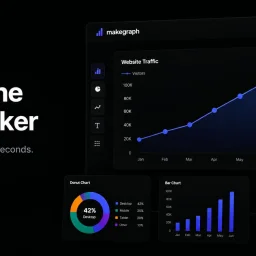
Data visualization is a crucial step in understanding and presenting complex information, but creating clear and compelling charts can be a tedious task, especially for those without extensive design or technical expertise. MakeGraph addresses this issue by providing a straightforward online chart maker that allows users to quickly transform their data into visually appealing charts. The tool is designed for individuals who need to generate charts for reports, presentations, and dashboards, and is particularly useful for those working with Excel or CSV data. What stands out about MakeGraph is its simplicity and versatility. The platform offers a range of chart types, including line charts, scatter charts, radar charts, and various bar chart configurations, such as stacked and waterfall charts. Users can upload their data or paste it directly into the tool, customize labels and colors, and preview their charts instantly. The ability to export charts as PNG or SVG files adds to the tool's convenience, making it easy to integrate the visualizations into various applications. The key features of MakeGraph include its ease of use, instant preview capabilities, and support for multiple chart types. The fact that it is completely free, with no signup or registration required, makes it an attractive option for users who need to create charts on the fly. The tool's flexibility in handling different data formats and its customization options further enhance its utility. Overall, MakeGraph is a valuable resource for anyone looking to simplify their data visualization process and create high-quality charts without fuss.

The complexity and confusion surrounding AI adoption can be a significant barrier for individuals looking to leverage its potential. Nextera AI Hub directly addresses this issue by providing a comprehensive resource hub that makes AI accessible and easy to use. The platform is designed for two primary audiences: those new to AI who require a foundational understanding of the technology, and individuals already familiar with AI tools who need targeted resources tailored to their specific situations. What stands out about Nextera AI Hub is its adaptive approach, guiding users through a step-by-step process to determine their current level of AI proficiency and provide relevant resources accordingly. For newcomers, it offers a starter kit that covers the basics, safety tips, and initial prompts. For more experienced users, it delivers customized prompts, workflows, and advanced resources such as n8n workflows and agent templates. The platform's key features include its ability to tailor AI help to individual users, a library of resources, and the capacity to generate specific prompts based on user input. Users can also save their resources for future reference. The fact that the platform is free, with no sign-up required, and offers instant access to its resources is a significant advantage, making it an attractive option for those looking to explore AI without initial commitment or cost. By offering its resources without charge and without requiring users to create an account, Nextera AI Hub demonstrates a commitment to democratizing access to AI. The platform's focus on real people and their specific needs underscores its mission to simplify AI adoption. Overall, Nextera AI Hub is a valuable resource for anyone looking to understand or utilize AI more effectively.

Financial calculations and business tasks often require specialized tools, but accessing these can be cumbersome due to paywalls, registration requirements, and data privacy concerns. AnyServ addresses this issue by offering a suite of calculators and business tools directly in the user's browser, eliminating the need for downloads, sign-ups, or server-side data processing. The platform is geared towards individuals and businesses seeking straightforward, accurate financial and business calculations without the hassle of traditional software or online services. What stands out about AnyServ is its commitment to user privacy and simplicity. By processing all calculations locally within the browser, AnyServ ensures that user data never leaves their device, providing a high level of security and compliance with data protection regulations like GDPR. The service also boasts a clutter-free experience, allowing users to pick a tool, input their data, and receive instant results without any friction. The range of tools available on AnyServ is diverse, covering financial, tax, and business needs. Users can access a VAT calculator, mortgage calculator, salary calculator, and percentage calculator, among others, all of which are designed with transparency and accuracy in mind. The formulas behind these calculators are based on official tax and banking standards, ensuring reliability. AnyServ operates on a completely free model with no hidden costs, accounts, or paywalls. The absence of registration requirements and the local processing of data contribute to a seamless user experience. The service supports multiple languages and is accessible on mobile devices, enhancing its utility across different user bases. With new tools being added regularly, AnyServ is continually expanding its capabilities to meet a wide range of user needs.

Startup founders often rely on intuition when making hiring decisions, a subjective approach that can lead to inconsistent outcomes. HireLikeaPro addresses this issue by providing a structured hiring framework that leverages AI to streamline the process. The tool is specifically designed for startup founders, small business operators, and hiring managers without a dedicated HR team, particularly those in SaaS, marketing agencies, and AI automation companies. What stands out about HireLikeaPro is its focus on the hiring decision framework, comprising job descriptions, scorecards, and candidate analysis, all available at no cost. The platform guides users through a simple, 15-minute process to generate a structured job description, create an interview scorecard with evaluation pillars, and analyze candidate interviews. The AI-powered analysis scores candidates against the scorecard and provides evidence-based hire or no-hire recommendations, reducing reliance on gut feelings. The key features of HireLikeaPro include its intake form, which generates a polished job description, and its ability to create a structured scorecard with behavioral interview questions and scoring guidelines. The platform also analyzes interview transcripts, uploaded or pasted by the user, to score candidates and make recommendations. Notably, HireLikeaPro is fully GDPR compliant, ensuring the security and privacy of user data. A significant aspect of HireLikeaPro is its pricing model - it is entirely free, with no credit card required, no free trial that expires, and no paywalls, making it an attractive alternative to comprehensive ATS platforms like Greenhouse and Lever, which can cost upwards of $6,000 per year. By providing a free, structured hiring framework, HireLikeaPro fills a gap in the market for startups and small businesses that need a more objective hiring process without the hefty price tag of traditional ATS solutions.

For small business owners and freelancers tired of paying monthly subscriptions for invoice software, a free, open-source alternative now exists that prioritizes data privacy and offline functionality. Invoiso delivers professional billing capabilities to Windows and Linux machines without requiring internet connectivity, cloud storage, or account registration. The problem this addresses is straightforward: most modern invoicing tools trap users in a choice between convenience (cloud-based, but your data lives elsewhere) and cost (expensive subscriptions for basic functionality). Invoiso eliminates both constraints by running entirely offline on your local machine. The product targets a specific but substantial segment: freelancers managing multiple clients, small shop owners in areas with spotty internet connectivity, field workers who need billing capabilities away from the office, and anyone who views data privacy as non-negotiable. For these users, the value proposition is compelling—professional invoice generation without monthly fees, plus the security of keeping customer information local. What distinguishes Invoiso is its radical simplicity in execution. The software generates polished PDF invoices, manages client and product databases, tracks payment status, and provides role-based access controls. Users can customize templates (choosing from Classic, Modern, or Minimal designs) and adjust column labels for their business type. The product includes GST readiness and UPI QR code support, making it functional for Indian markets. One-click backup and restore ensure data portability without reliance on cloud infrastructure. The feature set covers all fundamental billing needs: invoice creation and editing, payment tracking for partial or full receipts, status history, flexible line-item pricing overrides, and permission-based user roles restricting destructive actions to administrators. The offline model means instant operation without page-load delays and eliminates connectivity dependencies entirely. As an open-source project with no subscription requirement, no account setup, and no recurring costs, Invoiso's business model is simply absence: the software is free forever. This makes it particularly valuable for solo practitioners and micro-businesses working with thin margins. The product fills a genuine gap for users who've felt forced to choose between privacy and convenience, or between affordability and functionality. For small businesses and freelancers in that position, it represents a meaningful alternative to the subscription-heavy invoicing software market.