#no signup Startups & Tools
Discover the best no signup startups, tools, and products on SellWithBoost.
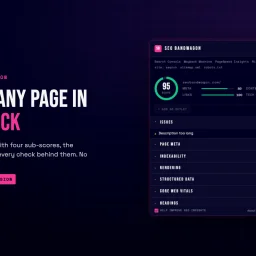
Chrome extension users seeking to evaluate webpage SEO without the overhead of premium tools now have an accessible option. SEO Bandwagon addresses the friction point of expensive auditing platforms by offering a free extension that delivers professional-grade analysis directly within the browser. The extension grades any page on a 0 to 100 scale with corresponding letter grades, then surfaces findings across twelve analytical categories. This breadth of coverage sets it apart from lighter SEO tools, spanning page metadata and indexability through structured data validation, Core Web Vitals, headings hierarchy, link analysis, and content metrics. All core functionality executes in the browser without requiring an account, removing a common barrier to adoption for casual auditing. The feature set reflects practical SEO concerns. Page meta checks validate title and meta description lengths against Google's display thresholds. Indexability diagnostics flag issues affecting crawlability and reveal redirect chains. Rendering analysis compares server HTML against the page as JavaScript interprets it, with options to preview the page as different crawlers would see it. Structured data checks catch JSON-LD, Microdata, and RDFa issues while identifying which rich results the page qualifies for. Core Web Vitals reporting draws measurements directly from the browser session. Optional touches enhance workflow efficiency. Users can export complete analyses as CSV or JSON, copy Google search results, and access a right-click context menu linking to Google's PageSpeed Insights and the Wayback Machine. Creating a free account adds a Citations tab for local business directory validation, domain information displayed beneath Google search results, and synchronization of analyses to a personal dashboard. The company's monetization separates cleanly from the extension itself. SEO Bandwagon offers paid plans for rank tracking and professional SEO services, but the free extension remains untethered from those offerings. This separation preserves the utility of the free tool and avoids the trial-to-paid conversion pressure that undercuts other freemium SEO platforms. For small business owners, content creators, and developers who need periodic SEO spot checks without subscription commitment, the extension fills a genuine gap between manual review and enterprise-grade platforms.

Photographers managing client proofs and mood boards typically face friction: commercial software requires installation, signup barriers delay work, and uploading images to remote servers raises privacy concerns. Contact Sheet Maker addresses these pain points directly by offering browser-based contact sheet generation without registration or server uploads. The core differentiation lies in its local-first architecture. Images are processed entirely in the browser, never transmitted to external servers. This design choice protects photographer intellectual property and client confidentiality while enabling instant workflow integration. For studios managing sensitive work, this privacy-by-default approach eliminates a significant compliance and security worry. The feature set balances simplicity with professional control. Users configure layouts through an intuitive grid system with adjustable columns, rows, gutter spacing, and gap sizing. Alignment options cover both horizontal and vertical positioning, while image scaling choices—cover, contain, or fill—accommodate different aspect ratio needs. Export flexibility spans three formats: PDF for printing, PNG for lossless digital proofing, and WebP for file-size optimization. Watermarking functionality protects proofs. Rather than a single stamp, Contact Sheet Maker tiles text diagonally across sheets, with adjustable opacity to balance visibility against image clarity. The watermark strength slider lets studios calibrate between subtle branding and obvious protection. A preset system enables template reuse. Studios save their preferred layouts, naming conventions, and watermark settings as reusable presets stored locally on the device. This reduces repetitive configuration for high-volume shoots while maintaining complete independence from cloud infrastructure. Additional customization includes caption display with font sizing and text alignment, background color control, and file naming strategies that propagate from input files through to frame captions. These details appeal to studios maintaining consistent deliverable formatting. The business model is straightforwardly free, with no paywalls or signup requirements. This accessibility removes barriers to trial and adoption, particularly valuable for freelancers and small studios evaluating new tools. Contact Sheet Maker targets photographers seeking to reclaim workflow efficiency and data control. By eliminating traditional software friction—installation, licensing, authentication—and server-dependent processing, it positions itself as the fastest route from shoot to proof delivery.

A unified collection of 142 free online tools, Toolmatic addresses a persistent friction point for developers and professionals: the need to access scattered utilities across dozens of platforms, each demanding signups, displaying watermarks, or hiding features behind paywalls. The service consolidates PDF manipulation, image conversion, code formatting, text utilities, SEO analysis, and design tools into a single browser-based environment. The product's clearest strength is its friction-free design philosophy. Every tool runs directly in the browser without account creation, watermarks, or restrictions. This approach trades complexity for accessibility, making it useful for quick, one-off tasks where spinning up an account would waste more time than completing the job itself. The breadth of the toolkit is substantial: eighteen PDF tools cover merging, compression, watermarking, and format conversion; thirty-nine developer tools handle everything from JSON and XML formatting to Base64 encoding and JWT decoding; image conversion spans formats including WEBP, HEIC, SVG, and favicon generation. The organization reflects thoughtful categorization. Tools group into logical sections like binary converters, password utilities, calculators, finance tools, and domain utilities. Popular tools such as the password generator, QR code generator, and JSON formatter are highlighted prominently, suggesting an understanding of which utilities drive traffic. The business model is straightforward: the entire suite is free indefinitely, with no signup requirement. This creates clear value for occasional users but raises immediate questions about sustainability. Some tools operate entirely in-browser, while others require a PHP backend on a user's server, suggesting a hybrid approach to computation-heavy tasks. One limitation emerges in the tool descriptions themselves. Many entries lack clarity about processing method or handling of uploaded data. Users cannot quickly determine whether their PDF remains private within their browser or transmits to Toolmatic's servers. For a tool that attracts users seeking quick access without friction, this opacity about data handling represents a missed opportunity for trust-building. The product succeeds as a practical utility collection for developers and professionals who value speed over feature depth. It occupies a useful niche: neither a specialized platform for a single task nor an overstuffed bloatware suite, but a genuinely quick answer to common conversion and formatting problems.
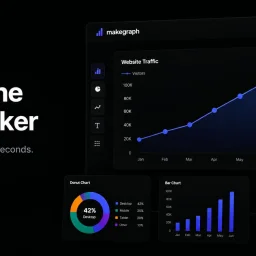
Data visualization is a crucial step in understanding and presenting complex information, but creating clear and compelling charts can be a tedious task, especially for those without extensive design or technical expertise. MakeGraph addresses this issue by providing a straightforward online chart maker that allows users to quickly transform their data into visually appealing charts. The tool is designed for individuals who need to generate charts for reports, presentations, and dashboards, and is particularly useful for those working with Excel or CSV data. What stands out about MakeGraph is its simplicity and versatility. The platform offers a range of chart types, including line charts, scatter charts, radar charts, and various bar chart configurations, such as stacked and waterfall charts. Users can upload their data or paste it directly into the tool, customize labels and colors, and preview their charts instantly. The ability to export charts as PNG or SVG files adds to the tool's convenience, making it easy to integrate the visualizations into various applications. The key features of MakeGraph include its ease of use, instant preview capabilities, and support for multiple chart types. The fact that it is completely free, with no signup or registration required, makes it an attractive option for users who need to create charts on the fly. The tool's flexibility in handling different data formats and its customization options further enhance its utility. Overall, MakeGraph is a valuable resource for anyone looking to simplify their data visualization process and create high-quality charts without fuss.