
Contact Sheet Maker
- No match
Machine translation — the English original is authoritative.
The Story
I built Contact Sheet Maker to solve the photographer's workflow problem—creating professional contact sheets and mood boards shouldn't require signup, complex software, or uploading images to a server. This free, browser-based tool lets photographers instantly organize, watermark, and export proofs locally, maintaining complete privacy and control over their work.
AI Overview
AI-generatedPhotographers managing client proofs and mood boards typically face friction: commercial software requires installation, signup barriers delay work, and uploading images to remote servers raises privacy concerns. Contact Sheet Maker addresses these pain points directly by offering browser-based contact sheet generation without registration or server uploads.
The core differentiation lies in its local-first architecture. Images are processed entirely in the browser, never transmitted to external servers. This design choice protects photographer intellectual property and client confidentiality while enabling instant workflow integration. For studios managing sensitive work, this privacy-by-default approach eliminates a significant compliance and security worry.
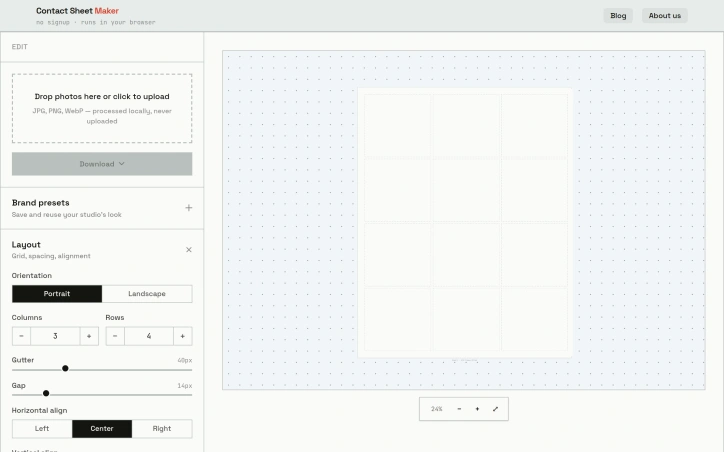
The feature set balances simplicity with professional control. Users configure layouts through an intuitive grid system with adjustable columns, rows, gutter spacing, and gap sizing. Alignment options cover both horizontal and vertical positioning, while image scaling choices—cover, contain, or fill—accommodate different aspect ratio needs. Export flexibility spans three formats: PDF for printing, PNG for lossless digital proofing, and WebP for file-size optimization.
Watermarking functionality protects proofs. Rather than a single stamp, Contact Sheet Maker tiles text diagonally across sheets, with adjustable opacity to balance visibility against image clarity. The watermark strength slider lets studios calibrate between subtle branding and obvious protection.
A preset system enables template reuse. Studios save their preferred layouts, naming conventions, and watermark settings as reusable presets stored locally on the device. This reduces repetitive configuration for high-volume shoots while maintaining complete independence from cloud infrastructure.
Additional customization includes caption display with font sizing and text alignment, background color control, and file naming strategies that propagate from input files through to frame captions. These details appeal to studios maintaining consistent deliverable formatting.
The business model is straightforwardly free, with no paywalls or signup requirements. This accessibility removes barriers to trial and adoption, particularly valuable for freelancers and small studios evaluating new tools.
Contact Sheet Maker targets photographers seeking to reclaim workflow efficiency and data control. By eliminating traditional software friction—installation, licensing, authentication—and server-dependent processing, it positions itself as the fastest route from shoot to proof delivery.
Founder Diary
DevlogThe maker hasn't posted a diary entry yet.
Key Features
Local-First Processing
Images are processed entirely in the browser without transmission to external servers.
Grid-Based Layout System
Configure contact sheets through adjustable columns, rows, gutter spacing, and gap sizing.
Multiple Export Formats
Export as PDF for printing, PNG for lossless proofing, or WebP for file-size optimization.
Diagonal Watermarking
Text tiles diagonally across sheets with adjustable opacity to balance protection and image clarity.
Local Preset System
Save and reuse layouts, naming conventions, and watermark settings stored locally on your device.
Use Cases
-
1
Commercial photographers
Managing client proofs and mood boards while protecting intellectual property and maintaining confidentiality.
-
2
Photography studios
Maintaining consistent deliverable formatting for sensitive work without compliance and security worries.
-
3
Freelance photographers
Adopting new tools without installation, licensing, or authentication barriers.
-
4
Client-facing studios
Protecting proofs with watermarking while integrating seamlessly into existing workflows.
FAQ
Does Contact Sheet Maker upload my images to the cloud? ▾
What export formats are supported? ▾
Can I save and reuse my layout settings? ▾
Do I need to sign up or install anything? ▾
Pricing
Completely free with no paywalls, signup requirements, or licensing fees.
Tech Stack & Tags
Discussion
No comments yet — be the first!
Join the conversation — sign up to comment.
Sign up freeCommunity Support
Boost this project on Sell With boost
Meet the Founder

More in Photo editing
MetaScope
As a professional photographer, I needed a tool...

Banana AI - Free AI Image Generator
Banana AI is a free AI image and video generatio...
TurboConvert - Image Converter
As a solo web dev I was constantly juggling PNG...

AImageResize
I built AImageResize to simplify image resizing...

throwback: same you. another lifetime.
We built Throwback to help people reconnect with...

PixelBoost AI
I built PixelBoost AI to eliminate the complexit...