
MetaScope

- No match
Machine translation — the English original is authoritative.
The Story
As a professional photographer, I needed a tool to accurately edit EXIF and metadata across multiple files. I built MetaScope to simplify metadata management for photographers and digital asset managers. It allows for batch processing and precise control over metadata.
AI Overview
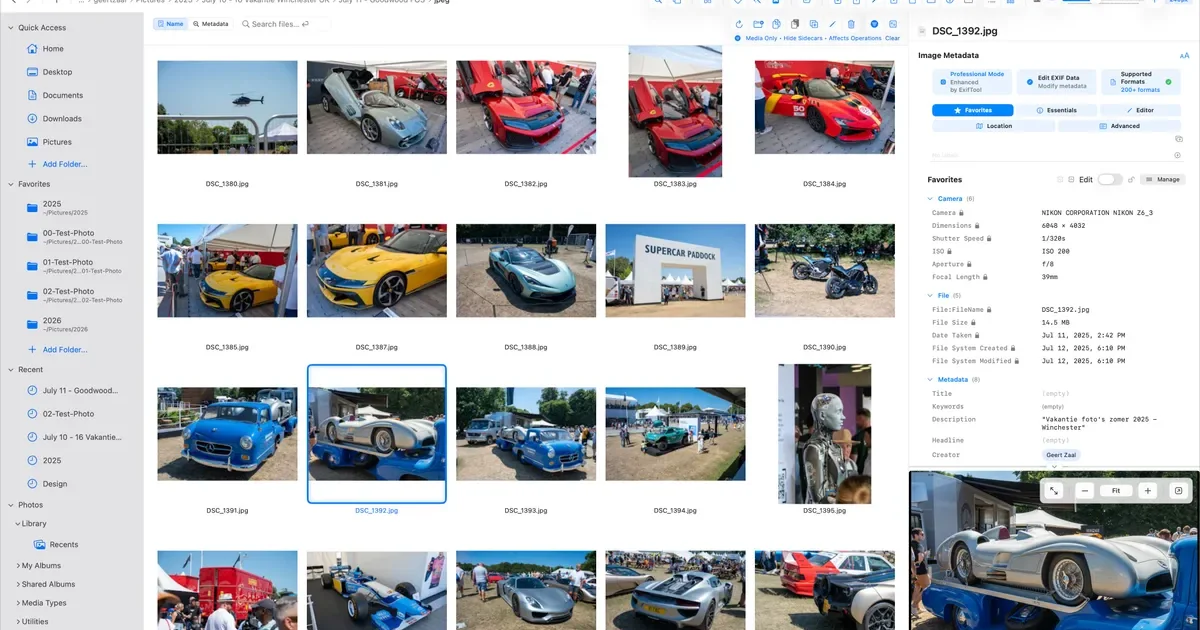
AI-generatedFor professionals in the creative industry, managing metadata across a vast library of files is a daunting task. Photographers, archivists, and digital asset managers need a reliable tool to edit EXIF, IPTC, and XMP metadata with precision and control. MetaScope is a native macOS app that simplifies metadata management, allowing users to accurately edit and batch process metadata across 50+ file formats, including RAW files.
What stands out about MetaScope is its comprehensive approach to metadata management, offering nine focused capabilities within a single app. The app's capabilities range from image and video viewing with advanced rendering and color management, to metadata browsing and editing with a 125-field registry and integrated search. The metadata editing feature is particularly noteworthy, allowing for inline field editing, template management, and batch application to thousands of files.
The app's intelligence features, such as on-device NLP enrichment and smart keyword suggestions, further enhance its capabilities. The automation features, including keyword rules and transformation rules, enable users to streamline their workflow and ensure consistency across their metadata. The export system also offers a range of formats, including PDF and HTML portfolio generation with custom branding.
Built for libraries with hundreds of thousands of files, MetaScope is designed to handle large-scale metadata management tasks with ease. While pricing details are available on the MetaScope website, the app's developer has clearly focused on creating a robust tool that meets the needs of professionals who require accuracy, scale, and control over their metadata. Overall, MetaScope is a powerful solution for creative professionals seeking to simplify their metadata management workflow.
Founder Diary
DevlogThe maker hasn't posted a diary entry yet.
Key Features
Metadata Editing
allows for inline field editing, template management, and batch application to thousands of files
Image and Video Viewing
offers advanced rendering and color management
NLP Enrichment
provides on-device NLP enrichment and smart keyword suggestions
Automation Features
includes keyword rules and transformation rules to streamline workflow
Export System
offers a range of formats, including PDF and HTML portfolio generation with custom branding
Batch Processing
allows users to batch process metadata across 50+ file formats
Use Cases
-
1
Creative Professionals
need a reliable tool to edit EXIF, IPTC, and XMP metadata with precision and control
-
2
Large Libraries
handle hundreds of thousands of files with ease
-
3
Digital Asset Managers
require accuracy, scale, and control over their metadata
-
4
Photographers and Archivists
need to manage metadata across a vast library of files
FAQ
What file formats does MetaScope support? ▾
Can MetaScope handle large libraries? ▾
Does MetaScope offer automation features? ▾
Tech Stack & Tags
Founder's Resources
Discussion
No comments yet — be the first!
Join the conversation — sign up to comment.
Sign up freeCommunity Support
Boost this project on Sell With boost
Meet the Founder

"My background spans enterprise transformation, cloud, partner strategy, solution architecture, and b..."
More in Photo editing

Banana AI - Free AI Image Generator
Banana AI is a free AI image and video generatio...

AImageResize
I built AImageResize to simplify image resizing...

TurboConvert - Image Converter
As a solo web dev I was constantly juggling PNG...

ImgKit
I built ImgKit because uploading photos to rando...

PixelBoost AI
I built PixelBoost AI to eliminate the complexit...

throwback: same you. another lifetime.
We built Throwback to help people reconnect with...