#templates Startups & Tools
Discover the best templates startups, tools, and products on SellWithBoost.
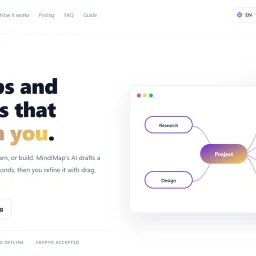
Visual organization tools have long required choosing between simplicity and capability. This all-in-one editor targets the friction point where ideas need structure—whether for project planning, team collaboration, or classroom instruction—by letting users describe what they want built and having AI generate the full layout in seconds. The platform combines six core capabilities within a single interface: mind mapping, flowcharting, task management, templates, collaborative features, and export options. Users input a description of their project or idea, and the system generates a structured visualization including nodes, branches, and hierarchy. From there, refinement is immediate; additional AI prompts can restructure, add, remove, or rename elements while preserving user-applied notes, icons, and colors. Eleven prebuilt templates cover common scenarios: project plans, study guides, SWOT analyses, product roadmaps, sprint planning, blog outlines, OKRs, and client onboarding flows. What distinguishes this offering is its self-contained architecture. The AI runs on the company's own servers rather than depending on third-party services like ChatGPT, Claude, or Gemini. Users need no API keys, no external accounts, and no browser extensions—the entire experience happens in the browser across desktop, tablet, and phone. This eliminates friction common to competing tools and means the service is private by default. The flowcharting capability includes a full shape library: ovals for start and end points, diamonds for decisions, parallelograms for input/output, plus document, hexagon, and cylinder shapes. Task tracking layers the same tree layout onto checkpoint management, with checkboxes, side-panel lists, filters, and a live completion bar to track remaining work. Collaboration happens two ways. Read-only sharing generates a single URL or QR code for viewers requiring no account or install. Editable sharing lets collaborators make changes directly in the browser while the original owner retains control; each save is versioned, stale tabs refresh cleanly, and the sharing link can be revoked at any time. The system prevents collisions by restricting simultaneous editing to one user at a time. Export flexibility covers PNG, JPEG, PDF, SVG, JSON, and Markdown formats, with watermarks absent from paid plans. JSON export integrates with an Android app, enabling seamless cross-device transfers. The product accepts cryptocurrency as payment, a signal of positioning toward digitally native users. Free and paid tiers exist, though specific pricing is not publicly detailed.

Ranking things is a universal pastime, yet the tools available for creating visually organized tier lists have historically been either cluttered with unnecessary features or hidden behind account requirements. Tier List Maker strips away the friction by delivering a straightforward, no-signup-required platform for turning ranked items into shareable images. The product targets a broad audience, from gaming enthusiasts comparing video game characters and weapons to film fans debating cinema quality to casual users ranking everyday items like fast food chains or fruits. The interface reflects a deliberate design philosophy: users can immediately start working by uploading images, selecting from a ready-made template, and dragging items into custom tier rows within a single session. What distinguishes Tier List Maker in a crowded category is its aggressive focus on simplicity. The platform accepts up to 200 images per ranking, with individual file size limits of 10 megabytes, supporting PNG, JPG, and WEBP formats. The drag-and-drop interface requires no learning curve. Most importantly, the export functionality is built in from the start—users can generate a clean PNG download of their complete ranking in minutes, making the tool genuinely fit for sharing on social media or communities. The template library demonstrates production value and market awareness. Rather than offering generic tier systems, Tier List Maker provides curated starting points across multiple niches: gaming templates for Pokémon, Genshin Impact, Honkai Star Rail, Marvel Rivals, League of Legends, and others, each pre-populated with relevant assets. Non-gaming verticals receive similar treatment, with templates for DC movies, fast food chains, and fruit nutrition comparisons. Several templates include quality-of-life features like role-based filters or searchability. The pricing structure is straightforward: the service is entirely free. No premium tier, no image upload limits requiring payment, no watermarks on exports. This approach positions Tier List Maker as a genuinely accessible community tool rather than a freemium product. The platform does carry functional constraints—templates consist of pre-populated assets rather than continuously updating, and customization depth stops at tier labels rather than extensive styling options. These boundaries reflect the core philosophy of doing one thing well. Tier List Maker succeeds because it acknowledges a genuine behavioral need, removes every obstacle between intent and completion, and delivers a polished output without asking for money or registration.

For professionals in the creative industry, managing metadata across a vast library of files is a daunting task. Photographers, archivists, and digital asset managers need a reliable tool to edit EXIF, IPTC, and XMP metadata with precision and control. MetaScope is a native macOS app that simplifies metadata management, allowing users to accurately edit and batch process metadata across 50+ file formats, including RAW files. What stands out about MetaScope is its comprehensive approach to metadata management, offering nine focused capabilities within a single app. The app's capabilities range from image and video viewing with advanced rendering and color management, to metadata browsing and editing with a 125-field registry and integrated search. The metadata editing feature is particularly noteworthy, allowing for inline field editing, template management, and batch application to thousands of files. The app's intelligence features, such as on-device NLP enrichment and smart keyword suggestions, further enhance its capabilities. The automation features, including keyword rules and transformation rules, enable users to streamline their workflow and ensure consistency across their metadata. The export system also offers a range of formats, including PDF and HTML portfolio generation with custom branding. Built for libraries with hundreds of thousands of files, MetaScope is designed to handle large-scale metadata management tasks with ease. While pricing details are available on the MetaScope website, the app's developer has clearly focused on creating a robust tool that meets the needs of professionals who require accuracy, scale, and control over their metadata. Overall, MetaScope is a powerful solution for creative professionals seeking to simplify their metadata management workflow.