
PixelBoost AI
- No match
Machine translation — the English original is authoritative.
The Story
I built PixelBoost AI to eliminate the complexity of photo enhancement. Most tools require technical skills or produce artificial results. I wanted to create something that instantly transforms any photo—whether it's blurry, noisy, or faded—with a single click, no expertise needed.
AI Overview
AI-generatedAutomated photo enhancement has typically demanded either technical prowess or a willingness to accept mediocre results. PixelBoost AI addresses this friction by offering one-click image restoration for anyone who has accumulated a backlog of disappointing photographs—blurry snapshots, noisy phone photos, faded scans, pixelated screenshots, or time-worn family prints that deserve better.
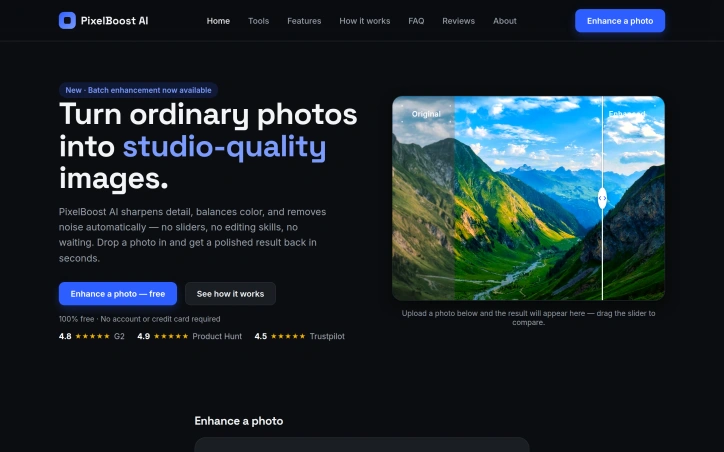
The product operates on a no-configuration philosophy. Users upload an image and receive an enhanced version back within seconds, with no sliders to adjust, presets to choose, or settings to learn. The underlying engine runs three automatic processing passes: a sharpness recovery stage that retrieves lost detail without introducing halos or grain, a noise reduction pass that eliminates compression artifacts and grain while preserving edges and texture, and a color correction phase that fixes white balance and lifts contrast. This pipeline targets the most common photo problems directly—the grainy ISO-boosted shot, the over-compressed JPEG, the severely faded original, the slightly out-of-focus moment.
What distinguishes PixelBoost from similar tools is both simplicity and breadth. The service handles restoration work that typically appeals to a specific use case: scanned family photos, old wedding albums, water-damaged prints. It also processes contemporary problems like camera grain and export compression artifacts. The implementation supports drag-and-drop uploads, accepts PNG, JPG, and WebP files up to 24MB, and requires no account creation or payment information.
The product operates entirely at no cost. No freemium upsell, no trial period, no signup requirement. A batch enhancement feature is available for processing multiple photos, though the content provided does not detail whether this remains free or introduces limitations. The service has accumulated ratings on mainstream review platforms—4.8 stars on G2, 4.9 on Product Hunt, and 4.5 on Trustpilot—suggesting user satisfaction has reached a measurable baseline.
The core limitation remains one that affects most automated enhancement tools: severe blur or very poor image quality presents a ceiling. PixelBoost can lift mild to moderate focus issues but makes no claim to recover substantially out-of-focus shots. For everyday photo maintenance—clarifying smartphone images, restoring inherited prints, cleaning up screenshots and recordings—it removes a significant friction point. The ability to process these photos without opening design software or learning enhancement techniques addresses a real gap between photo quality standards and actual user capabilities.
Founder Diary
DevlogThe maker hasn't posted a diary entry yet.
Key Features
One-Click Restoration
Enhances photos with a single click without any configuration or settings
Automatic Three-Stage Pipeline
Sharpness recovery, noise reduction, and color correction process images automatically
No Account Required
Works without signup, payment information, or account creation
Drag-and-Drop Upload
Simple interface supporting PNG, JPG, and WebP files up to 24MB
Batch Processing
Can enhance multiple photos in a single session
Use Cases
-
1
Family Photo Restoration
Revives old, faded, or scanned family prints and wedding albums to original quality
-
2
Smartphone Photography
Clarifies and cleans up grainy ISO-boosted photos and compressed mobile camera shots
-
3
Screenshots and Recordings
Removes compression artifacts and improves clarity of digital screenshots and recordings
-
4
Inherited Prints
Restores time-worn or water-damaged photographs that deserve preservation
FAQ
Do I need an account to use PixelBoost AI? ▾
What file formats and sizes does PixelBoost support? ▾
Can PixelBoost fix very blurry or out-of-focus photos? ▾
How much does PixelBoost AI cost? ▾
Pricing
Entirely free with no freemium upsell, trial period, or signup requirement.
Tech Stack & Tags
Discussion
No comments yet — be the first!
Join the conversation — sign up to comment.
Sign up freeCommunity Support
Boost this project on Sell With boost
Meet the Founder

More by Zaid Bin Javed

More in Photo editing
MetaScope
As a professional photographer, I needed a tool...

Banana AI - Free AI Image Generator
Banana AI is a free AI image and video generatio...

TurboConvert - Image Converter
As a solo web dev I was constantly juggling PNG...

AImageResize
I built AImageResize to simplify image resizing...

throwback: same you. another lifetime.
We built Throwback to help people reconnect with...

ImgKit
I built ImgKit because uploading photos to rando...