QuickDocs

- No match
Machine translation — the English original is authoritative.
The Story
One Suite for All Your Document Conversions.
🛡️ All Your Conversions 100% Offline & Private.
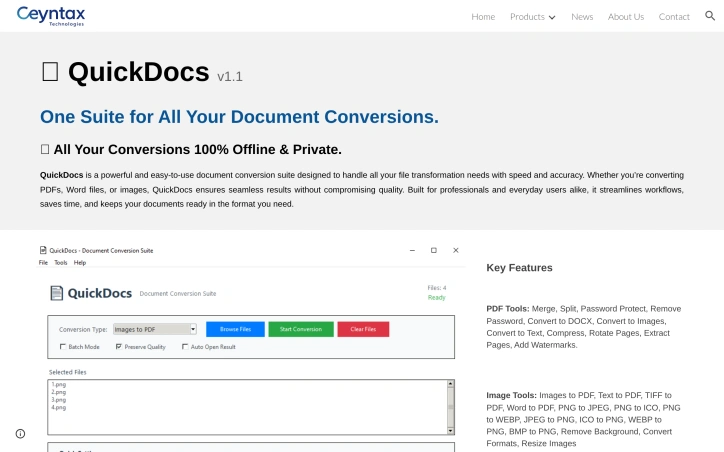
QuickDocs is a powerful and easy-to-use document conversion suite designed to handle all your file transformation needs with speed and accuracy. Whether you’re converting PDFs, Word files, or images, QuickDocs ensures seamless results without compromising quality. Built for professionals and everyday users alike, it streamlines workflows, saves time, and keeps your documents ready in the format you need.
AI Overview
AI-generatedDigital clutter often hides in folders scattered with PDFs, image files, and legacy Office documents that need quick reshaping without exposing them to the open web. QuickDocs tackles that friction head-on by packaging an offline conversion studio into a single Windows download. Mid-sized firm admins, freelancers switching between client formats, and privacy-conscious home users looking to avoid cloud uploads will find a straightforward answer to that everyday grind.
The suite’s primary differentiator is its insistence on on-device processing. Every merge, split, or background removal happens locally, eliminating the latency and compliance unease that accompany browser-based converters. Equally arresting is the breadth of tasks layered beneath an interface that makes no attempt to dazzle—you add a file, pick a transformation, and let the program quietly finish the job. No pop-up upsells, no sign-in preamble.
PDF handling carries the heaviest load. From password-locking sensitive reports to dissecting hundred-page epubs into single-topic chapters, the toolkit covers eighteen discrete manipulations including watermarking and high-ratio compression that keeps print fidelity intact. Image chores are handled with equal precision: scan a stack of PNG screenshots into one compact PDF, crank a presentation ICO down to a 32-pixel favicon, or strip the backdrop from a product photo without opening a second application. All file-type switches—whether TEXT-to-PDF or WEBP-to-JPEG—run through the same modal, reducing the learning curve to essentially zero.
CeyNTAX keeps pricing silent on the public page; the download link is unqualified, suggesting that the distribution model is either a free tier or a simple try-before-buy scheme. Until the company clarifies monetization, the only cost to the user is local disk space and the few moments it takes to decide whether this no-internet, no-nonsense engine earns a permanent spot in the taskbar.
Founder Diary
DevlogThe maker hasn't posted a diary entry yet.
Key Features
Offline File Suite
operates entirely on Windows with no cloud uploads required
PDF Manipulation Engine
eighteen discrete transformations including merge, split, password-lock and watermark
Image Toolkit
combines PNG-to-PDF export, favicon generation, and background removal in one modal
Zero Learning Curve
single-file drag-and-drop and modal-based format switching
Local Processing Core
no internet latency and no external server exposure
Clean Interface Policy
no pop-ups, upsells, or forced sign-ins
Use Cases
-
1
Mid-sized firm admins
quickly secure and repackage PDF reports while meeting internal compliance policies
-
2
Freelancers
reshuffle client deliverables between formats without uploading sensitive client data
-
3
Privacy-conscious home users
convert files without adding documents to public converter services
-
4
Windows power users
maintain a permanent taskbar presence for rapid, offline transformations
FAQ
Is QuickDocs entirely offline and secure for confidential documents? ▾
What file types can QuickDocs convert or manipulate? ▾
Do I need to create an account or pay upfront? ▾
Will QuickDocs run on a Mac or Linux machine? ▾
Tech Stack & Tags
Discussion
No comments yet — be the first!
Join the conversation — sign up to comment.
Sign up freeCommunity Support
Boost this project on Sell With boost
Meet the Founder

"Founder @ Ceyntax Technologies. Building trading engines, AI surveillance, Smart media players &..."
More by Dushshantha R.


More in PDF Editor
CropItFast
I built CropItFast because I was tired of clunky...

PDF Redaction
We built this because companies were sending sen...

SimpliConvert
We built SimpliConvert to solve the frustration...

HEICPDF.TO
I built HEICPDF.TO to solve the problem of incom...

Toolmatic
We built Toolmatic to give professionals and dev...
PdfCompare
I built PdfCompare to help legal teams, auditors...