File Walk

- No match
Machine translation — the English original is authoritative.
The Story
Smart Organization • Duplicate Detection • Lightning-Fast Search
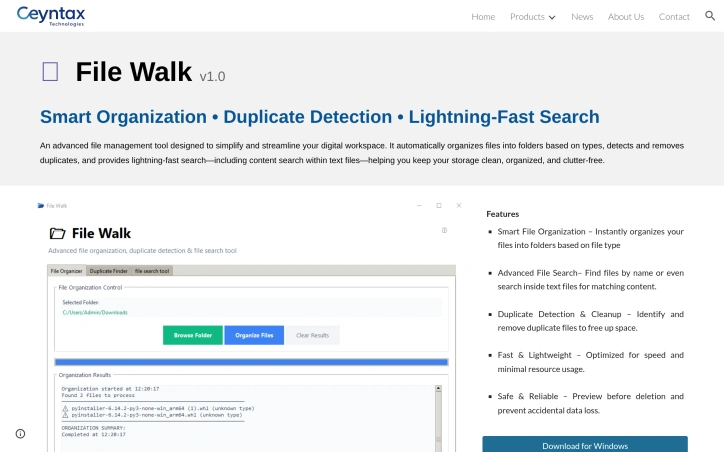
An advanced file management tool designed to simplify and streamline your digital workspace. It automatically organizes files into folders based on types, detects and removes duplicates, and provides lightning-fast search—including content search within text files—helping you keep your storage clean, organized, and clutter-free.
AI Overview
AI-generatedDigital clutter has become a persistent headache for Windows users managing large file collections. File Walk tackles this problem directly by automating the tedious work of organizing and maintaining a file system. The tool targets anyone dealing with disorganized directories—whether corporate users with sprawling shared drives or individual contributors managing personal projects—who lack the time or patience to manually sort through thousands of files.
The product centers on three core capabilities. First, it automatically categorizes files into folders by type, eliminating the manual labor of creating sensible directory structures. Second, it identifies and removes duplicate files, a feature that resonates with storage-conscious users facing bloated drives. Third, it offers a search functionality that goes beyond simple filename matching to scan the contents of text files, enabling users to locate information buried within documents rather than just matching filenames.
What distinguishes File Walk from basic file explorers is its integrated approach—combining organization, deduplication, and search into a single tool rather than requiring users to juggle separate utilities. The emphasis on preview-before-deletion and safeguards against accidental data loss addresses a real friction point in file management tools, where destructive operations carry significant risk.
The stated focus on lightweight performance and minimal resource consumption reflects a practical design philosophy. Many enterprise tools bloat over time, consuming memory and slowing systems; a tool explicitly optimized for speed positions itself as an alternative to heavier solutions. The Windows-only availability currently limits its addressable market, though this reflects deliberate scoping rather than technical constraint.
File Walk targets the pragmatic end of the market—users who value straightforward functionality over polished interfaces. There is no mention of cloud integration, collaboration features, or advanced metadata handling, which places File Walk squarely in the standalone utility category rather than the broader workspace management space.
Without published pricing information from the available materials, the business model is not disclosed. However, "Download for Windows" suggests either a paid download or freemium structure. The product has been tested and reviewed by Andrei Verdeanu, though specific details of that evaluation are unavailable.
For users drowning in file clutter and seeking rapid restoration of order without extensive configuration, File Walk delivers a focused toolkit built around essential functions. Success depends on the reliability of its automation and the robustness of its safeguards—aspects that require hands-on evaluation to fully assess.
Founder Diary
DevlogThe maker hasn't posted a diary entry yet.
Key Features
Automatic Categorization
Automatically organizes files into folders by type without manual setup.
Duplicate Removal
Identifies and removes duplicate files to free up storage space.
Content Search
Scans inside text files to locate information beyond simple filename matching.
Safe Deletion
Previews files before deletion with safeguards against accidental data loss.
Lightweight Performance
Optimized for speed with minimal resource consumption.
Use Cases
-
1
Corporate Users
IT teams managing large shared drives across enterprise networks.
-
2
Individual Contributors
Personal project managers with disorganized file systems lacking time to manually organize.
-
3
Storage-Conscious Users
Anyone facing bloated drives who wants to reclaim disk space efficiently.
FAQ
What makes File Walk different from Windows File Explorer? ▾
Is it safe to delete files with File Walk? ▾
Does File Walk slow down my computer? ▾
Tech Stack & Tags
Discussion
No comments yet — be the first!
Join the conversation — sign up to comment.
Sign up freeCommunity Support
Boost this project on Sell With boost
Meet the Founder

"Founder @ Ceyntax Technologies. Building trading engines, AI surveillance, Smart media players &..."
More by Dushshantha R.

Page Walker
Read with Ease, Browse with Comfort. Page Wa...
Schedio Smart Audio Player
Enjoy your music with features that go beyond a...

Sentinel High-performance surveillance System
Turn webcams and IP cameras into real-time, AI-d...

T9 Trading Signals
T9 Trading Signal is a simple, user-friendly And...
More in File storage and sharing apps

X-Streamify
X-Streamify is a private digital vault that brin...
Smart Renamer
A few months ago, I was stuck at a café with onl...

DropAI.zone
We built DropAI to solve the friction of sharing...

Transfereko
I built Transfereko to make secure file sharing...
Zency - Smart Document Manager
I built Zency to securely manage personal files...
SendNow
We built SendNow because financial professionals...