
Smart Renamer
- No match
Machine translation — the English original is authoritative.
The Story
A few months ago, I was stuck at a café with only 30 minutes to finish a client project. I needed to rename about 20 files in a specific sequence (Project-01, Project-02...) on my iPhone. I thought, “Surely there’s a simple app for this.”
I was wrong. The existing tools were either massive, subscription-heavy "file managers" or they didn't even support basic sequential numbering. I even tried hacking together a script in Pythonista, but the friction was too high for a quick task.
I went home that day and started building SmartRenamer.
AI Overview
AI-generatedBatch file renaming on iOS has long been a gap in the ecosystem, left to either feature-bloated subscription file managers or overly simplistic tools that lack essential capabilities. Smart Renamer addresses this directly, offering a focused batch renaming utility designed for professionals and power users working on iOS 17.0 and later.
The product emerged from genuine friction—the founder needed to rename sequential files on an iPhone during a quick client project and found no suitable tool existed. Rather than build another everything-to-everyone file manager, the team created something purpose-built: a dedicated renaming engine with a practical feature set.
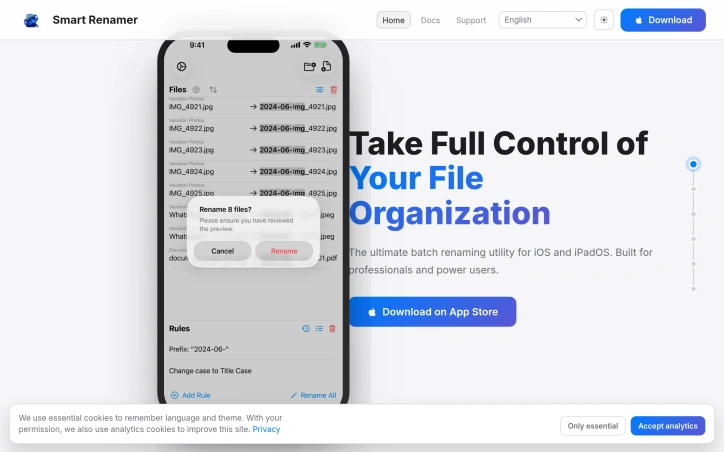
What distinguishes Smart Renamer is its scope. The core functionality covers the operations power users actually need: search and replace, insertion and deletion of characters, prefix and suffix handling, and extension management. Beyond these basics, the app provides more sophisticated capabilities including sequential numbering with custom padding and intelligent grouping that automatically resets counters, dynamic variable injection for metadata-based transformations, regex pattern matching for complex rule creation, and preset management for reusable configurations.
The interface prioritizes control without friction. Users preview all changes before committing them, with highlighted insertions and deletions showing exactly what will transform. If a change doesn't work as intended, undo is instant. For one-off adjustments that don't fit batch rules, users can edit individual filenames manually while keeping automated rules in place for the rest—a thoughtful balance between power and flexibility.
Additional features include full operation history, making it straightforward to trace what changed and when, and specialized transformations for advanced workflows. The combination of batch processing, manual override capability, and undo functionality reflects understanding that file renaming often requires both automation and human judgment.
Notably, the product explicitly positions itself as the definitive tool in its category—"the last file renamer you'll ever need." This confidence is reflected in the focused feature set rather than scope creep. No pricing or subscription model is mentioned in the available information, leaving the commercial structure unspecified.
For iOS users who regularly manage files and need reliable bulk renaming without the overhead of general-purpose file managers, Smart Renamer offers a genuinely useful solution to a specific problem that has remained underserved on Apple's platform.
Founder Diary
DevlogThe maker hasn't posted a diary entry yet.
Key Features
Batch File Renaming
Rename multiple files simultaneously using automation rules on iOS
Search and Replace
Find and replace text patterns across filenames
Sequential Numbering
Apply custom-padded numbers with intelligent counter reset
Regex Pattern Matching
Create complex renaming rules using regular expressions
Preview and Undo
See all changes before applying with instant undo capability
Operation History
Track complete record of all file renaming changes
Use Cases
-
1
Power Users on iOS
Manage multiple files with sophisticated rules without general-purpose file manager bloat
-
2
Mobile Professional Work
Quickly batch rename sequential files during client projects directly on iPhone
-
3
Advanced Workflows
Apply regex patterns and metadata-based transformations for complex renaming needs
-
4
iOS File Managers
Perform dedicated batch renaming without switching between multiple apps
FAQ
Is there a batch file renamer for iPhone? ▾
Can I preview changes before renaming? ▾
Does it support complex patterns like regex? ▾
What if I only need to rename a few files? ▾
Founder's Resources
Discussion
No comments yet — be the first!
Join the conversation — sign up to comment.
Sign up freeCommunity Support
Boost this project on Sell With boost
Meet the Founder

More in File storage and sharing apps

X-Streamify
X-Streamify is a private digital vault that brin...

DropAI.zone
We built DropAI to solve the friction of sharing...

File Walk
Smart Organization • Duplicate Detection • Light...

Transfereko
I built Transfereko to make secure file sharing...
Zency - Smart Document Manager
I built Zency to securely manage personal files...
SendNow
We built SendNow because financial professionals...