FileMason
- No match
Machine translation — the English original is authoritative.
The Story
FileMason is a smart file organizer for macOS that keeps your Mac tidy automatically. Create visual rules using intuitive dropdown menus — no coding required. It monitors your folders in real time and organizes new files according to your rules. Features include 11 predefined templates, 14 condition types (name, extension, type, size, date, Finder tag), 9 action types (move, copy, rename, tag, compress, trash), dynamic renaming with variables, full undo history, smart tracking to avoid duplicates, and menu bar access. Available in 6 languages. Requires macOS 13.0 Ventura or later.
AI Overview
AI-generatedKeeping a Mac organized requires either constant manual effort or technical prowess. FileMason aims to solve this by automating file organization through a visual, code-free interface. The tool targets macOS users who accumulate files across their systems but lack the inclination or skill to script custom solutions.
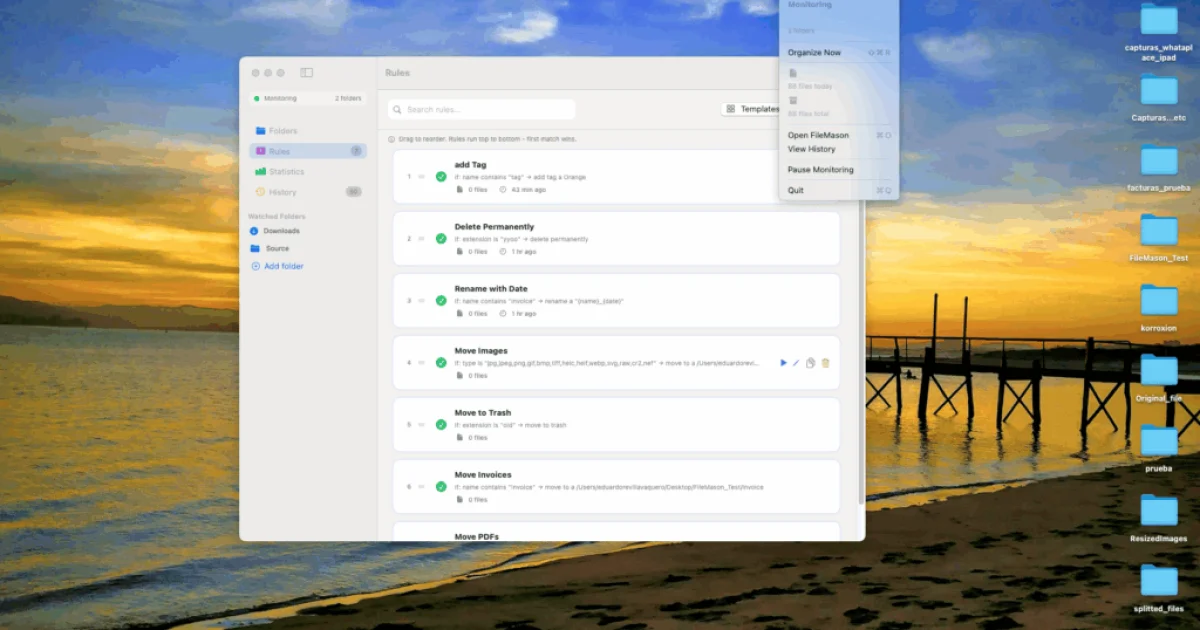
The product distinguishes itself through a visual rule builder that lets users define file organization logic without writing code. Users select conditions and actions from dropdown menus, then apply them automatically to their file system. Real-time monitoring means new files are sorted according to rules as soon as they appear, eliminating the need for manual intervention.
What sets FileMason apart is its priority system. Rules can be reordered by dragging, and the first matching rule wins, giving users fine-grained control over how files get processed. This prevents conflicts and allows for layered organization logic. The application includes smart tracking that processes each file only once, avoiding the duplicate operations that plague less thoughtful automation tools.
FileMason offers eleven pre-built templates for common scenarios like organizing screenshots, PDFs, photos, music, and documents. Users can build custom rules by choosing from fourteen condition types based on filename, extension, file type, size, creation date, modification date, and Finder tags, combined with nine action types covering move, copy, rename, tag, compress, and delete operations. The renaming functionality supports variables like {name}, {date}, {year}, {month}, and {counter}, enabling dynamic naming schemes.
Beyond automation, the application includes full undo history, allowing users to reverse any operation with a single click. A menu bar widget provides quick access without opening the main window. Language support extends to six languages: English, Spanish, German, French, Japanese, and Chinese.
The tool requires macOS 13.0 or later and is distributed through the Mac App Store. Specific pricing details aren't disclosed in available materials, though its App Store distribution positions it as a consumer-facing application. For Mac users frustrated with file clutter but uncomfortable with terminal-based automation, FileMason delivers a practical middle ground between manual organization and scripting.
Founder Diary
DevlogThe maker hasn't posted a diary entry yet.
Key Features
Visual Rule Builder
Define file organization logic without writing code using dropdown menus and selection
Priority System
Reorder rules by dragging to ensure the first matching rule applies, providing fine-grained control
Smart Tracking
Processes each file only once to avoid duplicate operations
Pre-built Templates
Includes eleven ready-made templates for organizing screenshots, PDFs, photos, music, and documents
Undo History
Full undo history allows reversal of any operation with a single click
Menu Bar Widget
Quick access to the application without opening the main window
Use Cases
-
1
macOS users with accumulated files
Those who lack the skill or inclination to write custom scripts need automated organization
-
2
Users organizing common file types
Screenshots, PDFs, and photos can be automatically sorted using pre-built templates
-
3
Frustrated Mac users
Those overwhelmed by file clutter but uncomfortable with terminal-based automation need a practical middle ground
FAQ
How do I organize files on Mac without writing code? ▾
What happens if multiple rules match the same file? ▾
Can I undo file operations in FileMason? ▾
What conditions and actions can I use for file organization? ▾
Tech Stack & Tags
Discussion
No comments yet — be the first!
Join the conversation — sign up to comment.
Sign up freeCommunity Support
Boost this project on Sell With boost
Meet the Founder

More by Eduardo Revilla Vaquero
More in File storage and sharing apps

X-Streamify
X-Streamify is a private digital vault that brin...

Smart Renamer
A few months ago, I was stuck at a café with onl...

DropAI.zone
We built DropAI to solve the friction of sharing...

File Walk
Smart Organization • Duplicate Detection • Light...

Transfereko
I built Transfereko to make secure file sharing...

Zency - Smart Document Manager
I built Zency to securely manage personal files...