
Page Walker

- No match
Machine translation — the English original is authoritative.
The Story
Read with Ease, Browse with Comfort.
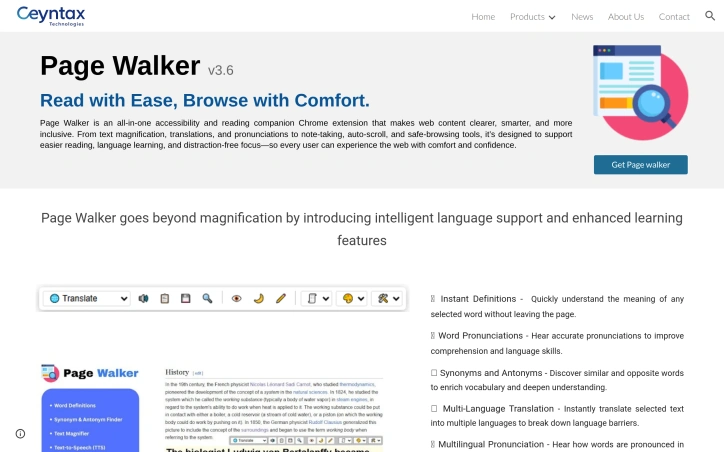
Page Walker is an all-in-one accessibility and reading companion Chrome extension that makes web content clearer, smarter, and more inclusive. From text magnification, translations, and pronunciations to note-taking, auto-scroll, and safe-browsing tools, it’s designed to support easier reading, language learning, and distraction-free focus—so every user can experience the web with comfort and confidence.
AI Overview
AI-generatedAccessibility extensions have proliferated in recent years, but few tackle the breadth of reading and learning challenges that this Chrome extension simultaneously addresses. Page Walker positions itself as a comprehensive companion for anyone struggling with text clarity, language barriers, or web-based distractions—from dyslexic users to non-native speakers to readers seeking visual comfort at odd hours.
The extension's strength lies in its ambitious feature set unified under a single interface. Rather than forcing users to juggle multiple specialized tools, it consolidates text magnification, translation, pronunciation, note-taking, and annotation capabilities into one workspace. The inclusion of OpenDyslexia font support and dyslexia-focused features demonstrates deliberate consideration of neurodivergent users, a segment often overlooked by mainstream browser tools. Dual night and day modes, grayscale toggling, and hover-based magnification all serve one principle: reducing friction between the user and readable content.
Language learners benefit from a particularly rich toolkit. Instant word definitions, pronunciation features across multiple languages, and synonym/antonym tools function as a built-in vocabulary accelerator. The ability to hear pronunciations in supported languages transforms reading from passive consumption into active learning—a meaningful advantage for ESL users or travelers navigating unfamiliar alphabets.
The safety-oriented features—threat word detection and automatic flagging of potentially harmful language—add protective browsing capabilities beyond traditional extensions. Similarly, the email extraction tool serves a practical need for users frequently collecting contact information from web pages. Auto-scroll and the built-in notepad push the extension toward distraction-free reading workflows, positioning it less as a one-off tool and more as an environment for focused, annotated browsing.
The product's ambition cuts both ways. A 12-plus feature list satisfies power users seeking an all-in-one solution but risks overwhelming users wanting just font size control. Interface design and user onboarding become critical factors; the available information doesn't clarify whether Page Walker prioritizes simplicity for casual users or depth for advanced ones.
No pricing information is disclosed, leaving uncertainty about whether this operates on a freemium model, one-time purchase, or subscription basis—a crucial detail for evaluating accessibility tool adoption decisions.
Page Walker attacks the accessibility market with breadth rather than depth, betting that consolidation appeals to a user base fatigued by installing separate tools for magnification, translation, and note-taking.
Founder Diary
DevlogThe maker hasn't posted a diary entry yet.
Key Features
Text Magnification
Adjustable font sizing with hover-based magnification for improved readability
OpenDyslexia Font Support
Specialized font and dyslexia-focused features for neurodivergent users
Translation Tools
Instant word definitions, pronunciation guides, and synonym/antonym tools across multiple languages
Dark/Light Modes
Night and day modes with grayscale toggling for visual comfort
Safety Features
Threat word detection and automatic flagging of potentially harmful language
Note-Taking
Built-in annotation system and notepad for focused, annotated browsing
Use Cases
-
1
Dyslexic Users
OpenDyslexia font and neurodivergent-focused features provide specialized support for reading and learning
-
2
Language Learners
Pronunciation guides, word definitions, and synonym tools accelerate vocabulary learning during active reading
-
3
Night Readers
Dark mode and reduced-light settings provide visual comfort for reading at unusual hours
-
4
Users with Reading Challenges
Consolidates magnification, translation, and annotation tools to reduce friction in web reading
FAQ
Does Page Walker help with dyslexia? ▾
Can Page Walker translate text? ▾
Does Page Walker have a dark mode? ▾
Can I extract emails from web pages? ▾
Tech Stack & Tags
Discussion
No comments yet — be the first!
Join the conversation — sign up to comment.
Sign up freeCommunity Support
Boost this project on Sell With boost
Meet the Founder

"Founder @ Ceyntax Technologies. Building trading engines, AI surveillance, Smart media players &..."
More by Dushshantha R.

File Walk
Smart Organization • Duplicate Detection • Light...
Schedio Smart Audio Player
Enjoy your music with features that go beyond a...

Sentinel High-performance surveillance System
Turn webcams and IP cameras into real-time, AI-d...

T9 Trading Signals
T9 Trading Signal is a simple, user-friendly And...
More in Chrome Extensions

SFM - Surface Filter Mode
Our Surface Filter Mode (SFM) plugin enhances we...

LexiLint
LexiLint started from a simple frustration: ever...

How Much Does It Cost? - Know what things really cost. in dollars and lattes
How Much Does It Cost? — The Chrome extension th...
Tabme
I'm Oleg, the creator of Tabme. A few years ago...

subtitle.im
subtitle.im is an all-in-one YouTube Chrome exte...

Sidenote
I kept catching AI summaries that were confident...