
Sidenote
- No match
Machine translation — the English original is authoritative.
The Story
I kept catching AI summaries that were confidently wrong.
Not obviously wrong, which would be fine. Wrong in the quiet way: a plausible sentence about a contract clause or a runbook step that was never actually in the document. Verifying it took longer than just reading the thing myself, so the summary was worth nothing.
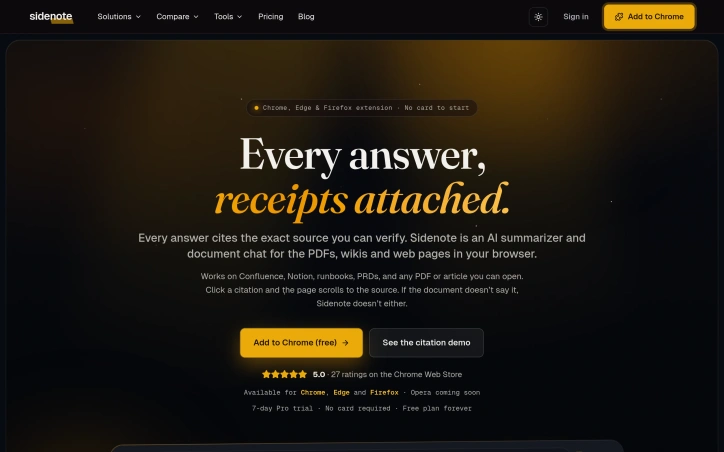
Sidenote is the opposite instinct. It sits in a side panel next to whatever you're reading (a PDF, a Confluence page, Notion, SharePoint, Google Docs, some random article) and summarizes it, explains it, or answers questions about it. The difference is that every claim has to quote the passage it came from. The server checks each citation against the text actually retrieved from your document and drops anything it can't prove. Click a citation and the page scrolls to that exact sentence and highlights it. If the answer isn't in the document, it tells you that instead of guessing.
That costs a little fluency. I think it's a good trade: an answer you can check in one click beats a polished one you have to take on faith.
Free to start, works in Chrome, Edge and Firefox, and your documents are never used to train models. Built and run solo in the UK.
I'd genuinely like to hear where it breaks for you.
AI Overview
AI-generatedHallucinating AI summaries plague the current generation of document tools, where plausible-sounding claims bypass verification until the reader discovers they were never in the source material. Sidenote tackles this through a forced citation model: every answer the AI generates must quote directly from the document being analyzed, and the server validates each citation against the actual retrieved text. Wrong claims get dropped. Citations become clickable, scrolling the document to highlight the exact passage. This transforms summarization from something requiring skeptical re-reading into a tool that actually compresses reading time.
The product works as a browser extension across Chrome, Edge, and Firefox, sitting in a side panel next to whatever document the user is reading. It handles the document ecosystem comprehensively: Confluence pages, PDFs with OCR support, Google Docs, Notion, SharePoint, GitHub READMEs, arXiv papers, Slack canvases, and generic web articles. The core features cover typical summarization needs: text summaries, chat interfaces, explanations, glossary generation, and semantic search within documents. Users can highlight passages, attach notes, export outputs as Markdown, HTML, or PDF, and organize their document library with tags and starred collections.
The product positions itself for internal knowledge work first, targeting users who spend time with runbooks, specifications, wikis, and technical documentation where accuracy matters more than polish. This focus is reflected in the data architecture: embeddings live in a UK region with row-level security policies isolating documents per user account. Users choose between two retention modes for each document. Store mode keeps documents indexed for the account lifetime, while Discard purges everything within 24 hours. The commitment to data privacy is explicit: documents are never used to train models.
What distinguishes Sidenote is its acceptance of friction as a feature. The citation requirement means summaries trade some fluency for verifiability, a calculation that resolves a real reliability problem other summarization tools avoid through opacity. The product launches free, remains a solo project built in the UK, and emphasizes shipped features over roadmap promises. For document-heavy work where verification time often exceeds reading time, this tradeoff addresses a genuine gap in the current landscape.
Founder Diary
DevlogThe maker hasn't posted a diary entry yet.
Key Features
Forced Citations
Every AI answer must quote directly from the source document, preventing hallucinated claims.
Citation Validation
The server validates each citation against actual retrieved text and drops incorrect claims.
Clickable References
Citations are interactive and scroll to highlight the exact passage in the document.
Multi-Format Support
Works with Confluence, PDFs with OCR, Google Docs, Notion, SharePoint, GitHub, arXiv, Slack, and web articles.
Comprehensive Analysis Tools
Provides text summaries, chat interfaces, explanations, glossary generation, and semantic search within documents.
Use Cases
-
1
Technical Documentation Teams
Organizations managing runbooks, specifications, and wikis where accuracy verification is essential.
-
2
Internal Knowledge Work
Users working with company documentation and technical wikis who need reliable summaries without re-reading.
-
3
Research and Academic Review
Researchers analyzing arXiv papers and technical documents who need verifiable summaries.
-
4
Privacy-Focused Knowledge Management
Teams requiring row-level document security and retention control for sensitive internal documentation.
FAQ
Does Sidenote use my documents to train AI models? ▾
What happens to my documents after analysis? ▾
How does Sidenote prevent AI hallucinations? ▾
Where are my documents stored? ▾
Pricing
Sidenote launches free and emphasizes shipped features over roadmap promises.
Tech Stack & Tags
Discussion
No comments yet — be the first!
Join the conversation — sign up to comment.
Sign up freeCommunity Support
Boost this project on Sell With boost
Meet the Founder

More in Chrome Extensions

Page Walker
Read with Ease, Browse with Comfort. Page Wa...

SFM - Surface Filter Mode
Our Surface Filter Mode (SFM) plugin enhances we...

How Much Does It Cost? - Know what things really cost. in dollars and lattes
How Much Does It Cost? — The Chrome extension th...

LexiLint
LexiLint started from a simple frustration: ever...
Tabme
I'm Oleg, the creator of Tabme. A few years ago...

subtitle.im
subtitle.im manages existing YouTube captions in...