

Dushshantha R.
Founder @ Ceyntax Technologies. Building trading engines, AI surveillance, Smart media players & utility software Obsessed with performance
7
Launches
26
Followers
80
Upvotes
🔥 3
Day streak
Achievements 10
All badgesBadge Bearer
Complete Profile
First Launch
Upvote Pioneer
First Follower
Serial Maker
Launch Machine
Hot Streak
Week Warrior
Influential Maker
Products by Dushshantha
7 total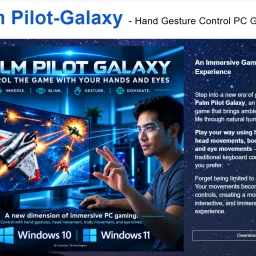
Palm Pilot-Galaxy Gesture control PC game
Games
Gesture-based control has remained largely confined to niche applications, but Palm Pilot Galaxy challenges this limitation by bringing natural human movement into mainstream PC gaming. The game transforms hand gestures, head movements, eye tracking, and body positions into direct game inputs, eliminating the intermediary of traditional controllers and keyboards. The product targets players seeking a more embodied gaming experience. Rather than treating input devices as abstractions between intention and action, Palm Pilot Galaxy positions the body as the control mechanism itself. This appeal extends beyond casual users to anyone interested in accessibility, hand-free interaction, or simply a departure from conventional gaming input. The core game itself is straightforward: a space-rescue narrative where players pilot a spacecraft to retrieve crew members from destroyed pods and retrieve a station commander. The gameplay centers on dodging hazards, destroying enemies, and managing object collection under pressure. This familiar arcade-style structure serves as the testing ground for the gesture recognition technology rather than demanding mechanical depth. What distinguishes Palm Pilot Galaxy is the breadth of its control modes. Eight distinct options allow players to isolate hand control, combine eye tracking with head movement, integrate palm gestures with lean sensing, or fall back to traditional keyboard input. This flexibility acknowledges that not all players have access to high-quality camera hardware or the physical capability to perform certain movements reliably. The ability to switch modes mid-game provides crucial accessibility and reduces friction across different player contexts. The customization layer runs deep. Players configure pause detection timeouts, select from multiple connected cameras, and tune spacecraft handling parameters including turn speed, top speed, and braking intensity. These settings address the reality that gesture recognition performance varies significantly across hardware configurations and physical environments. Technical specifications indicate a modest footprint at 235 megabytes for version 1.1.0. The title operates on a freemium model with both free and paid versions available, expanding its addressable market by lowering initial barriers to trial. The global leaderboard provides social motivation through competitive ranking, offering asynchronous competition that suits a game centered on alternative input methods. Real-time multiplayer coordination would introduce technical friction unnecessary for the core experience. Palm Pilot Galaxy occupies an intentional market position: not attempting to redefine the spaceship-piloting genre, but rather demonstrating that gesture recognition can sustain coherent gameplay sessions with meaningful player agency and broad accessibility across different hardware configurations.

T9 Trading Signals
Investing
Mobile trading often forces traders into a difficult choice: spend hours in front of a screen analyzing charts, or miss opportunities entirely. T9 Trading Signals addresses this by automating the analysis process through its Chart Walker Analysis Engine, delivering real-time trade alerts directly to Android devices. The app targets a broad audience spanning from novice traders taking their first steps in the market to experienced professionals seeking a faster decision-making framework. The core value proposition is straightforward—remove the time burden that traditionally accompanies active trading while maintaining the clarity required for confident entry and exit points. What sets T9 apart is its focus on mobile accessibility without sacrificing analytical depth. Rather than offering raw data or requiring traders to interpret complex charts themselves, the app delivers actionable signals complete with predefined entry points, stop-loss levels, and take-profit targets. This removes the guesswork typically involved in risk management and position sizing, allowing traders to move from alert to execution quickly. The Chart Walker Analysis Engine handles the pattern recognition work that typically consumes hours of manual chart analysis, automatically surfacing opportunities through real-time alerts. By taking this burden off the trader's shoulders, the app enables engagement with markets without demanding constant attention. The interface emphasizes simplicity and usability. Traders don't need advanced technical knowledge or extensive time learning complicated charting tools. The ready-to-use signals, combined with clear risk management parameters, create a system where beginners can operate confidently while experienced traders can potentially deploy capital more efficiently. For traders frustrated by the time investment required in traditional analysis, or those who lack the screen time to actively monitor markets throughout the day, T9 addresses a real friction point in modern trading. The mobile-first approach recognizes that today's traders expect access and decision-making power from their phones, not just their desktops. Whether execution speed and signal quality justify adoption ultimately depends on real-world performance, but the product clearly understands its market and the specific pain points it targets.

QuickDocs
Pdf-editor
Digital clutter often hides in folders scattered with PDFs, image files, and legacy Office documents that need quick reshaping without exposing them to the open web. QuickDocs tackles that friction head-on by packaging an offline conversion studio into a single Windows download. Mid-sized firm admins, freelancers switching between client formats, and privacy-conscious home users looking to avoid cloud uploads will find a straightforward answer to that everyday grind. The suite’s primary differentiator is its insistence on on-device processing. Every merge, split, or background removal happens locally, eliminating the latency and compliance unease that accompany browser-based converters. Equally arresting is the breadth of tasks layered beneath an interface that makes no attempt to dazzle—you add a file, pick a transformation, and let the program quietly finish the job. No pop-up upsells, no sign-in preamble. PDF handling carries the heaviest load. From password-locking sensitive reports to dissecting hundred-page epubs into single-topic chapters, the toolkit covers eighteen discrete manipulations including watermarking and high-ratio compression that keeps print fidelity intact. Image chores are handled with equal precision: scan a stack of PNG screenshots into one compact PDF, crank a presentation ICO down to a 32-pixel favicon, or strip the backdrop from a product photo without opening a second application. All file-type switches—whether TEXT-to-PDF or WEBP-to-JPEG—run through the same modal, reducing the learning curve to essentially zero. CeyNTAX keeps pricing silent on the public page; the download link is unqualified, suggesting that the distribution model is either a free tier or a simple try-before-buy scheme. Until the company clarifies monetization, the only cost to the user is local disk space and the few moments it takes to decide whether this no-internet, no-nonsense engine earns a permanent spot in the taskbar.

File Walk
File-storage-and-sharing-apps
Digital clutter has become a persistent headache for Windows users managing large file collections. File Walk tackles this problem directly by automating the tedious work of organizing and maintaining a file system. The tool targets anyone dealing with disorganized directories—whether corporate users with sprawling shared drives or individual contributors managing personal projects—who lack the time or patience to manually sort through thousands of files. The product centers on three core capabilities. First, it automatically categorizes files into folders by type, eliminating the manual labor of creating sensible directory structures. Second, it identifies and removes duplicate files, a feature that resonates with storage-conscious users facing bloated drives. Third, it offers a search functionality that goes beyond simple filename matching to scan the contents of text files, enabling users to locate information buried within documents rather than just matching filenames. What distinguishes File Walk from basic file explorers is its integrated approach—combining organization, deduplication, and search into a single tool rather than requiring users to juggle separate utilities. The emphasis on preview-before-deletion and safeguards against accidental data loss addresses a real friction point in file management tools, where destructive operations carry significant risk. The stated focus on lightweight performance and minimal resource consumption reflects a practical design philosophy. Many enterprise tools bloat over time, consuming memory and slowing systems; a tool explicitly optimized for speed positions itself as an alternative to heavier solutions. The Windows-only availability currently limits its addressable market, though this reflects deliberate scoping rather than technical constraint. File Walk targets the pragmatic end of the market—users who value straightforward functionality over polished interfaces. There is no mention of cloud integration, collaboration features, or advanced metadata handling, which places File Walk squarely in the standalone utility category rather than the broader workspace management space. Without published pricing information from the available materials, the business model is not disclosed. However, "Download for Windows" suggests either a paid download or freemium structure. The product has been tested and reviewed by Andrei Verdeanu, though specific details of that evaluation are unavailable. For users drowning in file clutter and seeking rapid restoration of order without extensive configuration, File Walk delivers a focused toolkit built around essential functions. Success depends on the reliability of its automation and the robustness of its safeguards—aspects that require hands-on evaluation to fully assess.

Page Walker
Chrome-extensions
Accessibility extensions have proliferated in recent years, but few tackle the breadth of reading and learning challenges that this Chrome extension simultaneously addresses. Page Walker positions itself as a comprehensive companion for anyone struggling with text clarity, language barriers, or web-based distractions—from dyslexic users to non-native speakers to readers seeking visual comfort at odd hours. The extension's strength lies in its ambitious feature set unified under a single interface. Rather than forcing users to juggle multiple specialized tools, it consolidates text magnification, translation, pronunciation, note-taking, and annotation capabilities into one workspace. The inclusion of OpenDyslexia font support and dyslexia-focused features demonstrates deliberate consideration of neurodivergent users, a segment often overlooked by mainstream browser tools. Dual night and day modes, grayscale toggling, and hover-based magnification all serve one principle: reducing friction between the user and readable content. Language learners benefit from a particularly rich toolkit. Instant word definitions, pronunciation features across multiple languages, and synonym/antonym tools function as a built-in vocabulary accelerator. The ability to hear pronunciations in supported languages transforms reading from passive consumption into active learning—a meaningful advantage for ESL users or travelers navigating unfamiliar alphabets. The safety-oriented features—threat word detection and automatic flagging of potentially harmful language—add protective browsing capabilities beyond traditional extensions. Similarly, the email extraction tool serves a practical need for users frequently collecting contact information from web pages. Auto-scroll and the built-in notepad push the extension toward distraction-free reading workflows, positioning it less as a one-off tool and more as an environment for focused, annotated browsing. The product's ambition cuts both ways. A 12-plus feature list satisfies power users seeking an all-in-one solution but risks overwhelming users wanting just font size control. Interface design and user onboarding become critical factors; the available information doesn't clarify whether Page Walker prioritizes simplicity for casual users or depth for advanced ones. No pricing information is disclosed, leaving uncertainty about whether this operates on a freemium model, one-time purchase, or subscription basis—a crucial detail for evaluating accessibility tool adoption decisions. Page Walker attacks the accessibility market with breadth rather than depth, betting that consolidation appeals to a user base fatigued by installing separate tools for magnification, translation, and note-taking.
Sentinel High-performance surveillance System
Security-software
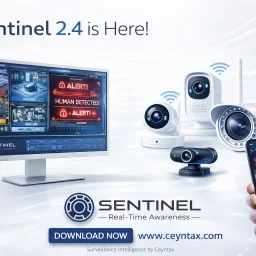
The headaches of outfitting a home or small business with enterprise-grade surveillance come down to cost, complexity, and false alarms. Sentinel neutralises all three by turning cheap webcams and IP cameras you already own into rule-based AI sentinels—no bloated NVR hardware, no recurring cloud fees, just a downloadable application that runs locally on Windows PCs. The sweet spot sits with residential caregivers, solo security managers, and lean startups that need hospital-grade vigilance without hospital-grade budgets. Where competing products flood users with generic motion bursts, Sentinel narrows the signal to highly specific events—falls, head slumps, motionless stretches, waving gestures, and even questionable neck angles—then issues instant desktop or phone alerts. Layer on top a zone painter and a human-count gate, and the software becomes context-aware, ignoring pets, rustling trees, and passing cars unless they step into a delineated area or violate a crowd count you set. Stand-out depth shows in the Care Assistance module. Fall detection and neck posture tracking are surgical counters to the two biggest risks in aged or desk-bound populations: sudden drop and long-term ergonomic injury. Add posture classification—standing, sitting, leaning, lying—and automated inactivity timers, and you have a system that doubles as a remote wellbeing nurse. These rules coexist with standard perimeter functions such as vehicle, animal, fire, face, and licence-plate recognition, each toggleable so a nursery play area can watch only for toppled toddlers while the loading dock next door worries exclusively about forklifts and tailgate thefts. Version 2.5 released April 2026 refines speed; early builds handle multiple 1080p streams without the GPU load associated with most AI diagnostics. Download the trial gratis straight from Ceynax’s site. When you decide to keep it, a one-time activation key ends the nagging—no subscriptions, no hidden camera limits, just an honest perpetual licence.
Schedio Smart Audio Player
Scheduling-software
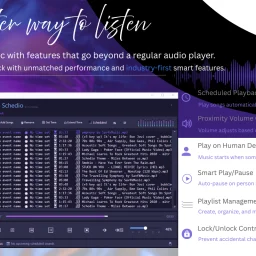
Automating audio playback based on presence and proximity, Schedio positions itself as an intelligent upgrade to standard media players for Windows users who want hands-free control over their listening environment. The application targets two distinct use cases: event organizers and presenters who need scheduled playback, and home or workspace users seeking ambient music that responds dynamically to occupancy. The product's core distinction lies in its sensor-driven features. Rather than requiring manual volume adjustments or playback commands, Schedio detects nearby movement via webcam and alters audio behavior accordingly. The proximity volume function continuously adjusts levels based on distance—playing softer as listeners approach and louder as they move away. This approach eliminates constant volume tweaking and creates a responsive listening experience that adapts in real time. The human detection feature automates play and pause entirely, starting playback when movement is detected and stopping when a space empties. For events or presentations, the scheduled playback capability lets users queue content to activate at predetermined times without oversight. The feature set extends beyond these core functions. Smart play/pause works as a persistent version of human detection, automatically resuming music when someone reenters a space. Playlist management provides standard organizational tools, while lock/unlock controls prevent accidental setting changes—useful in shared or public environments. An "extend scheduled time" feature allows single-click adjustments to ongoing playback, and the company emphasizes a professional audio engine tuned for clarity and depth. Schedio operates as a lightweight desktop application rather than a cloud-dependent service. It requires Windows 10 or 11 and needs internet connectivity only for initial setup; afterward, it functions entirely offline. A webcam and sound card are the only hardware prerequisites beyond the operating system itself. The product occupies a narrow but potentially valuable niche. Most audio players prioritize music discovery or library management. Schedio instead optimizes for environmental control and automation, making it suited for retail spaces, hospitality venues, presentation rooms, or homes where occupancy-responsive audio adds value. The execution strategy—offline-first architecture, minimal system overhead—suggests practical deployment considerations. What remains unclear from available information is pricing structure, licensing model, and whether the application serves individual consumers or targets businesses. The feature sophistication implies either paid or freemium positioning, though no details appear publicly documented.