#browser-based Startups & Tools
Discover the best browser-based startups, tools, and products on SellWithBoost.

Online utilities have long been plagued by a trust problem. Users seeking a quick file conversion or data formatting tool are often funneled through ad gauntlets, pressured to create accounts, or asked to upload sensitive files to servers of uncertain security. Tabreon takes a different approach, offering a collection of 56 free, browser-based tools designed for developers, creators, and everyday digital work. The platform's core differentiator is transparency around data privacy. The majority of Tabreon's tools process information directly in the user's browser, leaving files and text untouched on the device. For the small handful of tools that do require server processing—image format conversions and animated GIF handling—the tool pages explicitly disclose this requirement rather than pretending everything runs locally. Users can independently verify local processing by inspecting network traffic through browser developer tools, a verification method Tabreon explicitly encourages. Across six tool categories, Tabreon addresses common digital work tasks: text manipulation, developer utilities, QR code generation, image resizing and compression, PDF operations, and general utilities. The developer category alone spans 22 tools, including JSON formatters, UUID generators, hash calculators, Base64 tools, and JWT utilities. This breadth serves multiple user groups simultaneously without forcing unnecessary complexity on users who need only one or two specific tools. The platform's business model reflects its builder's philosophy. Core tools remain permanently free, with no account creation barrier. The site's advertising is visibly separated from content rather than intrusively placed, and the lack of heavy server infrastructure for client-side processing keeps hosting costs manageable enough to sustain a free offering. Built as a solo project using Next.js and Cloudflare Workers, Tabreon demonstrates that useful software does not require venture capital, user tracking, or aggressive monetization. For users fatigued by the exploitative practices common in the free online tools space, this collection of straightforward utilities represents a refreshing alternative. The platform's commitment to honest disclosure about what data leaves the device and what remains local sets a standard worth considering in an industry often defined by opacity.

Privacy-conscious content creators have long faced an uncomfortable choice when using online media editing tools: upload their work to remote servers, risking data exposure, or settle for desktop software limited by their system's resources. Voxora AI eliminates that trade-off by bringing a comprehensive suite of 26 tools directly into the browser, with all processing happening on the user's device and zero data sent to servers. The core innovation is architectural. The entire platform runs on client-side WebAssembly, meaning compression, silence removal, format conversion, and other processing tasks execute directly on a user's CPU or GPU. This delivers practical benefits beyond privacy: creators can work offline once the tools load, avoid upload and download delays, and retain complete control over their media throughout editing. The feature set addresses routine media workflows comprehensively. Audio professionals get silence removal with visual waveform controls and batch export in multiple formats. Video and audio compression leverage FFmpeg via WebAssembly to reduce file sizes by up to 90 percent without quality degradation. The platform extracts audio from multiple video formats, converts PDFs to Word and EPUB documents, optimizes images, generates QR codes, and includes developer utilities. The breadth spans six categories and appeals to podcasters, video editors, and anyone handling media files regularly. What distinguishes Voxora from existing cloud-based editors is not novelty—tools like Kapwing and Clipchamp offer comparable features deployed to servers. Rather, the distinction lies in rejecting server-side processing entirely. This appeals to professionals bound by data protection regulations, creators uncomfortable with standard SaaS privacy policies, and anyone working with sensitive content who treats local processing as non-negotiable. The platform is entirely free with no apparent monetization mechanism. The founder's stated motivation—removing the privacy sacrifice inherent in online tooling—suggests this is positioned as a genuine alternative rather than a freemium funnel toward paid tiers. For budget-conscious creators who prioritize privacy and accept WebAssembly's performance ceiling, Voxora delivers real utility. The realistic limitation is performance compared to dedicated desktop applications or cloud services leveraging server-grade hardware. But for routine media editing, silence removal, and format conversion, the privacy guarantee and zero cost make a direct pitch to a specific audience: those for whom privacy is not a secondary concern but a primary requirement.
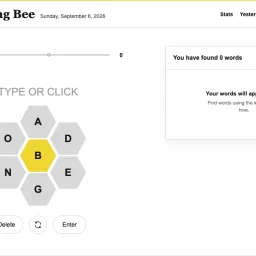
For fans of New York Times Spelling Bee seeking a free, browser-based experience, this independent recreation delivers the daily puzzle experience without barriers. Created by someone passionate about the game itself, the site targets word enthusiasts who want to play regularly, track progress, and explore puzzle archives without friction. The product distinguishes itself through fundamental accessibility. Offering free access to daily puzzles, the site includes streak tracking that rewards consistent engagement, an archive enabling players to revisit any available 2026 puzzle, and progress that persists directly in the browser. These features address practical needs: proving motivation through visible streaks, enabling practice through historical puzzle access, and removing setup friction through persistent local storage. The core gameplay mechanics mirror Spelling Bee's elegant system. Players construct words using seven available letters, with the center letter mandatory in every solution. Words require at least four letters to count, with longer words earning one point per letter. The scoring structure introduces strategic depth through pangram bonuses—identifying words using all seven letters awards seven bonus points, incentivizing players to exhaust the available space rather than settling for obvious solutions. The site supports learning through embedded resources. Editorial guides cover what Spelling Bee is, how to reach Genius rank, and how to interpret answers and puzzle data. A complete rules reference and solving guide demystify gameplay for newcomers, transforming the product from simple daily diversion into a skill-building platform for word-finding techniques. The creator describes motivation rooted in personal love for the puzzle rather than commercial ambition. The site declares independence from the New York Times with explicit notation that it is neither affiliated with nor endorsed by the publication. Infrastructure depends on cloud services via Supabase. No pricing model, subscription fees, or monetization is disclosed. For players who want consistent access to Spelling Bee's mechanics, this free alternative provides daily puzzles with tracking and archive features. It functions as an ad-free puzzle platform that removes traditional barriers to repeated engagement.

Batch image processing typically forces a choice between privacy and convenience. Desktop software requires installation and maintenance, while online tools demand uploading files to remote servers. MyImgLite eliminates that friction by moving the entire workflow into the browser, processing images locally on the user's device without server uploads or account creation. The product targets a specific recurring problem: teams and creators who regularly handle dozens of images—e-commerce vendors standardizing product photos, content publishers preparing batches of article images, and marketers resizing graphics for multiple channels. Rather than treating each image individually or wrestling with command-line tools, users upload a folder, configure one set of output parameters, and process the entire batch in a single operation. What distinguishes MyImgLite is its commitment to local processing and simplicity. The interface follows a three-step model: select a task, configure images and output settings, then download the results. No queue management, no waiting for remote processing, no surveillance of file contents. The technical approach—running everything in the browser—trades off some performance potential for absolute data privacy. The feature set covers the core image optimization tasks. Compression reduces file sizes across supported formats. Resizing preserves proportions or enforces exact dimensions, useful for adhering to platform templates. The conversion capabilities span modern web formats like WebP and AVIF alongside established standards like JPEG and PNG. Each format option includes relevant quality and encoding controls; advanced settings appear only where they matter. Users can compare original and output sizes before committing, reducing surprises. The 30-image limit per batch constrains enterprise-scale workflows but aligns with typical creator needs. The format coverage addresses practical scenarios: converting PNG to WebP for web delivery, standardizing JPEG dimensions for product catalogs, testing AVIF for smaller payloads on supported systems. Pricing presents no friction—the tool is free with no account requirement. This accessibility removes a barrier for one-off users and casual creators, though it raises questions about sustainability that the product page does not address. MyImgLite succeeds because it recognizes that not every image task requires cloud infrastructure or expensive software licenses. For creators and small teams handling regular but modest-scale batch work, local processing in the browser offers real convenience without compromising privacy.
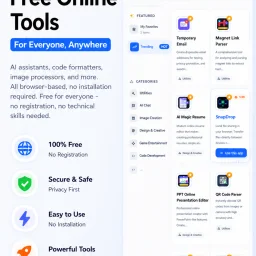
In today's digital landscape, productivity is often hindered by the need to install and manage multiple applications, each serving a specific purpose. CMDragon Tools addresses this issue by offering a comprehensive suite of online utilities that cater to diverse needs, from code formatting and image editing to file conversion and barcode scanning. The platform is designed for anyone seeking to streamline their workflow without the hassle of downloading and installing separate applications. What stands out about CMDragon Tools is its commitment to providing a seamless, browser-based experience that prioritizes user convenience and data privacy. The tools are carefully crafted to operate entirely within the user's browser, eliminating the need for server transmission and ensuring that sensitive data remains confidential. This approach is evident in tools like the EPUB Reader, which stores imported files locally and offers features such as customizable reading preferences, bookmarking, and full-text search. The platform boasts an impressive array of tools, including a Touch Screen Detection utility that performs comprehensive diagnostics and an advanced Barcode Scanner that supports a wide range of formats. These tools are not only feature-rich but also demonstrate a clear understanding of user needs, with functionalities such as live camera scanning, adjustable scan regions, and batch image decoding. By bringing essential utilities directly into the browser, CMDragon Tools simplifies workflows and enhances productivity. The absence of installation requirements, sign-ups, and server transmission aligns with the founder's vision of providing instant, no-download productivity. While pricing details are not explicitly mentioned, the platform's value proposition lies in its convenience, versatility, and commitment to user privacy, making it an attractive solution for individuals and professionals seeking to optimize their digital workflows.

Projection mapping has long been constrained by proprietary software suites and expensive hardware requirements that put the technology out of reach for independent creators and artists. 4mapper dismantles these barriers by delivering a browser-based solution that works directly in Chrome or Edge, eliminating installation friction and compatibility headaches across Windows, Mac, and Linux systems. The platform serves a broad creator community—from VJs working live events and nightlife venues to artists building permanent or temporary installations, and even casual experimenters setting up projection mapping at home for parties or seasonal installations. The founder's motivation was clear: to democratize a tool that had become unnecessarily gatekept behind expensive licenses and locked ecosystems. What distinguishes 4mapper is its aggressive simplicity. There's no software to download, no proprietary dongle to purchase, and no expensive graphics card requirements. Opening a browser and uploading video content or images is enough to define projection surfaces and begin mapping. The free tier removes trial friction entirely—users get a full project, 100MB of storage, and up to 10 files to experiment with indefinitely, with no credit card required. This signals that the company trusts its product enough to let people learn it completely free. The feature set covers the essentials: video and image mapping with quad surface definitions, scene management for sequencing, and watermark-free exports on the PRO tier. The PRO exclusive features—live widgets that stream real-time data like weather or crypto prices, and Arduino controller support via USB for custom hardware triggers—show the platform thinking beyond static projection toward interactive, reactive installations. The open-source Arduino library suggests a commitment to community-driven extensibility. Pricing is refreshingly straightforward. The lifetime model at €59 for PRO, rather than a recurring subscription, appeals to independent creators with limited budgets and those who work sporadically. The storage jumps from 100MB free to 5GB in PRO—a meaningful upgrade for artists storing multiple video assets. 4mapper targets a specific, underserved niche: creators who want projection mapping capability without months of learning complex software or thousands in licensing fees. Its browser-based accessibility and low floor to entry position it as a genuine alternative to legacy tools designed for post-production houses and large installations. For hobbyists, performers, and independent artists, this removes a significant barrier to entry.

The need to convert videos between different formats without compromising privacy is a pressing issue for many individuals. VideoSnap directly addresses this concern by offering a free online video converter that operates entirely within the user's browser, eliminating the need to upload sensitive files to third-party servers. This makes it an ideal solution for users who prioritize data security and control. What stands out about VideoSnap is its commitment to user privacy and its offline capabilities. By processing videos locally in the browser, VideoSnap ensures that users' files never leave their device, providing a level of security that is not typically found in online video conversion tools. Additionally, the fact that it can work offline after the initial visit makes it a convenient option for users with unreliable internet connections. VideoSnap's key features include its support for a wide range of video and audio formats, as well as its ability to adjust output quality and resolution. Users can convert videos between eight different formats and extract audio in five different formats. The tool also offers compression, trimming, and editing capabilities, making it a versatile solution for various video processing needs. Notably, VideoSnap is completely free to use, with no subscription plans, hidden premium tiers, or per-file charges. There are also no watermarks on the output files, and users are not required to register an account. The founder's intention to provide a private and free video conversion solution is evident in the product's design and functionality, making VideoSnap a valuable resource for users seeking a secure and cost-effective video conversion tool.