CMDragon Tools
- No match
Machine translation — the English original is authoritative.
The Story
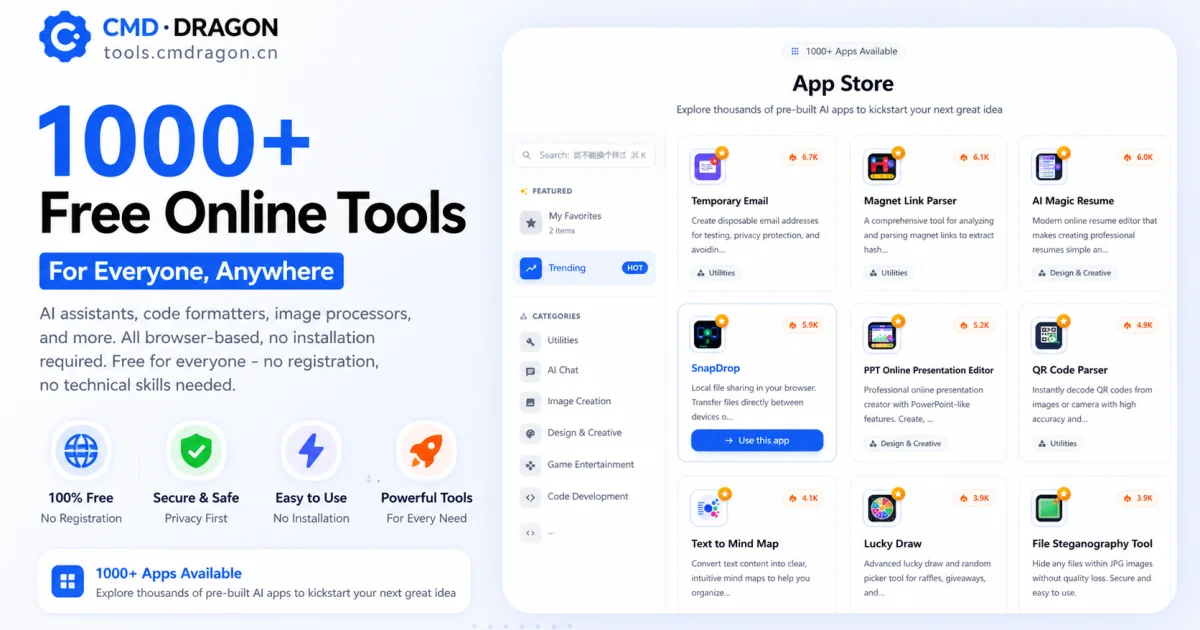
I built CMDragon Tools to eliminate the friction of installing dozens of separate applications. Our platform brings essential utilities—from format converters to barcode scanners to EPUB readers—directly into your browser with zero installation or sign-ups required. Thousands worldwide now simplify their workflow with instant, no-download productivity.
AI Overview
AI-generatedIn today's digital landscape, productivity is often hindered by the need to install and manage multiple applications, each serving a specific purpose. CMDragon Tools addresses this issue by offering a comprehensive suite of online utilities that cater to diverse needs, from code formatting and image editing to file conversion and barcode scanning. The platform is designed for anyone seeking to streamline their workflow without the hassle of downloading and installing separate applications.
What stands out about CMDragon Tools is its commitment to providing a seamless, browser-based experience that prioritizes user convenience and data privacy. The tools are carefully crafted to operate entirely within the user's browser, eliminating the need for server transmission and ensuring that sensitive data remains confidential. This approach is evident in tools like the EPUB Reader, which stores imported files locally and offers features such as customizable reading preferences, bookmarking, and full-text search.
The platform boasts an impressive array of tools, including a Touch Screen Detection utility that performs comprehensive diagnostics and an advanced Barcode Scanner that supports a wide range of formats. These tools are not only feature-rich but also demonstrate a clear understanding of user needs, with functionalities such as live camera scanning, adjustable scan regions, and batch image decoding.
By bringing essential utilities directly into the browser, CMDragon Tools simplifies workflows and enhances productivity. The absence of installation requirements, sign-ups, and server transmission aligns with the founder's vision of providing instant, no-download productivity. While pricing details are not explicitly mentioned, the platform's value proposition lies in its convenience, versatility, and commitment to user privacy, making it an attractive solution for individuals and professionals seeking to optimize their digital workflows.
Founder Diary
Devlog-
Passed 500 unique users in a single day. Feels good for a project with zero paid marketing. The organic bump came from a Reddit r/InternetIsBeautiful mention that we did not solicit. Grateful.
-
Added QR code generator to the utility pack. It was our #3 most-requested via email — behind PDF merge and image compressor, both already shipped. Users hitting the site through a shared QR link now have a warm intro to what else lives here.
Key Features
Browser-based Tools
Comprehensive suite of utilities requiring no installation
Privacy Protection
All data processed locally in browser without server transmission
Barcode Scanner
Advanced scanning with live camera support and batch image decoding
EPUB Reader
E-book reader with customizable preferences, bookmarking, and full-text search
Code Formatting
Tool for formatting code directly in the browser
Image Editing
Image manipulation capabilities accessible online
Use Cases
-
1
Developers and Coders
Need code formatting without installing separate applications
-
2
Privacy-conscious Users
Want utilities that never transmit data to external servers
-
3
Professionals
Seeking to streamline workflows without managing multiple applications
-
4
Content Creators
Need image editing and file conversion tools on demand
FAQ
Do I need to install CMDragon Tools? ▾
Is my data private with CMDragon Tools? ▾
What tools are included? ▾
Can I use CMDragon Tools offline? ▾
Tech Stack & Tags
Discussion (3)

The emphasis on local data processing is a key differentiator in an era where cloud-based tools often compromise privacy. From my experience building the platform, I've found that users increasingly prioritize both convenience and data sovereignty—and by keeping everything client-side, we address both. For those interested in exploring the full suite, the platform is available at https://tools.cmdragon.cn/ and includes over 1000 utilities, from AI assistants to image editors, all operating without any server uploads. It's designed to reduce tool fragmentation while maintaining high privacy standards.

I appreciate the detailed overview of CMDragon Tools, especially the emphasis on local browser-based processing for data privacy. It's a crucial feature that many online utility platforms overlook—by keeping sensitive data on-device, users avoid the risks of server-side storage. I've tested several similar tools, and the combination of zero-install convenience with strong privacy guarantees is rare. Over at CMDragon Tools, we also wrote about best practices for choosing privacy-first web utilities, including a comparison of local vs. server processing approaches. This aligns well with the article's focus on eliminating friction without compromising security.

Thanks for the detailed overview of CMDragon Tools. The emphasis on local data processing is a key differentiator in a market where many cloud-based tools still send data to servers. As someone who also curates a collection of browser utilities (I maintain a similar suite at https://tools.cmdragon.cn/), I've noticed that users are increasingly aware of privacy implications—especially when handling sensitive documents or images. Your EPUB Reader with local storage is a good example of balancing functionality with confidentiality. One aspect worth exploring is how such tools can further integrate with progressive web app (PWA) features for offline access, which would elevate the user experience even more. Great work on building a practical resource for productivity without the overhead of installations.
Join the conversation — sign up to comment.
Sign up freeCommunity Support
Boost this project on Sell With boost
Meet the Founder
"Experience now: https://tools.cmdragon.cn/zh CMDragon Tools is a comprehensive platform offering..."
More by cmdragon.cn


More in Automation tools

Infrabase.ai
I was evaluating AI infrastructure products for...

ListFlow – Crosslist to Poshmark, eBay, Mercari & More
I built ListFlow because resellers were wasting...

HVAC Tools Hub
I built HVAC Tools Hub because I saw professiona...
Hackpack-CLI
What is Hackpack CLI? Hackpack CLI is a lightwei...

Slap2Actions
I built Slap2Actions to turn physical impacts on...

Resource Tuner Console
Resource Tuner Console targets Windows software...