
Keep Screen On
- No match
Machine translation — the English original is authoritative.
The Story
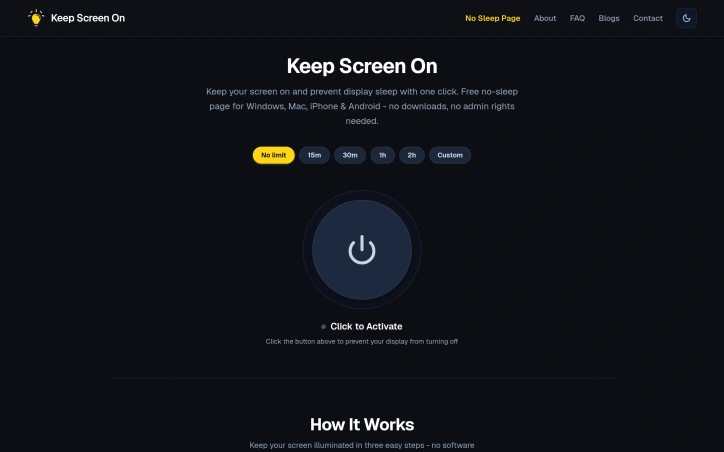
I built Keep Screen On because my screen kept falling asleep during presentations, long downloads, and late-night work sessions. I wanted a simple solution with zero installation, no browser extensions, and no permission requirements that works instantly across all devices. It uses the standard W3C Screen Wake Lock API to give you complete control over your display.
AI Overview
AI-generatedDisplay sleep interruption affects workers across industries, from someone presenting to a boardroom to developers monitoring overnight builds. Keeping a display awake without installing software has historically required either system tweaks, third-party applications, or sacrificing device settings entirely.
Keep Screen On solves this friction point by delivering wake-lock functionality directly through a browser. The product leverages the W3C Screen Wake Lock API—a web standard most modern browsers support—to prevent display sleep without requiring downloads, extensions, or administrator privileges.
The core experience is deliberately minimal. Users select a duration from preset intervals (15 minutes, 30 minutes, one hour, two hours) or set a custom timer, then activate a single button. A visual indicator confirms the wake lock is active. The browser tab remains open in the foreground or background while the display stays illuminated until the timer expires or the user manually disables it.
What distinguishes this product is its commitment to simplicity and privacy. The entire tool operates locally on the user's device with zero data collection, no tracking cookies, and no analytics. There are no telemetry concerns or privacy trade-offs to weigh. The lightweight implementation means negligible CPU and memory overhead, a consideration for users on battery power or older hardware.
Compatibility spans major operating systems and browsers: Windows, macOS, Linux, iOS, iPadOS, Android, and devices running Chrome, Safari, Microsoft Edge, and Brave. Platform-specific documentation addresses quirks—such as iOS requiring foreground tab visibility and Android supporting Chrome or Samsung Internet—that reflect real differences in how each system handles wake locks.
The product targets professionals working from home on managed IT infrastructure who need screen-awake functionality without circumventing security policies. It also serves anyone performing extended tasks—file downloads, render jobs, presentations—who would otherwise lose productivity to display timeouts.
Keep Screen On is completely free with no premium tiers or hidden revenue model mentioned. The business model remains unstated, which is unusual for a startup directory submission, though the product's simplicity and browser-based delivery suggest minimal operational costs.
Founder Diary
DevlogThe maker hasn't posted a diary entry yet.
Key Features
Screen Wake Lock
Prevents display sleep directly through your browser using the W3C Screen Wake Lock API
No Installation Required
Works without downloads, extensions, or administrator privileges
Privacy Focused
Operates entirely locally with zero data collection, tracking cookies, or analytics
Minimal Performance Impact
Lightweight implementation with negligible CPU and memory overhead
Cross-Platform Compatible
Supports Windows, macOS, Linux, iOS, iPadOS, Android across Chrome, Safari, Edge, and Brave
Flexible Timer Options
Choose from preset intervals of 15 minutes, 30 minutes, one hour, two hours, or set custom duration
Use Cases
-
1
Remote workers on managed IT
Professionals needing screen-awake functionality without circumventing security policies
-
2
Presenters and professionals
People presenting in boardrooms or conducting extended meetings where display sleep would interrupt
-
3
Developers and engineers
Those monitoring overnight builds, deployments, or render jobs requiring continuous screen visibility
-
4
Battery-conscious users
Anyone on older hardware or battery power performing extended downloads, renders, or tasks
FAQ
Does Keep Screen On require installation or extensions? ▾
Is my data tracked or collected? ▾
What devices and browsers does it support? ▾
Will this drain my battery or slow my computer? ▾
Pricing
Completely free with no premium tiers, though the business model remains undisclosed.
Tech Stack & Tags
Discussion
No comments yet — be the first!
Join the conversation — sign up to comment.
Sign up freeCommunity Support
Boost this project on Sell With boost
Meet the Founder

More in Automation tools
CMDragon Tools
I built CMDragon Tools to eliminate the friction...
QRSnap | Free Online QR Code Generator
QRSnap is a free online QR code generator that m...
Infrabase.ai
I was evaluating AI infrastructure products for...
ListFlow – Crosslist to Poshmark, eBay, Mercari & More
I built ListFlow because resellers were wasting...

HVAC Tools Hub
I built HVAC Tools Hub because I saw professiona...

DMly
We built DMly to help local service businesses a...