#online tools Startups & Tools
Discover the best online tools startups, tools, and products on SellWithBoost.

MamaTool gives people a single destination for the dozens of small utilities they reach for during an ordinary day, from generating a password and counting words to formatting JSON and calculating a loan EMI. Its audience spans a wide range: office workers polishing documents, students checking reading time, developers who need quick encoding or regex testing, and anyone who would rather not hunt through search results and sign-up walls for a simple calculation. The site presents more than fifty free tools, grouped into categories such as text tools, calculators, developer utilities, generators, image and media, and productivity. What distinguishes the product is its privacy posture. The site states plainly that everything runs in the browser, that no sign-up is required, and that tools are free. That combination matters because many single-purpose utilities on the web ask for an account or upload the user's files to a server before returning a result. MamaTool's design keeps the work on the user's own device, which makes it a sensible choice for sensitive material such as passwords, personal documents, or proprietary code snippets. The site also offers a recently used list stored on the device, which reduces the friction of returning to tools repeatedly. The breadth of the catalog is its main strength. The developer section covers JSON formatting with error messages, Base64 and URL encoding, a live regex tester, hash generation for SHA variants, and a data format converter, while the text section includes a diff checker, case converter, slug generator, and text-to-speech. The calculator set covers practical needs like tip splitting, date differences, percentages, and home loan repayment schedules. The homepage also highlights the most popular tools, such as the password generator, QR code generator, and image compressor, which helps newcomers find the most useful options quickly. Pricing is straightforward: the site describes its tools as free forever, with no sign-up. The site does not describe any paid tier, premium features, or advertising model beyond noting an advertisement placement. Overall, MamaTool offers a clean, privacy-conscious collection of everyday utilities that rewards users who want speed and simplicity without giving up their data.
Professionals and casual users constantly face the need for quick file conversion, document manipulation, and utility operations, yet existing solutions fragment across paid subscriptions, sketchy free services that upload data to servers, and desktop software that requires installation. Pari Tool addresses this gap with a collection of over 35 browser-based utilities that operate entirely on the user's device, eliminating privacy concerns and eliminating the need for account creation or payment. The core distinction of this product lies in its execution model. All processing happens client-side within the browser, meaning files never leave the user's computer. This architecture removes the fundamental trade-off that has long plagued free online tools: either accept that your files travel to someone's server, or pay for privacy. For users managing sensitive documents—tax records, personal photos, confidential PDFs—this distinction matters considerably. The tool also operates as a progressive web application, allowing installation directly from the browser without app store intermediaries. The feature set spans practical categories. PDF functionality covers merging multiple documents, splitting or extracting specific pages, compression, format conversion to images, password protection, and annotation editing. Image tools handle resizing, cropping, background removal, watermarking, and conversion between WebP, PNG, JPG, and PDF formats. Video utilities compress footage, convert between formats (MP4 to MOV), extract audio, and transform clips into animated GIFs. Beyond media, the platform includes text utilities for word counting and reading-time analysis, case conversion, batch find-and-replace operations, and duplicate removal. Specialized tools cover QR code and barcode generation, JSON formatting, file encryption with AES protection, ZIP compression, and practical calculators for EMI and tax invoice generation. What remains unstated but obvious: the business model assumes either a future monetization pivot or funding already in place. The product explicitly commits to remaining free with unlimited usage, which creates questions about sustainability that the available information doesn't address. The strength of Pari Tool lies not in algorithmic innovation but in practical consolidation. Rather than requiring users to bounce between a dozen specialized sites, it centralizes commonly needed operations in a single, privacy-respecting interface. For anyone regularly handling documents, images, or video files, the convenience factor alone—combined with the removal of upload anxiety—positions this as a genuinely useful addition to the web utility landscape.
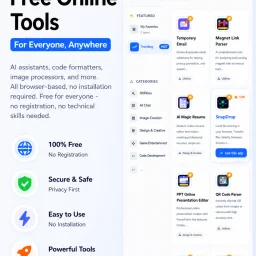
In today's digital landscape, productivity is often hindered by the need to install and manage multiple applications, each serving a specific purpose. CMDragon Tools addresses this issue by offering a comprehensive suite of online utilities that cater to diverse needs, from code formatting and image editing to file conversion and barcode scanning. The platform is designed for anyone seeking to streamline their workflow without the hassle of downloading and installing separate applications. What stands out about CMDragon Tools is its commitment to providing a seamless, browser-based experience that prioritizes user convenience and data privacy. The tools are carefully crafted to operate entirely within the user's browser, eliminating the need for server transmission and ensuring that sensitive data remains confidential. This approach is evident in tools like the EPUB Reader, which stores imported files locally and offers features such as customizable reading preferences, bookmarking, and full-text search. The platform boasts an impressive array of tools, including a Touch Screen Detection utility that performs comprehensive diagnostics and an advanced Barcode Scanner that supports a wide range of formats. These tools are not only feature-rich but also demonstrate a clear understanding of user needs, with functionalities such as live camera scanning, adjustable scan regions, and batch image decoding. By bringing essential utilities directly into the browser, CMDragon Tools simplifies workflows and enhances productivity. The absence of installation requirements, sign-ups, and server transmission aligns with the founder's vision of providing instant, no-download productivity. While pricing details are not explicitly mentioned, the platform's value proposition lies in its convenience, versatility, and commitment to user privacy, making it an attractive solution for individuals and professionals seeking to optimize their digital workflows.

For creators seeking a comprehensive and streamlined solution for their image editing needs, 24Picture offers a robust platform that consolidates a wide range of image tools in one place. The problem of navigating multiple complicated and scattered image editing tools is a significant pain point that 24Picture aims to alleviate. By providing an all-encompassing suite of image tools, the platform caters to the diverse needs of creators worldwide. What stands out about 24Picture is its commitment to being fast, free, and powerful, making it an attractive solution for creators who require efficient and cost-effective image editing capabilities. The platform boasts over 20 professional image tools that enable users to convert, compress, and edit images with ease. The availability of AI-powered batch processing is a notable feature that enhances the platform's capabilities. Noteworthy features of 24Picture include its image conversion tools, which support a wide range of formats, including JPG, PNG, WebP, HEIC, SVG, AVIF, and TIFF. Additionally, the platform offers image compression, resizing, and cropping capabilities, as well as a full-featured image editor and a GIF maker. The presence of specialized tools like the SVG optimizer and Base64 converter further underscores the platform's versatility. The platform's blog is also a valuable resource, offering tips, tutorials, and industry insights on topics such as image compression, resizing best practices, and the benefits of using WebP. While 24Picture's pricing model is not explicitly stated, the platform is touted as being "free," suggesting that it may operate on an open-core or freemium model. Overall, 24Picture is a valuable resource for creators seeking a comprehensive and user-friendly image editing solution.