
TikTok Video Downloader
- No match
Machine translation — the English original is authoritative.
The Story
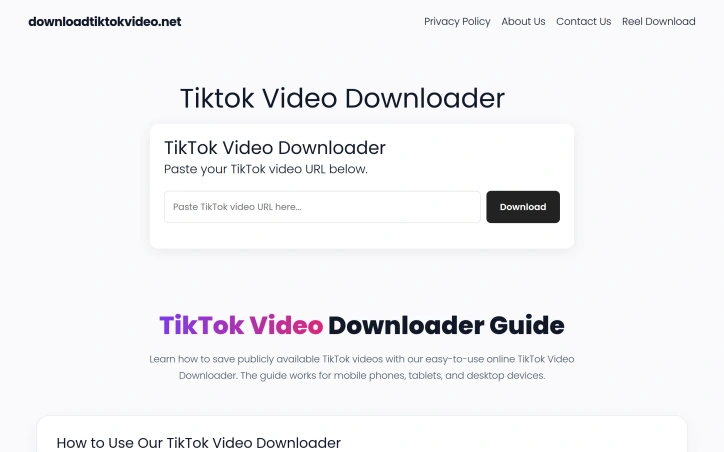
I built this tool to help people easily save and archive TikTok videos without needing an account or app. It solves the problem of losing access to videos when they're deleted—our downloader lets users backup content directly through their browser in seconds, with no login required.
AI Overview
AI-generatedContent preservation remains a persistent challenge in social media, where videos can vanish due to account deletion, creator changes, or platform policy. This web-based downloader tackles that friction point by enabling users to save publicly shared TikTok videos directly to their devices through a browser interface.
The tool addresses a straightforward use case: capturing and archiving TikTok content without the friction of app installation or account authentication. The typical user workflow spans three steps—copying a video link from TikTok, pasting it into the downloader, and initiating the download. This simplicity forms the product's core strength. Because the service operates entirely within a web browser and requires no login credentials, it removes barriers that would otherwise deter casual users.
Several design choices stand out. The lack of authentication eliminates the friction of account creation or credential management. Users bypass this entirely by accessing the tool through Safari, Chrome, or any standard browser. The downloader explicitly supports multiple platforms—iOS, Android, Windows, and Mac—reflecting a device-agnostic approach. Once downloads complete, files appear in the user's standard Downloads or Files folder, integrating with familiar device patterns rather than introducing proprietary file management.
The product's scope is deliberately narrow: it processes publicly available TikTok videos and delivers them as downloadable files. The creator frames this limitation transparently. The website emphasizes that private, removed, or restricted videos fall outside the tool's reach, and it explicitly advises users to respect copyright and content rights—a responsible stance that distinguishes it from less conscientious alternatives in this category.
From a capability standpoint, the tool performs a single function reliably: accepting a TikTok URL and converting it into a downloadable video file. There are no bells or whistles. No editing features, no batch processing, no video manipulation. This focused functionality makes the tool approachable for users who simply need to preserve content.
The business model remains unstated in the available materials. No pricing tier, subscription option, or ad structure surfaces in the website copy, leaving the monetization approach unclear.
For creators seeking a lightweight, low-friction way to archive public TikTok videos without installing software or creating accounts, this downloader delivers exactly that value proposition. Its strength lies in doing one thing cleanly: removing the barriers between a video link and a saved file.
Founder Diary
DevlogThe maker hasn't posted a diary entry yet.
Key Features
Web-Based Access
Operates entirely within a web browser without requiring app installation or downloads.
No Authentication Required
Users can download videos without creating accounts or providing login credentials.
Cross-Platform Support
Works on iOS, Android, Windows, and Mac devices through any standard web browser.
Direct Device Downloads
Files save to the user's standard Downloads or Files folder without proprietary file management.
Public Video Processing
Converts TikTok URLs into downloadable video files with reliable single-function performance.
Use Cases
-
1
Content Preservation
Users can archive public TikTok videos before they disappear due to account deletion or platform policy changes.
-
2
App-Free Users
People who prefer to avoid installing additional software can download videos directly through their browser.
-
3
Low-Friction Saving
Casual users seeking a simple three-step workflow—copy link, paste, download—without account creation barriers.
-
4
Cross-Device Access
Users needing downloads across multiple devices without maintaining a single proprietary application.
FAQ
Do I need to create an account to use this? ▾
What videos can I download? ▾
Where do my downloads save? ▾
Does it have editing or batch download features? ▾
Tech Stack & Tags
Discussion
No comments yet — be the first!
Join the conversation — sign up to comment.
Sign up freeCommunity Support
Boost this project on Sell With boost
Meet the Founder

More by Times Digest



More in File storage and sharing apps

X-Streamify
X-Streamify is a private digital vault that brin...

Smart Renamer
A few months ago, I was stuck at a café with onl...

DropAI.zone
We built DropAI to solve the friction of sharing...

File Walk
Smart Organization • Duplicate Detection • Light...

Transfereko
I built Transfereko to make secure file sharing...
Zency - Smart Document Manager
I built Zency to securely manage personal files...