
Letras Bonitas - Conversor de Fuentes
- No match
Machine translation — the English original is authoritative.
The Story
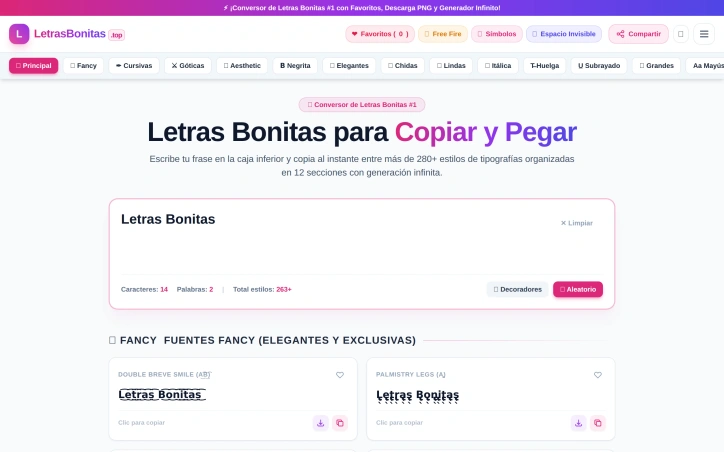
Cuando quería un nombre bonito para mi perfil de Instagram o para jugar Free Fire, siempre terminaba buscando a tientas entre sitios llenos de anuncios. Por eso creé Letras Bonitas: un convertidor sencillo donde escribes tu texto, pruebas más de 280 estilos y copias con un clic.
AI Overview
AI-generatedAnyone who has tried to customize a social media handle or gaming name knows the frustration of searching through sites crowded with advertisements. Letras Bonitas addresses that problem with a browser-based converter that turns plain text into decorative lettering ready to paste. It serves people who want an eye-catching Instagram bio, a stylish TikTok username, or a distinctive Free Fire player name, and it requires no design software or technical background.
The core workflow is direct. Users type or paste text into a single input box, and the transformed versions appear instantly, so they can compare styles before copying anything. With more than 280 styles organized into 12 sections, the catalog spans fancy, cursive, gothic, aesthetic, and bold designs, along with sections for Free Fire names and invisible-space characters. These dedicated categories show that the site is built around the specific needs of its audience rather than offering a generic list of fonts.
Several features distinguish it from simpler converters. A favorites system with a heart button lets users save the styles they return to often, and a random button proposes new combinations when inspiration runs out. One-click decorators add symbols to text, and a transparent PNG download lets users place a stylized font on posters, covers, or stories. Additional styles load on demand, so the selection grows as needed. A character and word counter also helps users stay within length limits on the platforms where they plan to post.
The site's guidance on platform fit is a thoughtful addition. It separates expressive, aesthetic lettering suited to casual profiles from more restrained styles intended for professional contexts such as LinkedIn, YouTube, and Snapchat. That distinction acknowledges that a decorative font which works well on a gaming profile can look out of place on a résumé-focused account, and it helps users choose accordingly.
Founder Diary
DevlogThe maker hasn't posted a diary entry yet.
Key Features
Instant Style Preview
A single input box displays transformed text versions immediately so users can compare styles before copying.
Large Style Catalog
More than 280 styles across 12 sections, including fancy, cursive, gothic, aesthetic, bold, Free Fire names, and invisible-space characters.
Favorites System
A heart button lets users save the styles they use often.
Random Style Generator
A random button proposes new style combinations when users need inspiration.
One-Click Decorators
Users can add symbols to their text with a single click.
Transparent PNG Download
Users can export a stylized font for use on posters, covers, or stories.
Use Cases
-
1
Instagram users
They can create an eye-catching bio without design software or technical skills.
-
2
TikTok creators
They can find a stylish username from a catalog of decorative lettering.
-
3
Free Fire players
They can create a distinctive player name using the dedicated Free Fire section.
-
4
Poster and story designers
They can place a stylized font on visuals using the transparent PNG download.
FAQ
How do I turn my text into fancy fonts for Instagram? ▾
Does the site have fancy fonts for Free Fire names? ▾
Which fonts are suitable for a LinkedIn profile? ▾
Can I download fancy text as an image? ▾
Tech Stack & Tags
Discussion
No comments yet — be the first!
Join the conversation — sign up to comment.
Sign up freeCommunity Support
Boost this project on Sell With boost
Meet the Founder

More in Writing assistants
Spit Notes
For songwriters who juggle voice memos and notes...

Subtext
We built Subtext because writers struggle to ide...

LinkedIn Speak Translator
I created LinkedIn Speak Translator to solve the...

AI Story Writer
I struggled to write stories, so I built an AI t...
Font Generator
I built Font Generator to solve a simple problem...
Verbia
I built Verbia to remove language friction from...