
Letras Diferentes: Gerador de Fontes para Copiar e Colar
- No match
Machine translation — the English original is authoritative.
The Story
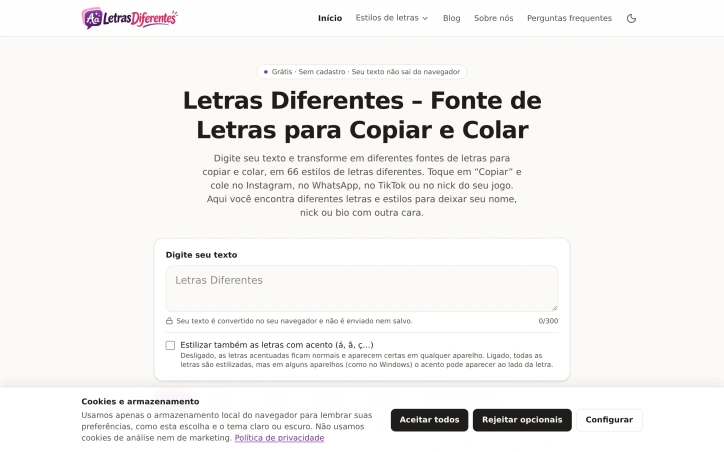
Eu criei o Letras Diferentes porque sempre quis deixar meu nome e minha bio com mais personalidade no Instagram, WhatsApp e nos jogos, mas os geradores que encontrava estavam cheios de anúncios ou exigiam cadastro. Aqui você digita seu texto e escolhe entre 66 estilos para copiar com um toque, de graça e sem login. O texto é convertido no próprio navegador e nunca é enviado nem salvo.
AI Overview
AI-generatedLetras Diferentes solves a narrow but common problem: people who want their names, usernames, and bios to stand out on Instagram, WhatsApp, and gaming platforms, where ordinary text offers little room for personality. The site is aimed at those users. They type a phrase, pick a style, and paste the result wherever they need it, without installing anything or creating an account.
What stands out most is how the site handles the text. According to the page, the conversion happens in the visitor's browser, and the text is neither sent to a server nor saved. For a tool that people use with names and personal bios, that is a meaningful design choice, and it is stated plainly on the page rather than buried in fine print. The interface is also refreshingly direct. A single input box with a 300-character counter sits at the top, and the results appear below it, each with its own copy button and a labeled example.
The style library is the core feature. Styles are grouped into categories such as Negrito, Cursivas, Góticas, Pequenas, Bolhas e quadrados, Riscadas e sublinhadas, Decorativas, Glitch e efeitos, and Especiais, and a Todos tab shows everything at once. The range covers bold serif and sans-serif variants, script, Fraktur-style Gothic, small caps, superscript and subscript, circled and boxed letters, strikethrough, underline, and wave or dot decorations. It also includes framed and symbol-based looks, such as star borders, Japanese brackets, hearts, and arrows. Each style is previewed with a sample so users can judge the result before copying.
One thoughtful detail is the accent toggle. It is off by default, which keeps accented letters normal and reliably readable on any device. When turned on, accented letters are styled too, but the page warns that some systems, Windows among them, may show the accent separately beside the letter. That explicit trade-off helps users make an informed choice.
On business terms, the founder states that the generator is free and requires no login. The page does not describe any paid tier, premium features, or account system.
The product is simple and does its one job well, with clear privacy handling and a broad set of styles. Its main limitations are its focus on text transformation alone and the fact that the characters are Unicode substitutions, so display depends on the app or device rendering them.
Founder Diary
DevlogThe maker hasn't posted a diary entry yet.
Key Features
Browser-Side Conversion
Text is converted in the visitor's browser and is neither sent to a server nor saved, as stated on the page.
Broad Style Library
Styles span bold, script, Gothic, small caps, superscript and subscript, circled and boxed, strikethrough, underline, and wave or dot decorations.
Categorized Styles
Styles are grouped into categories such as Negrito, Cursivas, Góticas, and Glitch e efeitos, with a Todos tab showing everything at once.
Style Previews
Each style is previewed with a sample so users can judge the result before copying.
Accent Toggle
An option, off by default, styles accented letters while warning that some systems may show the accent separately.
Single Input Interface
One input box with a 300-character counter shows results below, each with its own copy button and labeled example.
Use Cases
-
1
Instagram users
People who want their names, usernames, and bios to stand out on Instagram, where ordinary text offers little room for personality.
-
2
WhatsApp users
People who want distinctive styled text for their names or messages on WhatsApp.
-
3
Gamers
Players who want their names and bios to stand out on gaming platforms.
-
4
Privacy-conscious users
People who prefer a tool that processes their personal names and bios without sending or saving the text.
FAQ
Is the Letras Diferentes generator free to use? ▾
Does Letras Diferentes save or send the text I type? ▾
Why are my accented letters showing separately on Windows? ▾
Do I need to install anything or create an account to use the generator? ▾
Pricing
The founder states the generator is free and requires no login, and the page does not describe any paid tier.
Tech Stack & Tags
Discussion
No comments yet — be the first!
Join the conversation — sign up to comment.
Sign up freeCommunity Support
Boost this project on Sell With boost
Meet the Founder

More in Writing assistants

Spit Notes
For songwriters who juggle voice memos and notes...

Subtext
We built Subtext because writers struggle to ide...

LinkedIn Speak Translator
I created LinkedIn Speak Translator to solve the...

AI Story Writer
I struggled to write stories, so I built an AI t...
Font Generator
I built Font Generator to solve a simple problem...
Verbia
I built Verbia to remove language friction from...