
Package Pal
- No match
Machine translation — the English original is authoritative.
The Story
Hey everyone! 👋 I’m Sagar, the creator of PackagePal.
💡 The Backstory: Why I built this
A few months ago, I was migrating a personal Node.js project to Go. While the core language syntax wasn't too difficult to translate, I hit a massive roadblock when it came to the dependencies.
For almost every single package in my package.json, I had to stop coding, open a browser, and search:
"What is the Go equivalent of Axios?" "What replaces Winston for structured logging in Go?" "Should I use Gin, Fiber, or Echo for Express routing?" I ended up spending two full days just comparing libraries, copy-pasting basic setup snippets, and reading documentation tabs. It was a huge productivity killer. I kept thinking: "Why isn't this information just one hover away inside my editor?"
So, I built PackagePal.
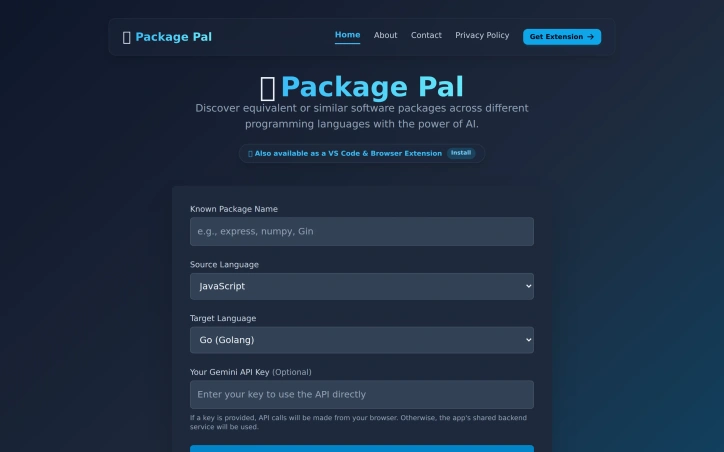
🔍 What is PackagePal? PackagePal is a free, privacy-first VS Code extension that uses Gemini AI to suggest package equivalents in your target language right when you hover over an import statement.
Instant Hover Suggestions: Hover over any import (e.g., import axios from 'axios') and see the top 3 equivalent libraries in your target language (e.g., Go, Rust, Python). Code Snippets: Get ready-to-use boilerplate code for each suggestion so you can implement it immediately. Direct Docs Links: Click straight through to the official documentation for the suggested package. Sidebar Explorer: Automatically scans your active file and lists all dependencies and their alternatives in a clean tree view.
I’d love to hear your thoughts! What language pairs do you migrate between the most? What features would make your development workflow smoother?
Thank you so much for checking out PackagePal! ❤️
AI Overview
AI-generatedDevelopers frequently face a significant hurdle when switching between programming languages, namely finding equivalent libraries and packages. Package Pal addresses this challenge by providing a platform that instantly suggests alternatives across multiple languages. The tool is specifically designed for developers who need to migrate projects, refactor legacy services, or learn new frameworks.
What stands out about Package Pal is its use of state-of-the-art AI to bridge the gap between different package ecosystems. By leveraging this technology, it enables developers to map their existing knowledge from one language to another seamlessly. The tool's ability to provide instant translations, complete with documentation URLs, installation commands, and usage examples, is particularly noteworthy.
The key features of Package Pal include cross-language support for over 15 popular languages, an IDE extension that allows for in-editor package discovery, and the option to run queries client-side using a user's own Gemini API key. This last feature is especially useful for users who require higher rate limits. Additionally, the tool provides a sidebar explorer that automatically scans the active file and lists all dependencies and their alternatives in a clean tree view.
Package Pal is available as a free VS Code extension, with a clear emphasis on privacy. The tool is committed to protecting user data and provides transparent information about its data collection practices and use of third-party cookies. Users have control over their data, and the option to opt out of personalized advertising is available through Google Ad Settings or aboutads.info. Overall, Package Pal is a valuable resource for developers navigating the complexities of cross-language development.
Founder Diary
DevlogThe maker hasn't posted a diary entry yet.
Key Features
Cross-Language Support
Supports over 13 popular languages
IDE Extension
Allows for in-editor package discovery
Client-Side Queries
Enables running queries using a user's own Gemini API key
Sidebar Explorer
Automatically scans the active file and lists dependencies and alternatives
Documentation Provision
Provides documentation URLs, installation commands, and usage examples
Use Cases
-
1
Developers Migrating Projects
Need to find equivalent libraries and packages in new languages
-
2
Developers Refactoring Legacy Services
Require assistance with cross-language development
-
3
Developers Learning New Frameworks
Can map existing knowledge from one language to another
FAQ
Is Package Pal available for multiple programming languages? ▾
Can I use Package Pal without sharing my data? ▾
How can I control personalized advertising on Package Pal? ▾
Pricing
Available as a free VS Code extension
Tech Stack & Tags
Discussion (1)

If you have any suggestions or want any features do let me know.
Join the conversation — sign up to comment.
Sign up freeCommunity Support
Boost this project on Sell With boost
Meet the Founder
More in Search

Drivium
We built Drivium to help people confidently buy...
amaze.directory
I was tired of AI tool directories filled with u...
KAR AI
I built KAR to fix how people buy cars in Europe...

Tools Network
I built Tools Network to solve the overwhelming...
FeaturedLane
We created FeaturedLane because finding quality...

DigMyName
We built DigMyName to simplify domain discovery....