
PDFOutput
- No match
Machine translation — the English original is authoritative.
The Story
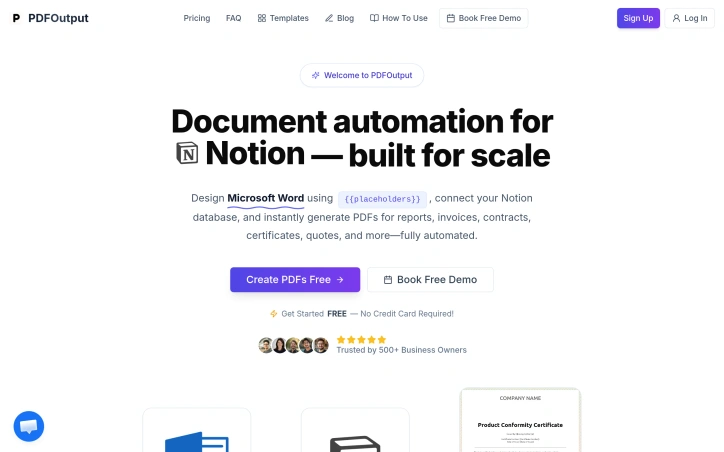
PDFOutput lets you turn Google Docs into polished PDFs in seconds, powered directly by your Notion database.
Create your document templates in Google Docs using {{placeholders}}, and PDFOutput automatically fills them with your Notion data to generate ready-to-use PDFs.
Everything runs inside your Notion database, so there’s no need to switch back and forth or manually trigger exports. Once set up, documents generate seamlessly as your data updates.
Perfect for producing reports, invoices, contracts, certificates, quotes, and more at scale.
AI Overview
AI-generatedAutomating document generation has long been a pain point for businesses that need to produce high volumes of personalized outputs—invoices, contracts, certificates, and similar documents that require individual customization but follow standardized formats. PDFOutput addresses this friction by creating a bridge between two widely-used platforms: Google Docs for template design and Notion's database capabilities for data management.
The core workflow is straightforward and practical. Users design a Google Document with placeholder variables, then connect it to a Notion database containing the information that should populate each field. The system handles the rest, generating individualized PDFs at scale without requiring users to manually merge data or use complex programming logic. This approach makes document automation accessible to non-technical teams—a significant advantage over traditional mail merge tools or custom integration solutions.
What distinguishes PDFOutput from simpler alternatives is its focus on the complete document lifecycle. Rather than limiting functionality to basic text substitution, it targets a diverse range of use cases: operational documents like reports and invoices, contractual materials, achievement certificates, and commercial quotes. This breadth suggests the platform is designed for teams across multiple departments and verticals, whether they're in finance, operations, HR, or sales.
The templating model itself deserves attention. Google Docs is familiar to nearly every business user, eliminating the learning curve associated with specialized template languages. Notion databases provide a structured, visual way to manage the source data without requiring spreadsheet expertise or database administration. By leveraging tools people already know, PDFOutput reduces adoption friction and makes it feasible for small teams to implement without dedicated technical support.
The automation angle is crucial for the target market. Generating documents at scale—whether that means hundreds of customer invoices monthly or thousands of certificates for program participants—shifts from a tedious manual process to a reliable, repeatable workflow. This is valuable not just for efficiency but for consistency and compliance, ensuring every generated document maintains the same structure and formatting.
The integration between these three components—Google Docs, Notion, and PDF output—is presented as seamless, though the actual depth of that integration would become clearer through hands-on use. For organizations already invested in either Notion or Google Workspace, this positioning makes natural sense as an extension of existing tooling rather than introducing a completely new platform into the stack.
Founder Diary
Devlog-
I shipped important features for this week:
- Implementation of E-signatures into the tool.
- Ability to monitor the progress of the documents being generated inside the dashboard.
- Published few blogs for the marketing side of thing as well.
Key Features
Template-Based Generation
Design templates in Google Docs with placeholder variables that automatically populate from Notion databases.
Bulk PDF Creation
Generate hundreds or thousands of individualized PDFs at scale without manual effort or custom programming.
Multi-Format Support
Create invoices, contracts, certificates, reports, and quotes from a single templating system.
Non-Technical Friendly
Uses familiar tools like Google Docs and Notion instead of specialized template languages or programming logic.
Use Cases
-
1
Finance Teams
Automating invoice generation at scale ensures consistency and compliance across all customer documents.
-
2
HR Departments
Generate achievement certificates and compliance documents for large groups without manual effort.
-
3
Sales Teams
Create personalized quotes and contractual materials quickly while maintaining standardized formatting.
-
4
Operations Teams
Automate report generation and document production to replace tedious manual processes with reliable workflows.
FAQ
How does PDFOutput work with Google Docs and Notion? ▾
Do I need coding skills to use PDFOutput? ▾
What types of documents can I create? ▾
How many documents can I generate at once? ▾
Tech Stack & Tags
Discussion
No comments yet — be the first!
Join the conversation — sign up to comment.
Sign up freeCommunity Support
Boost this project on Sell With boost
Meet the Founder

More in Automation tools
CMDragon Tools
I built CMDragon Tools to eliminate the friction...

Infrabase.ai
I was evaluating AI infrastructure products for...

ListFlow – Crosslist to Poshmark, eBay, Mercari & More
I built ListFlow because resellers were wasting...

HVAC Tools Hub
I built HVAC Tools Hub because I saw professiona...
Hackpack-CLI
What is Hackpack CLI? Hackpack CLI is a lightwei...

Slap2Actions
I built Slap2Actions to turn physical impacts on...