PixText
- No match
Machine translation — the English original is authoritative.
The Story
PixText edits the text that's already inside an image. Click any text in a screenshot, poster or product photo, type new words, and AI erases the original and rebuilds the background — size, colour and position matched automatically. Free to start, with no daily download limit.
AI Overview
AI-generatedEditing words that are already baked into a photograph has long required design software and access to the original source file. PixText works directly on finished images. Users click a line of text in a screenshot, poster, or product photo, type the replacement, and the software removes the original lettering while reconstructing the background behind it. Most photo text tools stack new words over an old picture, but here the old words are gone.
The product is built for people who need quick corrections without heavy software. Support teams can fix a typo in a interface capture, marketers can update the date on an event poster, sellers can revise prices on listing photos, and anyone can swap a meme caption. The site is clear about where the editor performs best: text placed over an image, especially on flat or simple backgrounds such as interface labels and price tags. That candor about scope sets sensible expectations.
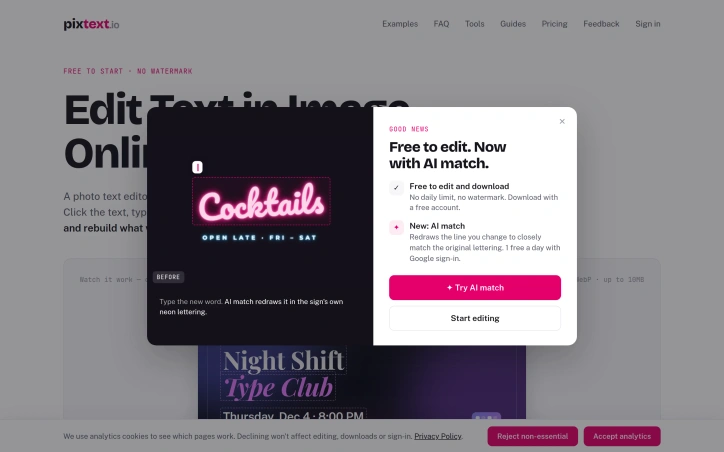
The before-and-after comparison, which lets visitors drag a handle across the image, makes the results easy to judge. The more notable addition is the AI match option. Standard editing draws on a list of fonts, but neon signs, hand lettering, and logos fall outside those lists. AI match redraws the changed line in the original style, and the sign example, where a menu item changes while the neon lettering is preserved, shows the intent clearly.
Other practical details include automatic detection of text regions, export as a sharp PNG at the processed resolution, and support for JPG, PNG, and WebP files up to 10MB. The site states that images are processed in memory and not saved, except for small AI match previews kept for 72 hours for quality checks.
On pricing, the core editor is free to start, with no watermark and no daily download limit. AI match is more restricted: users who sign in with Google receive one free AI match per day. The material provided does not describe paid plans.
Founder Diary
DevlogThe maker hasn't posted a diary entry yet.
Key Features
Click-to-Edit Text
Users click a line of text in a screenshot, poster, or product photo and type the replacement.
Background Reconstruction
The software removes the original lettering and reconstructs the background behind it.
Before-and-After Comparison
A draggable handle lets visitors compare the original and edited image side by side.
AI Match
Redraws changed text in the original style, preserving neon signs, hand lettering, and logos.
Automatic Text Detection
The editor automatically detects text regions in an image.
PNG Export
Edited images can be exported as a sharp PNG at the processed resolution.
Use Cases
-
1
Support teams
Fix a typo in an interface capture without heavy design software.
-
2
Marketers
Update the date on an event poster quickly.
-
3
Sellers
Revise prices on listing photos without access to the original source file.
-
4
Meme creators
Swap a caption on an image with minimal effort.
FAQ
Can PixText edit text in a finished photo without the original file? ▾
What image formats does PixText support? ▾
Is PixText free to use? ▾
Does PixText store my uploaded images? ▾
Pricing
The core editor is free to start with no watermark or daily download limit, and AI match offers one free use per day for users who sign in with Google, while the material does not describe paid plans.
Discussion
No comments yet — be the first!
Join the conversation — sign up to comment.
Sign up freeCommunity Support
Boost this project on Sell With boost