
SuperMCP
The Story
AI Overview
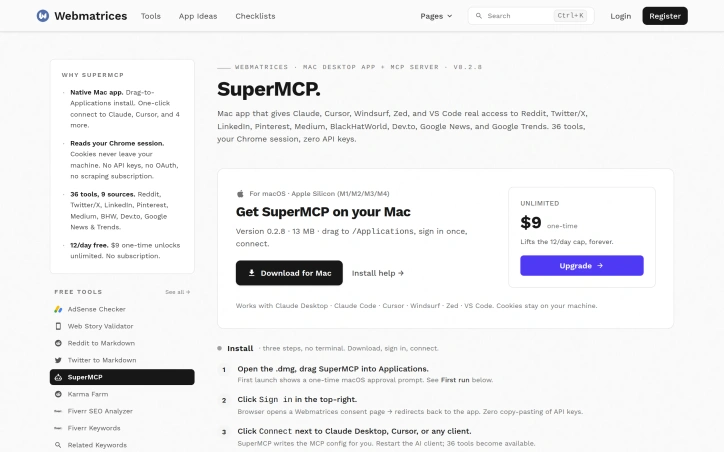
AI-generatedThe product is built for macOS users running Apple Silicon processors who want to connect Claude Desktop, Cursor, or other MCP-compatible clients to live social data. Installation is deliberately frictionless—download the DMG, drag to Applications, sign in through a browser flow, then click to connect to each AI client. The app automatically configures the underlying MCP setup, sparing users from manual JSON editing.
What sets SuperMCP apart is its focus on privacy and simplicity. Cookies remain on the user's machine, and there are no intermediate API layers or subscription requirements for data access. The interface provides operational visibility that goes beyond basic integration: a live activity log shows every tool invocation with query details, latency, and response status across all sources. Users can inspect full request and response payloads inline or download them for debugging AI reasoning, and a dashboard displays aggregated stats like call count, success rate, and percentile latency breakdowns.
The product offers 36 tools spanning Reddit, Twitter, LinkedIn, Pinterest, Medium, BlackHatWorld, Dev.to, and Google News & Trends. Chrome profile switching allows users to maintain separate logins for work and personal accounts without managing browser extensions. A source status panel indicates which platforms the user is currently signed into, eliminating ambiguity when debugging failed API calls.
Pricing reflects a one-time purchase model rather than recurring subscriptions. The free tier permits twelve daily tool calls; a nine-dollar one-time payment removes the cap entirely. This approach makes SuperMCP accessible to individuals and small teams while offering straightforward upgrade economics for heavy users. The lean feature set and narrow macOS focus suggest the founder has optimized for a specific, underserved workflow: giving AI agents social media access without the authentication and infrastructure headaches that plague alternative approaches.
Key Features
Chrome Login Integration
Uses Chrome session cookies for local authentication instead of requiring separate API keys or OAuth flows
Live Activity Log
Displays every tool invocation with query details, latency, and response status across all sources
Multi-Platform Support
Offers 36 tools spanning Reddit, Twitter, LinkedIn, Pinterest, Medium, BlackHatWorld, Dev.to, and Google News & Trends
Chrome Profile Switching
Allows users to maintain separate work and personal logins without managing browser extensions
Request Debugging
Users can inspect full request and response payloads inline or download them for debugging AI reasoning
Use Cases
-
1
macOS AI Users
Connect Claude Desktop, Cursor, or other MCP-compatible clients to live social data without external API keys
-
2
Privacy-Conscious Developers
Access social data through locally-stored cookies with no intermediate API layers or subscriptions
-
3
AI Agent Builders
Give AI agents social media access without the authentication and infrastructure headaches of alternative approaches
-
4
Multi-Account Users
Maintain separate work and personal social media logins through Chrome profile switching
FAQ
How does SuperMCP authenticate without API keys? ▾
What social media platforms does SuperMCP support? ▾
Is there a free version? ▾
What AI clients are compatible? ▾
Pricing
Free tier with twelve daily calls; nine-dollar one-time purchase removes the limit
Tech Stack & Tags
Discussion
No comments yet — be the first!
Join the conversation — sign up to comment.
Sign up freeCommunity Support
Boost this project on Sell With boost