Word Puzzle World
- No match
Machine translation — the English original is authoritative.
The Story
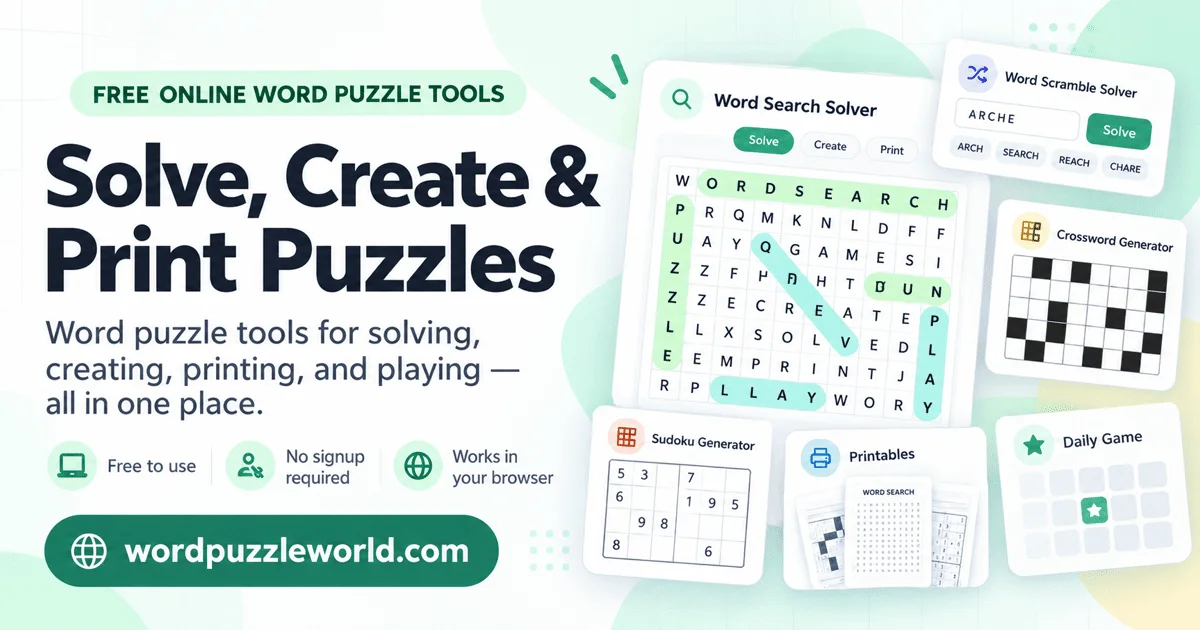
Word Puzzle World started with a familiar frustration: solving or preparing word puzzles often means copying grids, retyping word lists, and checking answers by hand. We built a free browser toolbox that brings these everyday tasks together so people can get straight to the puzzle.
Scan a word-search photo or screenshot, review and edit the recognized letters, then find words in all eight directions. Create custom word searches, word scrambles, and crosswords with answer keys and print or export options. Use the anagram and unscramble tools, browse ready-to-print activities, play a daily word search, or work with Sudoku.
The site is made for puzzle fans, teachers, parents, tutors, students, and homeschool families. Its core tools work on desktop and mobile browsers without an account or installation, making it easy to prepare classroom vocabulary practice, share a family activity, or check a puzzle already in hand. Our goal is simple: spend less time retyping and more time solving, learning, and playing.
AI Overview
AI-generatedSolving or creating word puzzles has long meant switching between multiple tools, manually transcribing grids and word lists, and checking answers by hand. Word Puzzle World consolidates this friction into a single collection of browser-based utilities designed to eliminate repetitive tasks and get users straight to the puzzle itself.
The platform serves puzzle enthusiasts across multiple contexts: casual players seeking daily entertainment, educators preparing vocabulary activities, parents organizing family time, and homeschool families developing learning materials. Teachers and tutors benefit particularly from the ready-to-print themed word searches, crosswords, and word scrambles with separate answer keys.
The core offering includes six primary tools. The word search module handles both solving and creation, with a notable feature that scans photos or screenshots to recognize letters and build searchable grids. The word scramble and anagram solvers rearrange jumbled letters with filtering options by length or pattern. A crossword generator lets users build puzzles from custom clues or select from themed ready-made options. The Sudoku solver provides logical hints and solutions. A timed word hunt game rounds out the collection by having players connect adjacent letters on existing boards or custom grids.
Several design choices strengthen the product's practical utility. The no-signup requirement removes activation friction. Browser-based delivery means no installation overhead and works across desktop, tablet, and mobile devices. The inclusion of guides addressing common questions—how to solve Sudoku for beginners, scanning techniques for word search photos, and crossword design principles—helps new users get oriented. The emphasis on printable, classroom-ready content reflects genuine understanding of how educators and homeschool families actually use puzzle tools.
Word Puzzle World positions itself against the scattered experience of hunting down specialized solvers and generators across the web. Consolidation alone offers value, but the execution extends beyond simple tool aggregation. The photo-scanning feature for word searches introduces automation where users previously might manually transcribe grids. The layering of themed ready-print options with custom creation tools accommodates different user needs: those wanting quick activities and those wanting to build.
The platform is entirely free with no apparent freemium model or upgrade path. This straightforward positioning removes decision-making from the user experience but raises questions about sustainability that the publicly available content does not address. As a utility-focused offering in an increasingly capability-rich space, Word Puzzle World succeeds by doing one thing well: removing the busywork from puzzle workflows so users spend time solving and creating rather than managing administrative overhead.
Founder Diary
DevlogThe maker hasn't posted a diary entry yet.
Key Features
Photo Scanning
recognizes letters from photos or screenshots to build searchable grids
Word Scramble Solver
rearranges jumbled letters with filtering by length or pattern
Crossword Generator
build puzzles from custom clues or select themed ready-made options
Sudoku Solver
provides logical hints and solutions
Word Hunt Game
timed game connecting adjacent letters on existing or custom grids
No Signup Required
removes activation friction for instant access
Use Cases
-
1
Casual Players
seeking daily entertainment and puzzle solving
-
2
Educators and Teachers
preparing vocabulary activities and ready-to-print classroom materials with answer keys
-
3
Homeschool Families
developing learning materials and educational activities
-
4
Parents
organizing family time with puzzle activities
FAQ
How do I scan a word search photo? ▾
Do I need to create an account? ▾
Can I use it on my phone? ▾
Can I print puzzles for my class? ▾
Pricing
Entirely free with no freemium model or upgrade path.
Discussion
No comments yet — be the first!
Join the conversation — sign up to comment.
Sign up freeCommunity Support
Boost this project on Sell With boost
Meet the Founder

More by Carson


More in Productivity

OkComputer
OkComputer is an AI harness for professionals an...

ToolPotion
ToolPotion.ai — Discover the Right AI Tools for...
Syllable Counter
This is a syllable counter tool made by AIWriteK...

SpeakerEject
SpeakerEject is a free collection of browser aud...

AppDeploy
AppDeploy was built to solve a problem I repeate...

NexusAI
NexusAI began with a straightforward observation...